Tuesday, 31 March 2009

Virtualization primer 2: concepts

Different virtualization technologies are appropriate for different needs.

All virtualization technologies provide an environment in which one or more virtual computers (guests) run within a single physical computer (host).

This is achieved with a virtualization layer, in some cases known as a hypervisor. The virtualization layer provides each guest with an environment that emulates a physical computer, and manages resources (CPU, memory, IO) across the guests.

Virtualization layers tend to fall into one of three models: hosted hypervisor; operating system; or native hypervisor.
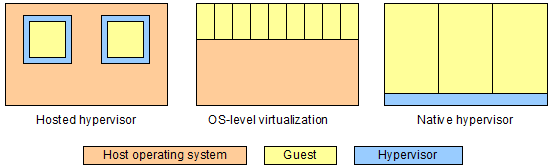
Comparison of three virtualization models: hosted hypervisor, operating system-level virtualization, and native hypervisor

  • A hosted hypervisor is a software application that runs within the host's operating system.
  • Operating system-level (OS-level) virtualization is provided by a specialised operating system without a separate hypervisor layer.
  • A native hypervisor (or bare-metal hypervisor) sits below the guest operating system and controls the virtualization.

These different models have a big impact on the performance of the guests, what guests can be run, how well the guests are isolated from each other, and how many guests can be packed onto a single host.

In the hosted hypervisor approach, guests run as applications on the host. The guests will tend to compete with each other for physical resources such as CPU and memory. The virtualization layer can typically emulate a variety of physical devices, and can support a wide variety of guests. The reliance on emulation, and the number of layers involved, tends to reduce performance. Because each physical computer needs a complete copy of the operating system, relatively few guests can be supported by each host.

OS-level virtualization overcomes many of the shortfalls of hosted hypervisors. The host operating system understands virtualization, and shares out resources effectively. The host operating system may provide common device drivers, a common kernel, and even common parts of the file system, which can be used by the guests with very little overhead. OS-level virtualization tends to be fast, and allows many guests to be packed onto a host. On the downside, the guests all have to run an operating system compatible with the host, and the performance of each guest can be heavily affected by the other guests.

The native hypervisor approach is different again. It provides a virtual environment that is close to a physical environment, with good partitioning of resources and allowing a variety of operating systems to be used. It is not as good at packing in guests as OS-level virtualization, because the virtual computers are more separated and share less. It provides good isolation between guests.

There is no right or wrong approach. Different virtualization technologies meet different needs.

Hosted hypervisors are relatively simple, and make it easy to setup a guest on any server or PC. They are good for creating test environments, or for running an old operating system version for a legacy application.

OS-level virtualization is good for creating similar guests at very low cost. It is used heavily by providers of web hosting.

Native hypervisors are good for mixed production use, because they provide more predictable performance and good isolation.

To illustrate these different approaches, next week I will look more closely at examples of each.

© Copyright 2009 Minimal IT Ltd. See the Minimal IT website for the original newsletter and copyright information.

Tuesday, 24 March 2009

Virtualization primer 1: benefits

Virtualization cuts cost and risk, gives you flexibility, and encourages architectures that are more aligned to business.

Over the past few weeks, I have been setting up test environments and evaluating hosting providers to support a forthcoming relaunch of the Metrici Advisor service. To support both testing and hosting, I have needed to get to grips with server virtualization.

You may already be familiar with virtualization, but just in case you are not, I thought I would write up what I have found as a short series of newsletters. This week I will cover the benefits of virtualization, and in later newsletters look at some of the technical concepts, review some examples, and make some recommendations. I will focus on what virtualization means to IT managers, rather than the technical detail.

Virtualization is a simple idea. Without virtualization, each physical computer runs just one operating system instance. Virtualization changes this by letting you run many independent operating system instances on each physical computer. Put simply, virtualization lets you cut up one big computer into lots of little computers.

Virtualization has many benefits.

Virtualization can reduce cost. As hardware power has increased, many servers are now significantly underutilised. I have seen huge servers that run at less than 5% of their capacity. Splitting these into multiple virtual servers lets you use this spare capacity instead of buying new servers.

Virtualization can reduce risk. If applications share the same server, they can disrupt each other. A rogue process can grab all the CPU and memory, or even interfere with the data of another application. Separating different applications out onto different virtual computers can greatly reduce this risk.

Virtualization gives flexibility. Virtualization removes the dependency of the operating system on a particular piece of hardware. It allows you to grow, shrink or move the virtual computer without having to modify the hardware.

Virtualization encourages aligned architectures. To achieve strong ownership, applications for different business areas need to be separate, and be supported by IT that can run independently of other areas. Virtualization allows you to do this cost effectively. You can have the economies of scale of running a small number of large computers, and the alignment of running a separate computer for each need.

From a management viewpoint, virtualization is almost magic. It allows you to manage production systems more flexibly, at lower cost and with reduced risk. It allows you to provide small systems economically, and scale these up smoothly. It allows you to set up multiple systems easily, for example to create multiple test environments.

Virtualization has been around for a long time. I started my career programming IBM mainframes, which have been providing virtualization since the 1970s. Virtualization has become more widespread, and now you can use it to build solutions with some of the economies of scale, flexibility and resilience of mainframes, but using much cheaper technology.

Having briefly outlined the benefits, next week I will give a management view of some of the technical concepts involved.

© Copyright 2009 Minimal IT Ltd. See the Minimal IT website for the original newsletter and copyright information.

Tuesday, 17 March 2009

Blingware

In the present economic climate, we need to focus on the fundamentals of IT, and root out IT projects that are just for show.

I am very attached to using the right words, and I don't like to use new words without good reason. But a couple of weeks ago I was having lunch with a friend and we were discussing overambitious IT. He used the term "blingware", and it seems such an accurate word that I wanted to share it more widely.

"Bling" (or "bling-bling") is a word for flashy, ostentatious, elaborate and sometimes gaudy jewellery. It has quickly spread from rap and hip-hop into the mainstream, and somewhere along the way, in some circles at least, has taken a more negative meaning.

So, what would I define as "blingware"? Blingware is flashy IT. It's purpose is to impress. It may be disproportionately expensive, and it may have little real value. The sellers and users of blingware don't realise just how silly it can look.

We have all seen blingware on a small scale. The manager who insists on the latest, fastest laptop, even though they only do a few spreadsheets.

Blingware is much more dangerous on a large scale - what we could call "enterprise blingware". These are the major packages that organisations adopt so that they can be seen to be with-it, so that the CIO can impress his colleagues and his peers, and so that the organisation can boast about it in their annual report. I have seen plenty of this type of project fail, and very few succeed.

In the present economic climate, IT must get its act together. It must show that it can deliver real value. We need to root out blingware.

The key to avoiding blingware is to stick to the fundamentals of IT. IT isn't about being flash; it's about being efficient. IT is meant to be dull. We should be suspicious of anything that is too exciting. We should be suspicious where there is great enthusiasm for the project, but little idea of the solution.

We should always know how a new piece of IT will help people do their jobs. IT itself only ever does three things: it automates the storage, processing and communication of information. If we do not understand how these capabilities support people in their work, then we should be suspicious.

We need to be insistent on good business cases. Often we insist on good business cases for small projects, but the really big projects get special treatment. Words like "imperative", "must-have" and "strategic" all imply blingware. Real value can always be articulated simply.

Lastly, we can descope. A lot of projects start off well, but are then drowned by extra features and unrealistic expectations. We need to cut back, not add more.

In the present economic climate, there is less pressure to implement blingware. But the disciplines that avoid blingware are even more important. We need to stick to the fundamentals of IT, understand precisely how and where IT will help, and have a strong business case. By searching hard for blingware, we can make a much better case for even the most mundane investments.

© Copyright 2009 Minimal IT Ltd. See the Minimal IT website for the original newsletter and copyright information.

Tuesday, 10 March 2009

The perils of general-purpose

Sometimes we need to look harder to find really good solutions.

We all know that reuse is a good thing.

At the lowest level, we reuse objects or modules of code to reduce programming effort.

We reuse larger pieces too. We reuse major components such as databases. Whenever we buy packaged software, we are, in the broadest sense, reusing a product that someone else has made.

Reuse does not just cut down on coding. The more times you use the same products, the more benefit you get from the investment of time you have made in learning them, and the investment in admin and support.

Some of the best reuse come from solutions that can be reconfigured to meet multiple needs. For example, the Drupal content management system provides rich functionality that makes it easy to build web-based applications. As well as reusing the Drupal system code, you can reuse your investment in implementing and learning the product because you can apply it to many different applications.

But there are problems with reusing flexible solutions.

In IT, we are very good at working in the abstract. We generalise the problems we see, and create solutions that do not just solve the immediate problem, but can solve a whole class of similar problems. These general-purpose products can give us huge reuse, in the broadest sense, as is the case with Drupal.

But there is something about really good general-purpose solutions that makes them inherently harder to understand.

Take Apache Cocoon for example. Cocoon is a framework for XML processing. I am sure it is a very clever and capable set of technologies, and could be really useful for many applications. It can be used for creating web sites, as a generation and integration environment, or as a web services development framework. Even though I can see some similarity between all these uses, I find Cocoon hard to understand because it has no direct comparison and it meets so many different needs.

We have the same problem at Metrici. We offer methods and tools for IT assessment and improvement. These can meet multiple needs - IT governance, project reviews, legacy renovation, cost reduction, RFP processes, application portfolio management. They let you reuse ideas and materials across all these areas. But they can be harder to understand because there is nothing else to directly compare them with and they are very general-purpose.

As vendors, we need to present general-purpose products as solutions to the needs that people recognise that they have. We may have to hide the general-purpose nature of the products and present them more narrowly. Drupal is in part successful because it is presented as a content management system, even though it can do a whole lot more. Having a clear core purpose makes it easy to understand what it does, and gradually grasp the breadth of the tool.

As purchasers, we need to look hard at the products we buy. Some of the products that are harder to grasp, like Cocoon, can be the most valuable. They may take a bit more effort to understand than simple point solutions, but the payback can be so much greater.

© Copyright 2009 Minimal IT Ltd. See the Minimal IT website for the original newsletter and copyright information.

Tuesday, 3 March 2009

What's really important?

You can manage IT much more effectively by asking the question "What's really important?"

IT is complicated. It has lots of different parts - hardware, software, working practices - and each part can be broken down into more and more detail.

For example, consider system recovery (often known as disaster recovery).

You can look at the detail of system recovery. You can look at technologies such as RAID and remote mirroring. You can consider recovery point objectives and recovery time objectives. You can examine procedures for backups. You can look at how system recovery fits into broader business contingency. Each of these can be expanded into almost infinite detail.

But asking the question "What's really important about system recovery?" makes everything simpler. There are very few things that really matter: that you know what the recovery objectives are; that you have the capability to meet the recovery objectives; and that you have successfully tested the recovery.

You can then characterise different scenarios. You can think of the ideal, the minimum acceptable, and the unacceptable.

The ideal system recovery scenario is that recovery objectives are clearly understood because they are part of a broader business contingency or continuity plan; facilities are in place to achieve recovery; and recovery has been recently tested and found to meet objectives.

The minimum acceptable scenario is that there is an agreed view of what IT should be recovered; facilities can be made available; and reasonable recovery has been demonstrated.

There are a number of unacceptable scenarios. It may be that there is no generally accepted view of what IT should be recovered; that there are no recovery facilities; that recovery would not be possible without significant damage to the business; that important aspects of recovery objectives can not be met; or recovery has never been tested.

To give another example, what's really important about testing? Ideally tests achieve a high level of coverage, tests are passed, and tests are modified before code is changed so that the tests can guide the developers. It is acceptable that there are test plans and they are passed. It is not acceptable to have no test plans, to test very little, or that the system seriously fails the tests.

You can repeat this across all parts of IT, to get a simple view of everything that's important to managing IT in your organisation.

Starting from this simple high-level view has many advantages.

Dealing with the high-level helps communication. You can use the "really important" concepts as a focus for conversations with your colleagues outside the IT organisation, and still relate them to technical detail within.

With a simple scoring and weighting scheme, answering the questions for each of your systems gives you an insight into what systems and what aspects of IT are priorities. It is much more efficient to start with the high-level and drill down to the detail where you need it, than to start with the detail and then try to summarise.

Perhaps most importantly, this approach lets you do the whole job. You simply can't manage all the detail, but if you focus on what's really important you can grasp all the parts that make up IT. And managing the whole, not just some of the parts, is what's really important.

© Copyright 2009 Minimal IT Ltd. See the Minimal IT website for the original newsletter and copyright information.