Tuesday, 21 December 2010

Quite ambiguous

Picking the right words for IT is very hard.

One of the satisfying things about writing this newsletter is that it is read by people all over the world. Although I am British, I can communicate with people in the US, in India, in other English-speaking parts of the world, and, because English is the closest thing we have to a global language, in many other countries too.

However, I use the term "communicate" very loosely. I am very aware that use of language varies wildly across the world.

Although I am sure I fail a lot of the time, I do try to remember this when I write. As an example, I am careful not to use the work "quite". "Quite" is very commonly used in British English, but it is an awkward little word because it can mean "totally" or "very", or it can mean or "moderately" or "only slightly". In British spoken English we distinguish by the amount of stress we put on the word, so "quite warm" can mean "hot" or "between cool and warm" depending on how you say it.

From what I understand, "quite" nearly always means "very" in other countries, especially in the US. One example, possibly fictitious, is the British job applicant to a US-based company who was told that they were "quite pleased" with his interview. In the UK this would be a polite refusal; in the US it means they really liked him.

IT is a global profession, with the same solutions and ideas being applied across the world. We therefore need to be very careful with the words we use. Added to that, IT is a young profession, and we have not yet settled on the right words to use in different situations.

This can cause misunderstanding even within a single organisation. Within my own company we have argued whether we should present our approach as "lightweight". What we are trying to get across is that our methods for improving IT are easy and cheap. But it could just as well be interpreted that our methods are not powerful and are not professional.

We have a similar problem when we try to explain that we can support assessments and analysis in many different subject areas. I have tried using the word "generic", meaning that they are not specific to one subject area but can be applied to many. However, "generic" could just as easily mean that our solutions are not from a known brand and are inferior quality.

It takes time to find the right words. We have learnt to use "general-purpose" rather than "generic". Other people use the term "lite" rather than "lightweight", though I cannot bring myself to use such a horribly misspelled word.

In IT we have all the terminology problems of a technical subject, amplified by the global nature of the profession, and made harder by its newness. There are huge opportunities for misunderstanding. We have to work hard at finding the right words, and need to value clarity much more than elegance in how we communicate.

© Copyright 2010 Minimal IT Ltd. See the Minimal IT website for the original newsletter and copyright information.
Tuesday, 14 December 2010

Postmodern IT

A postmodern interpretation can help us understand many problems in IT.

Postmodernism is a difficult, ill-defined and contentious subject. A lot of what is written about postmodernism relates to the arts, and is largely incomprehensible to anyone from a scientific or technical background.

It is therefore with some trepidation that I attempt to relate postmodernism to IT.

As the name suggests, postmodernism is what comes after modernism. Modernism can be characterised as an attempt to interpret the world as rational and to use that understanding of the world as the basis for improvement. Postmodernism is a step on from modernism that asserts that the world is not as rational as we imagine it to be, and that out interpretation of the world, and our understanding of what improvement looks like, is largely a product of our own minds and the meanings that we attach to things. This has a huge relevance to IT.

IT has historically been technically demanding. It has attracted people who have a strong drive to structure and consistency. We think of IT as a systematic, rational, technical activity.

This perception of IT is carried into our working methods and how we apply IT to business problems. We use structured methods, and intricate architectures. We approach project management in a detailed and structured way. We have formal methods to capture, structure and follow-through on requirements. The IT profession is a reflection of our systematic and rational world view.

Yet we do acknowledge shortcomings with our approach. We often have problems engaging with our business colleagues. We often ignore the more human aspects of IT, like usability. There is a gulf between the formal management structures that IT implements and the more instinctive and fluid approaches used elsewhere.

A postmodern interpretation helps understand this. Our systematic and rational approach to IT is a reflection of who we are, much more than a fundamental reflection of how IT must be. Difficulties with business engagement reflect differences of world view that stem from the types of people that are attracted to IT. Recognising this can give us new ways to engage.

Postmodernism also applies to technical products. The modernist IT mindset is that technology should improve. Every product should incorporate all the capabilities of what has been before, plus new innovations. Sometimes products break this rule, and very successfully. Recently I came across Q10, which is a plain text writer's editor. It has none of the sophistication of modern word processors. It takes the entire screen up thus removing the advantages of a windowed environment. By doing this it creates a fantastically uncluttered writing tool. I see it as postmodern because instead of trying to compete for technological advance, it has accepted that the value of a tool is subjective to its users, and focussed solely on just one group of users.

My attempt to apply postmodernism to IT may come across as contradictory, confusing and generally annoying, which seems to be common with postmodernism. However, as as body of thought it can help us understand the tendency to overemphasise structure, rationality and technological advancement, and to look more carefully at how we can apply IT more successfully to the different types of opportunities that exist.

© Copyright 2010 Minimal IT Ltd. See the Minimal IT website for the original newsletter and copyright information.
Tuesday, 7 December 2010

ConTEXT

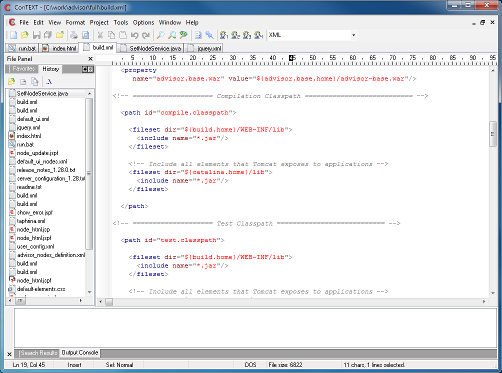
ConTEXT is a simple, powerful, open source text editor for Windows.

Screen shot of ConTEXT editor

ConTEXT is designed to make it easy to edit source code of various forms, such as program code, HTML or configuration files. Its main features are:

  • You can edit multiple files in multiple tabs.
  • It automatically maintains a manageable list of recently opened files, allowing you to jump in and out of a set of related files with ease. You can set bookmarks in files, to easily find your way around them.
  • It has features to help editing code, such as automatic indent, block indent and comment/uncomment.
  • It supports different editing options, such as what characters to use at the end of a line, or whether to use tabs or spaces for indents.
  • It has tools for common editing tasks, such as a compare tool and sort, which means you do not have to leave the tool to perform these.
  • It has configurable syntax highlighters, which give you many more visual clues to the code you are editing. Highlighters for many different types of code can be downloaded for free.

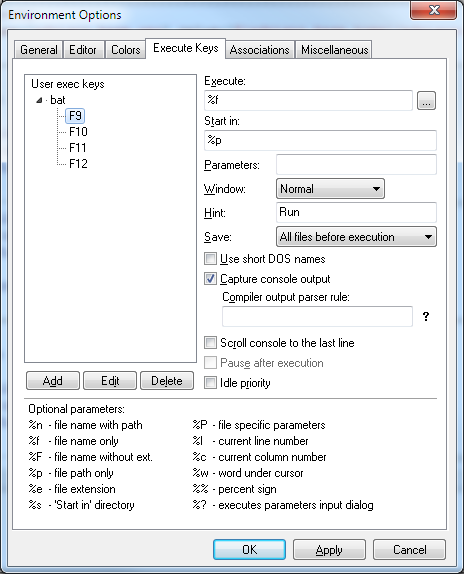
One of the most useful features of ConTEXT are the execute keys and user commands. These allow external programs to be executed when you press a key or one of the buttons on the toolbar.

Screen shot of ConTEXT options showing how to set up execute keys to run a batch file.

I use this with simple batch files to run all my compilations and test directly from ConTEXT.

What I really like about ConTEXT is that it is very simple indeed. If you have ever used any Windows program before, you will be able to use ConTEXT straight away. It has all the features you really need to edit code, but it is not bloated with a whole load of unnecessary stuff. It is a small, well-behaved executable with no particular setup requirements.

There are, of course, much more advanced integrated development environments (IDEs), which offer many more features, in addition to editing and basic tools. Many people find IDEs really useful. Personally, I have never found IDEs easy to work with รข€“ they are too hard to set up, there is too much to learn, and they hide what is really going on. ConTEXT does everything that I need, and for the past five years I have used it for the vast majority of my development work. But even if you do use an IDE, ConTEXT provides a very good secondary tool for occasional tasks that your IDE can not support so simply.

Choice of editor bring out strong feelings amongst programmers, and we can be fiercely loyal to the tools we use. If you are happy with the editors you use, then I am not trying to convert you to ConTEXT. However, if you have any involvement in software development of any kind, and you do not have a good general-purpose editor, then you really should get to know ConTEXT.

© Copyright 2010 Minimal IT Ltd. See the Minimal IT website for the original newsletter and copyright information.

Tuesday, 30 November 2010

Office Starter 2010

Office Starter 2010 may tempt some people away from the full paid-for version of Office and away from free alternatives such as OpenOffice.org.

I am a die hard user of free and open source software. I have been using OpenOffice.org exclusively for more than five years. I have written about how I would never turn back to proprietary software.

It has therefore come as a great shock to me to find myself increasingly using Office 2010, albeit only the free starter edition.

Office 2010 starter edition is preinstalled on many new Windows PCs, along with the means to upgrade to the full paid-for version. It serves two purposes. Its main purpose as far as Microsoft is concerned is to encourage people to purchase the full version of Office. It also serves as a replacement for Microsoft Works.

Office Starter 2010 includes only Word Starter and Excel Starter (so no Outlook or PowerPoint). They are surprisingly fully-featured, lacking only advanced features such as tracking changes in Word, and pivot tables and macros in Excel. They are free to use, and do not have a time limit. They do show adverts, typically for Microsoft Office, down in the bottom right.

Microsoft are careful in how they position Office Starter to resellers. They point out that Office 2010 is only likely to meet the full needs of some home users, not businesses or anyone used to the full office suites.

Why, then, have I started using them? Mostly it comes down to laziness.

Although we use OpenOffice.org internally, our customers and partners tend to use Microsoft Office. Although we can read and edit Microsoft Office documents in OpenOffice.org, out of laziness I had not changed file associations on my PC, and Word and Excel documents automatically open in Office Starter. However, Office Starter has the great advantage that I can save documents using the newer office formats (.docx and .xlsx), whereas OpenOffice.org can only write the old formats (.doc and .xls). This means that I am more confident that the changes and formatting that I make can be read again by others.

There are other things that tempt me to use Office 2010 Starter Edition rather than OpenOffice.org. It can now read and write the file formats used by OpenOffice.org and other suites (.odt and .ods files). Also, on Windows 7, my version of OpenOffice.org seems to have serious problems with pasting into other programs. This type of problem tends to get fixed quickly in open source programs, but for now I simply have to use Office 2010 Starter for some things because OpenOffice.org is broken.

So, by a combination of laziness, simplicity and desperation, I have started using Office 2010. I am even beginning to find my way around the new ribbon bar, which is initially daunting to anyone coming from other office suites.

I can not see myself rushing out to buy a full copy of Microsoft Office, and I do still use OpenOffice.org for most things. But Microsoft must have done something clever with Office Starter to tempt me away from my beloved open source software.

© Copyright 2010 Minimal IT Ltd. See the Minimal IT website for the original newsletter and copyright information.

Tuesday, 23 November 2010

Self-destructing standards

Many standards suffer from creeping self-destruction. Should we do away with them?

There seems to be a common progression to the creation, elaboration and abandonment of standards. It goes something like this:
  • Step 1. Someone has a good idea about how to do things differently.
  • Step 2. Because the idea works well, they write it down for other people to use.
  • Step 3. People think it such a good idea, they adopt it as a standard.
  • Step 4. To make sure the standard delivers maximum value, it is made more comprehensive and more formal. An industry consortium or government body takes over the standard.
  • Step 5. Because it is comprehensive and formal and official, people really believe in the standard, and demand it as basis for all work, even areas outside the scope of the original good idea.
  • Step 6. An industry grows up around the standard, with tools, and training, and certification. People's jobs depend on the standard, and it is defended rigorously, and developed further and further.
  • Step 7. The tools, training and certification take over; they become the standard; the original good idea is lost.
  • Step 8. The standard is seen as bureaucratic and unhelpful, or just too hard.
  • Step 9. Someone has a good idea about how to do things differently.
IT is particularly prone to this sort of self-destructive standardisation because people in IT are attracted to both making things systematic and making things efficient. The movement to agile methods is in part a reaction to the earlier structured methods, and yet we can not seem to resist adding formality which will eventually sink agile methods.

You can even see this happening with technical standards. XML is basically a simple standard for encoding data. People elaborate XML, with schemas, name spaces, SOAP wrappers, and things like that. In response, people adopt other standards, such as JavaScript Object Notation (JSON) structures, taking them back to something as simple as basic XML.

Although there are exceptions, where standardisation is both necessary and necessarily complex (such as HTML standards), there does seem to be a limit the sophistication and complexity of a standard before you get a counter-movement to something simpler.

I do not think we should get rid of standards, but we do need to avoid the problem of over-elaboration and abandonment. I suggest:
  • If you have a good idea, try to distil and promote the fundamentals of the idea. Wrapping it up in a formal standard may smother it.
  • Before you insist on a standard, ask yourself whether you really need the standard, or just the good ideas that it contains. If you insist on a standard, you might be institutionalising all sorts of baggage that you don't really want, and missing out on the fundamentals.
  • Be suspicious of any standard where the specification runs into hundreds of pages, and where there are special tools and certification schemes. It will be hard work, and may be getting to the end of its life.
  • Fundamentals are important. Standards can provide a good focus for the work, but they do not replace the underlying ideas and skills.
© Copyright 2010 Minimal IT Ltd. See the Minimal IT website for the original newsletter and copyright information.

Tuesday, 16 November 2010

SaaS and EAI 2: how to respond

To integrate software-as-a-service (SaaS) applications with internal applications, you need to think about integratability and control, not development speed.

Integratability, the underlying ease with which systems can be integrated, is fundamental, but we rarely think about it for in-house systems or demand it for packages. Integratability is achieved by having a defined, meaningful interface that opens up the functionality of the system to other systems. The technology is less important – it could be flat files, web services, or some sort of programming interface. What is important is that the interface is well defined and properly supported, and that it fully encapsulates the required processing, for example managing the rejection of invalid data.

When systems have good integratability, integration is hugely simplified. Basic integratability is the first step if you want to integrate your internal systems with SaaS.

Once these basic interfaces are in place, there are many options for connecting systems.

Personally, I tend towards hand-coding. I would define a common format and technology that represents the contract between two systems, and then write an additional layer of code at each system to bridge between this and the system's own interface. This approach protects your investment, because the impacts of changes to each end can be managed locally and do not have a knock-on effect.

Many organisations use specialist middleware tools and specialist teams for integration work. When considering the problem from an integration and middleware viewpoint, specialist tools and teams look like they give economies of scale and control.

I think there can be problems, though. We would not centralise, say, all user interface programming, because we know that the user interface is a fundamental part of the system that needs to be managed alongside the rest of the code.

Within an application team, economies of scale from centralised teams can mean project blocks when the work has to be scheduled. It can be easier to get your own team to write integration code in their normal development language, rather than to have to wait for a specialist team, even if the specialist team is more efficient. Centralising integration centralises control, but arguably it is better to align control with the business applications. Specialised tools add more components that need to be kept up-to-date, making it harder and more expensive to make your systems last longer.

The approach for integrating external systems, such as SaaS, is pretty much the same as internal systems. I would expect to develop a local proxy to convert the external system's interface into the common format used by the organisation. I have less of a problem with specialist tools for external systems, because there are fewer impacts to your organisation when the tool reaches the end of its life. However, it is still important to think of the common formats and underlying integratability of the applications to which the SaaS connects.

I know many are drawn to tools that promise to make integration easy. But in the long run, the easy option stores up problems as you take control away from the applications and become reliant on more components. Pushing integration effort to the applications looks harder, but is a much more stable option for the long term.

© Copyright 2010 Minimal IT Ltd. See the Minimal IT website for the original newsletter and copyright information.

Tuesday, 9 November 2010

Saas and EAI 1: the problem

How will the move to software-as-a-service (SaaS) affect enterprise application integration (EAI)?

Subscribing to software-as-a-serice (SaaS) applications is all very well and good, but you still need to connect the software to your other applications, both those that you run in-house, and other SaaS.

This is a much harder problem that internal EAI. Internally, you can set standards for what data means, how it is formatted and how it is sent. Once you are dealing with external software, you have to fit in with what the SaaS provides. You have to maintain your automated and business processes across a much more heterogeneous set of technologies and providers. In the same way that architecture and governance become much more important, EAI becomes much more important too.

It is hard to know how to respond to this challenge. I specialised in EAI/systems integration for many years. There are some common traps that people fall into when doing EAI internally to the organisation, and it is worth considering how these might impact external EAI.

The biggest problem is that people set the wrong objectives for integration. Integration is of course about connecting systems. However, very importantly, it is also about preserving the separation between systems so that you have freedom of action in the future.

Given the technical challenges of connecting externally, many will fall into the trap of adopting the first method that they can get to work, without thinking through the long-term implications. This is of course even more important when part of the purpose of SaaS is to make it easier to adopt and swap software. Bad integration will quickly give you "legacy SaaS"; you do not want it, but you can not unpick it.

Another big problem is abdication. Integration looks hard, and purchasers will be tempted by SaaS providers who say they already provide interfaces into your other applications, both internal packages and other SaaS. In my experience these are never good. There is a lot of different between demonstrating that you can send simple data between two systems as a one-off exercise, and a long-term commitment to support your changing business processes across all combinations of versions of their software and those of another provider. Like it or not, you have to take charge.

There is also a big problem with tools. Well-designed integration is not that hard to implement. However, there are sometimes problems and it is useful to have a tool kit to solve them. The problem is that these tools then take over. People standardise on tools, rather than fitting tools around standards. All integration is then shoehorned into complicated architectures that problem connections need, rather than letting the majority of connections use something simpler. Inevitably you end up with a specialist team to support the tools, and knowledge of and accountability for the integration is split from those with direct knowledge of the business systems.

It is possible to avoid these problems, but it is challenging technically and is challenging to get management support because the right approach looks harder than the wrong approach. Next week I will outline what I think is an appropriate response to the challenges of EAI and SaaS.

© Copyright 2010 Minimal IT Ltd. See the Minimal IT website for the original newsletter and copyright information.

Tuesday, 2 November 2010

Architecture and governance in an on-demand world

Over the next few years, organisations will increasingly adopt outsourcing and everything-as-a-service delivery models. We need to understand how to respond to these changes.

We need to start by considering the current approaches. At the risk of gross generalisation, current approaches to enterprise architecture (EA) and IT governance are detailed and standardised. EA involves formal models of business, covering business processes, organisational structure, information, business applications and supporting technology. IT governance involves controls on the change and service delivery processes used by the IT organisation. Both EA and IT governance assume a good deal of standardisation and maturity within the organisation.

Many organisations have problems adopting and getting value from EA and IT governance. Generalising again, many organisations view EA and IT governance as optional activities, that are only focussed on the IT organisation, and are disconnected from the realities of IT and of business.

It is tempting to think that outsourcing and everything-as-a-service will reduce our need for EA and IT governance, and sidestep these problems. It is certainly true that some aspects architecture and governance will diminish. If you run fewer in-house development projects, then you need less governance on your development processes. If you buy in software-as-a-service (SaaS), then you need less technical architecture. Overall, however, I think there will be a need for much more architecture and governance.

Take information architecture for example. When everything is in-house, using bespoke systems, the organisation's information architecture is implicit in the existing systems, and it can be hard to justify an architectural effort to formalise it. However, as soon as you adopt more packages and more software-as-a-service, you absolutely have to understand the relationship between the information assumed by these and your organisation's needs. The same is true for business processes. IT will be more heterogeneous, more dynamic, and less controlled, which makes architecture more relevant, not less.

Governance is similar. Where IT processes are all in-house, the case for IT governance is weaker because everyone involved is basically working towards the same goals. As soon as you introduce a service provider, there are potentially conflicting interests. The relationship, and every aspect of the service, has to be governed. IT processes will be less standardised, which makes governance more important, not less.

To respond to these new challenges, and to overcome existing problems, we need to change how we approach EA and IT governance.

I think we need to "get real", and to adopt a much more practical and down-to-earth approach. Current EA and IT governance are far too detailed, and their requirement for elegant models and defined processes places far too much of a burden on the organisation. We need simple, robust approaches that add value to the organisation even if its architecture and processes are heterogeneous and somewhat chaotic.

In this newsletter, I often write about taking a system view of IT, looking at IT as large lumps of business systems, rather than the whole complex of technology, processes and organisation. Simpler approaches like this are a good starting point for understanding architecture and IT governance in an on-demand world.

© Copyright 2010 Minimal IT Ltd. See the Minimal IT website for the original newsletter and copyright information.

Tuesday, 26 October 2010

IT isn't over yet

There will be rewarding careers in IT for many years to come, but we need to be flexible and understand where the new opportunities will be.

Last week I took a pessimistic view of IT, wondering whether the IT careers that we take for granted are over.

The two things that worry me are the rise of outsourcing, and the trends towards packages and everything-as-a-service. To what extent does this leave rewarding careers in IT, especially in end user organisations, especially in relatively rich countries like the UK?

Outsourcing is attractive because it allows you to benefit from the economies of scale of the service provider, giving lower cost, access to greater skills and more flexible resourcing. However, this comes at the cost of greater distance from business. There will always be a role for specialists close to business who understand how to apply IT, and who can respond quickly to changing requirements. There is no benefit in outsourcing this business knowledge.

The trend away from bespoke software to packages and software-as-a-service will continue up to a point, and on-demand applications will be commonplace. However, there will still be situations unique to each organisation that will require local knowledge and local development (though this may be on an on-demand platform).

As hardware and network infrastructure becomes cheaper and easier, there is actually less of a case for outsourcing because doing it yourself is also cheaper and easier. Cost and control issues will still make it worthwhile for large companies to run their own IT, as they do for many non-IT services.

Business change will continue. Although large IT departments are often a casualty of mergers, IT is vital during the change process. As businesses merge, new businesses start up. We have more to gain from business change than most.

Technical change will continue, and we will be required to navigate businesses through it. As more services are provided on-demand, there will be many technical challenges to keep us busy.

All this suggests that there will be rewarding careers in IT for many years to come. Some things will change forever. Large companies used to have armies of in-house development staff and IT operations staff. Those jobs have gone or moved, as have the management jobs that they supported. However, if you take those jobs away, there are many jobs left, and many new jobs.

There will still be service providers and technology companies. They may shift some work to areas of lower cost, but they will still desperately need people with local contacts and business knowledge.

There will still be infrastructure and operations jobs, both in end user organisations and service providers. Some jobs, such as virtualization specialists, will be in greater demand as we shift to new delivery approaches.

Within end user organisations, there will still be a role for analysts who understand how business works, and new roles managing the relationships between the organisation and their service providers.

IT has for may years been a tool for business change and efficiency, and we could be accused of profiting at the expense of others. Now it is our turn to be more flexible and to understand the new opportunities rather than dwell on the past.

© Copyright 2010 Minimal IT Ltd. See the Minimal IT website for the original newsletter and copyright information.

Tuesday, 19 October 2010

Twilight of the technologists

Will IT jobs as we know them cease to exist?

Here in the UK, autumn is in full swing. We like to fool ourselves that we will have some more warm sunny days, but really we know that winter is on its way.

Probably because of this, I find myself worrying about the future, particularly the future of our chosen profession as information technologists.

Two things worry me.

The first is outsourcing. In theory, there should be nothing to worry about outsourcing. If jobs move to service companies, then the people can move too.

But it is not that simple. The reason service companies can provide services more cheaply is that they have economies of scale, and that means doing the same work with fewer people.

Outsourcing to other countries is another worry. I think it is good, both economically and morally, that work flows to parts of the world where labour costs are lower. But in relatively rich countries like the UK, on a personal level, it is concerning to see so many jobs move elsewhere.

The second thing that worries me is that we are finally seeing some of the promised efficiencies of IT, in the form of packaged software and everything-as-a-service. Although these have been around in some form for many years, they are now taking hold. Twenty years ago large organisations would write their own software as a matter of course. Now that is a rarity. Now you really can rent your infrastructure, or your applications, for a monthly fee. All this efficiency means fewer jobs.

Business continues to change, and IT is often a casualty. I live about 50 miles North West of London, where local IT jobs have been dominated by large retail groups and banks. Aggressive outsourcing and mergers have taken their toll. Many, perhaps most, of the IT professionals I know locally have experienced redundancy, and a large number of these still have not found permanent positions elsewhere.

On top of these general industry trends, the political and economic situation is difficult here in the UK. The reduction in public spending, which personally I think is long overdue, will reduce the lucrative public sector contracts that many of us (me included) have benefited from.

All this paints a bleak picture for IT. There do not seem to be as many IT jobs as there were, particularly in end user organisations, and we do not enjoy the sort of rarity premium that we used to. There is still a lot of IT work within service providers, but if you have been working in an end user organisation for some years you may find you have not got the technical and business skills they demand. The income expectations and career security we used to take for granted have gone.

Has IT had its day?

I don't think it has. Things will change, and I do not think we will go back to what we used to have. But I think there will still be rewarding careers. Next week, I will look forward a few years to where I think these trends will take us, and how we, as information technologists, will fit into that picture.

© Copyright 2010 Minimal IT Ltd. See the Minimal IT website for the original newsletter and copyright information.

Tuesday, 12 October 2010

Knowing when to change

One of the big challenges for the long-term management of systems is deciding when to adopt new technologies.

If you want systems to be long-lived, you need to pick technologies that are technically and commercially viable. You need to use technologies in a standard way, to make sure that you keep on the upgrade path and that you can swap to other technologies if suppliers fail.

You also need to make sure that the original technology decisions are respected. There will be a constant pressure to adopt this or that new technology. Adding a component that then fails technically or commercially can undermine the entire system and force expensive redevelopment.

However, if you defend your original decisions too enthusiastically, you might not adopt new technologies when you should. You might condemn your system to premature death.

We faced this problem with our Metrici Advisor software. Because it is the basis of our business, we have to make sure that is is long-lived. Also, since Metrici Advisor helps people manage their systems for the long term, we have to show that we know what we are doing.

When we started development in 2005 we made some choices. The system is Java based, running in Apache Tomcat. We use the MySQL database, but do not use any non-standard features. The web pages use only standard HTML and CSS.

We decided not to use any JavaScript on the web pages. JavaScript is easy to get wrong, particularly with the browsers of five years ago. There were no generally accepted frameworks or standards for JavaScript. It was a skill that we did not have. Using JavaScript would have undermined our attempts to make the application simple and standard. Rightly or wrongly, we decided that our system would be better without it.

Over the past five years, I have defended the absence of JavaScript. During that time, though, web applications have improved, and ours now seems rather clunky. We lack the visual effects, gadgetry and dynamism that people now expect. We risk falling behind.

Over the same period, JavaScript has evolved. A lot of JavaScript is now developed using the jQuery library, which is becoming a de facto standard. Without going into the details, jQuery provides a much easier and more standard way of using JavaScript to add visual effects, gadgetry and dynamism without disrupting the overall design. It overcomes many of our original objections to JavaScript.

We have therefore decided that the time is right to adopt JavaScript and jQuery.

Was I wrong to defend our original decisions for so long? That is a difficult question. We could have adopted jQuery a couple of years ago, but if we had not defended our original decision robustly, we would have been just as likely to have picked a different library or developed our own framework, which would have left the system in a mess.

Managing systems to be long-lived is hard. You have to defend the system from the vagaries of fashion, and you have to disappoint constantly those who want you to adopt the latest and greatest technology. Conversely, you must adopt new technology when the time is right. It is a difficult balancing act.

© Copyright 2010 Minimal IT Ltd. See the Minimal IT website for the original newsletter and copyright information.

Tuesday, 5 October 2010

Aristotle and project management

The Greek philosopher Aristotle (384-322 BC) has been one of the major contributors to the development of Western thinking, covering areas as diverse as logic, biology, philosophy and IT project management.

Yes, that's right. Aristotle was an expert on IT project management, or would have been if IT had been invented then.

Aristotle's great contribution to project management was to explain causality, the reasons why things come about.

Aristotle explained that every thing can have four causes:
  • Material cause. This describes the parts or materials that make up the thing.

  • Formal cause. This describes the pattern of the thing, the way that the parts are arranged and come together.

  • Efficient cause. This describes the tasks and skills that are used to create the thing.

  • Final cause. This describes the purpose or aim of the thing.
Aristotle's four causes are a great way of analysing an IT system or an IT project. For an IT project, we have:
  • Material cause. This is the hardware, software, equipment and components that must be combined to produce the solution.

  • Formal cause. This is the architecture or design of the solution.

  • Efficient cause. This is the project management and development activities that must be applied to build the solution.

  • Final cause. This is the business purpose, value and requirements that the solution must meet.
This analysis of causes is useful because it is simple and succinct, but is complete and covers every aspect of delivering an IT solution.

You can use it to check whether your project is properly balanced.

In IT, we tend to stick to what we know. For many IT projects, we know the technology and design, and can cope with the development and project management. We are good at bringing the first three causes together. However, we often forget the final cause. We have a rather sketchy idea of how the solution will deliver business value. But without the final cause, the project is purposeless.

You can use this approach to build better teams, to make sure that you have the right balance of skills. Each of us has preferences. My order of preference is formal, material, final and then efficient. I like design, I can cope with technology, I am interested in business value, but I do not find day-to-day project management particularly engaging. If I am on a team, I like to work with good project managers and with people who are good at capturing and analysing business needs.

You can also use this approach to assess existing IT systems. You can consider the technology (material cause), design (formal cause), the human and system process flows (efficient cause) and then the value that it brings (final cause). From my experience of assessing IT systems, many people can articulate the material causes of their IT, but have only a sketchy idea of the other three.

Although it is not a detailed analysis, Aristotle's four causes is a useful reminder that IT is not simply about technology or design or process or value, but the skilful combination of all of these.

© Copyright 2010 Minimal IT Ltd. See the Minimal IT website for the original newsletter and copyright information.

Tuesday, 28 September 2010

More than I can chew

If your development is optimised for delivering small increments, then you had better stick to small increments.

I have just spent a very frustrating week testing a new release of software and getting it ready for production.

Usually, testing new releases is relatively painless. We have automated regression tests for every part. There are occasional problems, things that unexpectedly stop working, or tests that need amending, but generally I can get a new release through tests in about half a day.

On this release, it took me a week to complete testing and get the release into production. I have been trying to think why this release has been so much more difficult than others. I think the answer is that some of our usual disciplines had broken down.

To give some background, we are a small company, and early on we realised that if we were to compete with larger companies we would have to be smart about how we develop software. We invested a lot of time on structuring our software so that it is easy to amend, on documentation, and on building tests. This allows us to continually enhance the system in small increments. In many respects it is an agile approach, but we have arrived at it from business necessity rather than from any ideological or theoretical basis.

Larger organisations have more resources, and they do not need the same disciplines. They have resources to investigate, to amend code, and to create new tests. They can assign people permanently to different parts of the software, to ensure that each area is properly represented. They have a capability to take on much larger change projects, though their costs and speed of response are higher.

In hindsight, the mistake we made with this last release was to put too much in it. Our methods are optimised for small increments, where the impact on the software is relatively small.

In this case we were making three significant changes: a new web services interface, a revision of code for user authentication, and new methods for managing user interface themes. We had been playing around with these separately from the main body of code, and then rolled all of them together into one release.

Because these changes had been developed separately from the main body of code, there was a lot of work involved in properly reintegrating them. It is much harder to insert a fully-formed piece of code into a system and get it to work properly than it is to gradually add the functionality, carefully thinking through the implications as you go.

As well as the problem of reintegrating code that had been developed separately, we had the problems of the changes interacting with each other. For example, we had worked through the implications of the new user authentication methods reasonably well, only to find that they did not work with the new code for web services and for user themes.

Simply put, because of the size of the release, we had accidentally abandoned the agile principle of constant integration, and suffered accordingly. The moral of the tale is simple. If your development is optimised for delivering small increments quickly, then you had better stick to small increments.

© Copyright 2010 Minimal IT Ltd. See the Minimal IT website for the original newsletter and copyright information.

Tuesday, 21 September 2010

What's the point of web services?

Web services are not just an advanced technology for sophisticated web solutions. They also meet down-to-earth requirements like testing and integration.

Web services allow one computer to access data or functions on another computer, using the same technologies used to access web pages. The World Wide Web Consortium (W3C) defines specific technical standards for web services. Most people use the term more loosely to mean any application programming interface that can be accessed over the web.

You might think that web services are something sophisticated, for example something you would only need if you want to make your system available as part of a Web 2.0 mashup (whatever that is).

However, if you follow the loose definition, it is surprisingly easy to write web services, and you can use them for very down-to-earth requirements.

To give an example, we provide a web-based system for assessment and data analysis. We want to allow partner organisations to create solutions in which users sign on to the partner's system and then gain access securely to the capability in ours without signing on again.

To do this we need to provide a web service. We use a very simple approach - passing standard web query parameters to the server, and returning results as XML. This was easy for us to implement because we use XML internally in our system, but even without this building simple web services is no harder than building a simple web application. We decided to allow access to all the functionality of the system through this secure web service interface.

This has opened up up all sorts of new possibilities.

Rich applications. Our standard web interface deliberately avoids advanced gadgetry because it can clutter the user experience. However, in a few places, we could do with a more dynamic interface, for example to show users when background analyses have finished without having to refresh the page. With web services, we can access functionality directly from scripts in the browser, making it relatively easy to create a more dynamic user interface.

Data setup and configuration. In some cases, our system needs a reasonable amount of setup, for example to define a large number of new users. Web services make it easy to build scripts that import data from other structures.

Testing. We have regression tests for both back-end functionality and the user interface. Setting up test data for the user interface is hard when the test system is running remotely. Web services allow us to call the system directly, making test data setup much easier.

Integration. Web services provide a well-defined integration point for any functionality. For example, we could use it to export questions to a simple survey tool, and import captured answers to ours for more in-depth analysis.

Web services sound like they are hard to implement, and are only required for sophisticated systems that need complicated Web 2.0 functionality. We have found that simple web services are as easy to implement as a basic web application, and that they provide a single, consistent mechanism to meet many down-to-earth requirements, such as building more dynamic applications, data setup, testing and integration.

© Copyright 2010 Minimal IT Ltd. See the Minimal IT website for the original newsletter and copyright information.

Tuesday, 14 September 2010

9 to 5 is dead, long live 9 to 5

Working from home frees you from the daily grind of 9 to 5 office life. Ironically, to cope with this freedom, you have to reinvent the daily routine.

I have been working from home for more than five years now. With broadband, email and Skype I can get on with most tasks as easily as I could in an office.

So much so, I hardly notice that I am working from home most of the time. I talk to colleagues, customers and partners. I work on designs and plans and programs. I respond to business and technical issues. Although I am working from home, I am carried along by the demands of the work much the same as if I were in a physical office.

Over the years, I have tackled most of the challenges of working from home. It is important to be organised about your work, to have a definite plan. It is important to have a good space in which to work. You have to minimise interruptions, but recognise that they are as much a part of working from home as they are of being in an office. You have to make an effort to "go home" at the end of the day.

Recently, over the holiday period, something strange happened. My colleagues were away. Our customers and partners were quiet. I had a pile of well-defined technical work to get on with.

I was really looking forward to it. I very much enjoy technical work. A whole week without interruptions. Bliss.

What I found, though, is that when the work is defined, and I have nothing urgent to respond to, and no interruptions, and a quiet house, and a tidy desk, I really struggle to be productive for the whole week. My particular problem is pacing the work. I have got into a bad habit of starting the week with very long days, and then losing my energy for the rest of the week.

Looking back when I used to work in an office, I can think of many times when I was not energetic. I would have periods of being unwell, or a bit unfit, or a bit fed-up. Although it had a big impact on my work, it was hidden by the tempo of office life. If I came into a bit tired, I could hide my tiredness to my colleagues and to myself by spending longer than I need on reading emails, and perhaps a bit of background "research", to while away the time between the inevitable meetings.

Working at home, I can not hide behind office life, and need to manage my personal energy much better. I am trying to learn to stick to office hours, to start promptly in the morning (but not too early), take regular breaks, and to finish at a reasonable time in the evening. For me, the hardest thing to learn after escaping from the 9 to 5 routine is that I need to recreate the 9 to 5 routine to work effectively.

© Copyright 2010 Minimal IT Ltd. See the Minimal IT website for the original newsletter and copyright information.

Tuesday, 7 September 2010

Machiavelli and the birthday question

Management information systems provide a critical management function despite being deeply flawed.

There is a question that everyone involved in the provision of management information systems (MIS) ought to be able to answer.

The question is "How many people do there need to be in a room before it is more likely than not that two of them have the same birthday?"

Why is this question so important? The question is about probability, and probability is fundamental to understanding variability and statistics. If you do not understand probability, how do you know that the figures from your MIS are anything more than random chance?

Most people answer "about 180" to the question, but the answer is actually 23 (see calculation spreadsheet). If you did not know that, you are not really qualified to be in the MIS business. I did not know the answer the first time I saw it.

It is not just our understanding of statistics that is poor. We have inadequate data definitions. We make basic reasoning mistakes, such as selecting data that supports our position, rather than looking for data that could disprove it. There are all kinds of systematic bias in the data we collect. From what I have seen, very little of commercial MIS would stand up to rigorous scrutiny.

How should we do to respond to this dark side of MIS?

The best answer is to employ statisticians, to define and calculate data better, and distinguish real information from artefacts and noise.

Sadly, few MIS projects stretch to employing professional statisticians. We therefore need to tread carefully when we present MIS solutions. We need to:

  • Encourage users to be critical of the data. We need to train them to be especially critical of anything that supports their position. Putting poor data into a posh system with pretty graphs does not make the data better.

  • Do not lose additional narrative. So often management look at the pretty graphs and headline figures. However, any complicated analysis will have all sorts of caveats and definitions. Make sure that figures are accompanied by explanation.

  • Check definitions and derivations. If you do not understand the meaning of the base data, or how the calculations work, chances are nobody else does and any outputs are pretty much worthless.

  • Do not over-centralise. Once MIS is centralised, the context and narrative get lost, and we pay too much attention to over-simplified figures. MIS is not just there to help the centre judge the rest, it is there to help the rest do their work too.
Most importantly, we have to recognise that the purpose of MIS is to build certainty in order to define, justify and motivate management action. Even though some MIS is little more than ritual divination, it still helps cut through management indecision and set a direction.

We should recognise the Machiavellian nature of MIS. The true purpose of MIS is to build certainty of action, not necessarily to provide good data.

© Copyright 2010 Minimal IT Ltd. See the Minimal IT website for the original newsletter and copyright information.

Tuesday, 31 August 2010

Lighting up dark corners

Specialists have an important role lighting up the dark corners that management can not see.

There is a lot of truth in the phrase "You can not manage what you can not measure". You need to be able to discern good outcomes from bad.

Also, you can not measure what you can not define. You need to know where one thing ends and the next thing starts. You need a mental model to know what it is that is good, and what it is that is bad.

But in a self-referencing twist, how you define the world largely depends on how you manage it. Your approach to management imposes a structure on the world, which dictates how you define and measure it, which then impacts how you manage it.

To manage as best we can, we use structures that match the main needs of the work. In IT we tend to structure the world into development activities split by project, and service delivery activities split by role.

Whatever structure you use, though, there are always limits to what you can manage. Even the best managers have blind spots.

Often we use specialists to fill in the gaps that the main structure does not cover. For example, if most of the work is organised as projects, we will have specialists looking at different technical areas.

We generally think of specialists as supporting the main structure, for example providing technical expertise to projects. But a major value of specialists, and one that we should value, is that they take a different viewpoint from that of the main management structure and can see things that management can not.

Often this leads to conflict. In its mildest forms, specialists are seen as a bit over-zealous, for example a database administrator going on about database standards. In its more severe forms, specialists are seen as undermining management. When I worked as an enterprise architect, I would raise comments on projects' fit to the overall architecture, but these were incomprehensible to the dominant project management structure which only thought in terms of project delivery, and I was seen as unhelpful and working against management.

Whether you are working as a manager or a specialist you need to navigate this. One way is to superimpose an additional structure over the work to support a common viewpoint. This shared structure has to be very simple. You will not be able to get a common viewpoint if you use a consolidated work plan, or an enterprise architecture, or a set of ITIL processes.

I use a simple structure of "systems", where a system is a business application, and the software, hardware and human processes that support it. I embellish this with "qualities" that represent the valuable things we have to achieve. Most different IT viewpoints can be mapped to this structure, and it can be used to explain the issues that different viewpoints encounter.

Whatever simplified structure you use, it will always be thought of as inferior and less relevant than detailed management and specialist structures. But it is not there to replace other structures. It is there to provide a forum to combine multiple viewpoints, and let specialists light up the dark corners that management can not see.

© Copyright 2010 Minimal IT Ltd. See the Minimal IT website for the original newsletter and copyright information.

Tuesday, 24 August 2010

From PCs to online services

How should IT management respond to the shift from PC applications to online services?

IT is a very plastic, mouldable entity, with little inherent structure. Different components can be configured and reused in many different ways. To avoid this turning into unmanageable mush, you have to impose some structure on it.

At the risk of gross oversimplification, we tend to impose different management structures on server-based IT and PC-based IT.

For server-based IT, we impose structure by splitting IT into distinct systems or applications. We assign business owners, IT representatives and support teams. We may have common elements, such as enterprise architecture and shared infrastructure, but we map how individual systems or applications fit within them. We adopt standards to help us manage systems and to help them interoperate. The mindset is one a controlled, joined-up capability to support joined-up business processes.

For PC-based IT, we tend to take a different approach. PC systems have often been single user, and PC management has less requirement to support joined-up business processes. Because of the technical challenges of the PC environment, management and support of PC-based applications is often left with a specialist PC support team, who work relatively independently of the architecture and infrastructure used to manage server-based systems. The mindset is one of ensuring all the applications function smoothly on the PC, rather than supporting joined-up business processes.

IT, however, is changing. IT capability is increasingly delivered as online services, whether these are applications delivered using a Software-as-a-Service (SaaS) model, or capabilities built on top of social sites such as Facebook. Increasingly, the PC is just a browser to access online services. There are more and more non-PC mobile devices, such as smart phones and tablets. Users' identity and focus is moving to online services, rather than the hard disks of their PCs.

How should you respond to this change?

Because online services are accessed through PCs, and because online services appear to be independent of other IT, there may be a temptation to manage new online services in a similar way to PCs. It may even be convenient to redeploy PC support staff for this, if other aspects of PC support diminish and the PC becomes little more than a "super browser". This approach would focus on ensuring that access to online services works smoothly.

However, the disciplines and approaches typically used for server-based IT are very relevant to online services, even if you are not yourself responsible for running the servers. Online services supporting core business processes need the same level of governance and joined-up thinking that we currently apply to in-house server-based systems. They need owners, representatives and support. They need to fit within the enterprise architecture. They need standards, especially if you need them to interoperate with each other or with your internal systems.

The PC support mindset, with its laudable and necessary focus on smooth running functionality, may not be the right basis to support the move to online services, however obvious and convenient this may be. The traditions and working practices of server-based IT may be a more appropriate starting point.

© Copyright 2010 Minimal IT Ltd. See the Minimal IT website for the original newsletter and copyright information.

Tuesday, 17 August 2010

Embracing steady state: how

Last week I suggested that we need to break down the big distinction between projects and steady state management, and that we should manage more as steady state. This week I describe how.

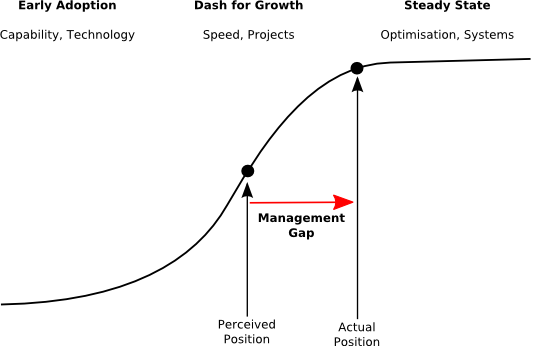
The need to shift from dash to growth to steady state

Most organisations have moved on from managing technical capability, to using projects to deliver changes as quickly as possible.

In reality, though, most organisations have matured even further. Most work in most projects involves replacing functionality, not delivering new functionality. Our management approach has not kept up, and we are still managing a dash for growth. To maximise the value from our investments in IT, we now need to change our management approach.

We need to present IT differently. During the dash for growth, there was a lot of opportunity for totally new IT. It was appropriate to use relatively simple and even emotive arguments such as "information is the life blood of the organisation" to argue for IT.

Now that IT is more mature, and the general case for IT has been made, we need much more precise discussions about optimising the use of IT, to separate truly valuable use from gratuitous use. We need more rigorous analyses of the business value of information, and the ongoing costs of using, running and maintaining IT. We may need to dampen the enthusiasms of our business colleagues for systems that can not deliver value. A down-to-earth view of IT, as a capability to automate the storage, transformation and communication of information, can help us understand value more precisely.

The main IT management focus needs to alter, too. When the emphasis was on growth, it made sense to structure much of IT management (and career structures) around projects.

Now that IT is more mature, we need to focus on the IT that we already have. We need to shift attention to the ongoing management of meaningful business systems, rather than overemphasise big changes. We need to move on from projects that implement new IT to incremental changes that continuously realign what we have to where business is going.

At a more detailed level, we need to design and develop systems to be long-lived and easy to evolve. We need to choose technology that can last a long time, and use it so that it can. We need to value standardisation more than productivity.

We need to design in a way that makes systems easy to work with. We need modular designs, but not so intricate that nobody other than their original developers can understand them. We need to adopt methods of connecting systems that emphasise ease of independent change, rather than development speed. We need to pay more attention to documentation and testing, because these are much more important when systems are long-lived.

Regular readers will recognise these themes: demand reduction, precise definition of IT value, system focus, incremental change, standards, simple design, decoupled integration, documentation, and testing. These are not as exciting as technology and projects, but they are what we need. We need to move on from our obsessions with yesterday's problems, and use these to tackle tomorrow's.

© Copyright 2010 Minimal IT Ltd. See the Minimal IT website for the original newsletter and copyright information.

Tuesday, 10 August 2010

Embracing steady state

It is time to move away from the big distinction between steady state and projects.

Enterprise IT is split into two. On the one hand we have changes and projects. On the other, we have steady state, business as usual.

We split IT specialisms along these lines. Support, operations, system administration and security are generally managed as steady state activities. Analysis, design and programming are generally managed in projects.

In many respects it is a very reasonable split. It recognises the work required to keep things more-or-less as they are, and separates this from the work required to take leaps forward in capability.

It is a common pattern, too, even in nature. Evolutionary biology recognises the idea of a "punctuated equilibrium" - periods of more-or-less steady state punctuated occasionally by periods of more rapid change.

Despite its obvious appeal, I think the big distinction between steady state and projects is now becoming a barrier to cost-effective IT.

Years ago, many IT projects introduced fundamentally new ways of doing business, or gained benefit from fundamentally new technologies. A colleague of mine was very much involved in the initial adoption of IT in fashion catalogue shopping. This is a relatively complicated business model, in which women (it was nearly always women) acted as agents to sell clothes on credit to their friends and neighbours, then collected the money in instalments over the following weeks. It was a huge business, but relatively complicated, with suppliers, agents, credit agreements, home delivery, returns, catalogue production, and so forth.

The introduction of IT had massive impacts in clerical, financial and logistical support. As he described it, any afternoon you could dream up a project that would save a million pounds. Given the return on investment in new projects, the overriding requirement was to get new systems in quickly, and to keep them stable and functioning long enough to be replaced with a new system that would provide a similar huge return on investment. There was no point building longevity into systems - speed of development was everything.

If you look at a typical IT project now there is much less genuinely new capability. Small steps forward in business capability are hidden inside massive projects to replace existing systems that have become too hard to work with or which rely on out-of-date technology. Even though technology is cheaper and development faster, the return on investment is much lower because less new capability is being delivered.

The split between projects and steady state made a lot of sense years ago, and was an efficient way of gaining value from IT. As the incremental benefit of projects decreases, the split makes less sense. There is now more value in changing and improving systems incrementally, which requires changes to how we design, develop and manage systems. This would let us get away from massive change projects, which are now a less efficient way of getting value from IT.

I suspect the biggest barrier to this is that our perception of IT, the specialisms we have, our career paths and reward structures, are all linked to the strong distinction between steady state and projects. Our approach to management is stuck in an outdated "dash for growth" model. We need to embrace the steady state.

© Copyright 2010 Minimal IT Ltd. See the Minimal IT website for the original newsletter and copyright information.

Tuesday, 3 August 2010

Core value

To explain value, you have to look deeper than features and benefits, and understand how your products add value to your customers in a way that distinguishes you from your competitors.

At Metrici, we typically work with partner organisations. This lets us reach more customers than we could by ourselves. It allows us to focus our efforts on our areas of expertise, which are materials, methods and software for automated consultancy tools. It gives partners innovative products to introduce to their customers.

With each partner, we have to begin from the start. We have to explain the proposition, explore how it can add value to the partner, and then develop with them appropriate solutions for their customers.

Going through this process recently, I have been struck again by a recurring problem. The problem is how to explain how the products bring new value to the partner's customers.

This is doubly hard for us. A lot of the benefits of our approach are benefits to the partner. It is much quicker and cheaper to develop consultancy tools using our methods and software than it is to program from scratch. But what are the unique selling points of those solutions to our partners' customers?

The solutions have a lot of good features. The partner organisation can add their content. The expert system we use brings an extra level of insight not available from other tools. We can organise materials and assessments, and automate analysis, to make the whole process very streamlined. We can tailor the solution for each customer. Everything is available on the web. These are all good, but they do not of themselves provide a compelling reason for the customer to use the product, or explain how we add value in ways that others do not.

After scratching at this for a while, I think I can now explain what our unique value is.

Most of the normal ways we try to improve IT involve looking at IT from the viewpoint of the things we are responsible for. We manage projects and teams. We optimise processes. We consolidate technology.

Our approach is different because it looks at IT from the viewpoint of whole systems, which cut across the layers of people, processes and technologies that we typically manage. Because we look at IT in a different way, we can spot opportunities that other methods can not see. And because the way that we analyse IT is more closely related to the structure of IT as perceived by its owners and users (who see services and systems, not layers of people, processes and technology), it is much easier for us to articulate the business case for changes and improvements.

I can now explain the core value of our products. They identify additional opportunities for increasing business, reducing risk and reducing cost. Like an onion, this is wrapped in layers of other benefits which make it easy to run the process, and easy for partners to provide services, but which can make it harder to understand the tangible, unique, value-adding benefits of the products.

Try this for yourself. Can you explain the core value of your products? If you are like me, you may find it harder than you think.

© Copyright 2010 Minimal IT Ltd. See the Minimal IT website for the original newsletter and copyright information.

Tuesday, 27 July 2010

The conflicts of IT

Codes of conduct for IT professionals do not fully cover the conflicts inherent in IT.

In all trades, there is a commercial conflict between the consumer and the provider; the provider wants to make as much money as possible, and the consumer wants to pay as little as possible.

Where there is competition, this conflict is outweighed by commercial pressures, and, consumers generally get what they want at a reasonable price and providers generally make a profit.

Professional services are different because the service is more complicated and the client does not fully understand the service that they need. Clients have to trust professional providers. There is a conflict between the professional duty to provide only the services that the clients truly needs, and the professional need to make money. Most professions manage this to an extent through professional standards and professional bodies.

Some professions have special conflicts that are managed in special ways.

Healthcare is particularly expensive, and people need it most when they are least able to pay for it. There is a conflict between the professional duty to care for the sick, and the professional need to make money. Many authorities manage this conflict by providing healthcare through taxation (as in the UK) or through compulsory health insurance.

Lawyers and similar professionals have special conflicts if they are representing both sides in a dispute. Lawyers have to refuse work (and therefore money) where there would be a conflict of interest by representing both sides in a dispute.

IT, and particularly software, also has a special conflict.

Software does not rot, through generalisation software can deal with many different problems, software can potentially be reproduced without limit, and software can be combined and extended to create new solutions. The special conflict in IT is between the professional duty to provide a good enough solution at the lowest cost, and the professional need to make money through activity, uniqueness and change.

Mostly we ignore this conflict. IT sales aims to sell the customer as much as they can. Although there is competition, as a profession we have not evolved an ethic to exploit the reusable, general, unlimited and extensible potential of software. The open source movement is a step in this direction, but it is an alternative supply model rather than a set of industry principles.

There are attempts at ethical codes in IT, such as the very good Software Engineering Code of Ethics and Professional Practice. However, other than generally acting in the interests of the client and employer, this does not recognise the unique conflicts inherent with software. If you substitute the word "signage" for "software" throughout the document, it reads OK as a code of ethics and professional practice for sign writers.

I do not want to abandon the idea of making money, but I think there is massive potential for delivering better solutions for less if we can manage this conflict better, and we will hit both ethical and practical problems unless we do. We need to find a way of making money, while fully exploiting the reusable, generic, unlimited and extensible potential of software. I do not have a solution, but the first step is to recognise that the conflict exists.

© Copyright 2010 Minimal IT Ltd. See the Minimal IT website for the original newsletter and copyright information.

Tuesday, 20 July 2010

An apology to project managers

It is easy to lose sight of the basic benefits of project management.

In these newsletters, I have often criticised IT projects and project management. Here are a few examples:
My main criticisms of IT project management is that it focuses too much on the notional achievement of project objectives, or the blatant pursuit of personal and political objectives, rather than the substantive delivery of value from the work. Most IT projects are largely political, very few understand how value is delivered from IT, and hardly any manage the achievement of that value. Some IT project managers are blatantly self-promoting – like the one who admitted to me that he did not want a cheap and easy way to test the system because he did not want to risk his career by running a small project.

However, I think I have made a bit of a mistake and forgotten the basic value that project management brings. For that I owe an apology to project managers everywhere.

What has made me see sense is that we have recently taken on a new manager. Part of her role is to manage our development projects, which, being primarily a software company, is where we spend a good deal of our time and energy. Up until recently we have muddled through managing the projects ourselves, and the improvements of the last few weeks have been a very useful reminder of the basic benefits of project management. This is what we have found.

First, project management frees up the time of technical staff. I used to spend a large part of my time wondering what to do next, and losing time by swapping between tasks. Now I don't. I have someone to worry about that for me.

Second, although we are focussing more on the technical work, we are more confident that neither the big picture nor the little tasks are being forgotten. Both of these tend to get squeezed when you really focus on detailed work, but good project management can look after these without diluting focus.

Thirdly, project management keeps us on track (well, almost). We have an idea of what we need to deliver, when, and gentle but firm reminders to do so.

Lastly, project management helps us to manage the externals. As owners and representatives of the business, we have to keep in contact with partner organisations. However, when it comes to delivery, it is useful to delegate some of that contact to a project manager who can deal with it efficiently.

This may be an oversimplification of project management, but I think it is useful to remind ourselves that the basic benefit of project management is to bring organisation, focus and communication to the work. And to project managers everywhere, I apologise for missing that.

© Copyright 2010 Minimal IT Ltd. See the Minimal IT website for the original newsletter and copyright information.

Tuesday, 13 July 2010

XML-based programming 7: is it for you?

Is XML-based programming suitable for your project?

Over the past few weeks I have described using XML during systems development and programming. It all started with using XML to pass data between different layers of the application, and has grown to use XML as a common format for all the ancillary parts of the system, such as configuration and testing.

When I started, I did not set out to create a whole new way of working. There are already lots if good frameworks to choose from, and it would be stupidclever to invent another one.

However, our use of XML has evolved to something significant and useful. It delivers very good separation between different layers of the system, and provides a flexible and consistent approach for many different aspects of development.

This has allowed us to merge together a complicated web application, some fairly hefty batch-style analysis, and a generic report production mechanism. It has allowed us to develop a single test approach which covers all of these, including low-level services, user interface, and reporting. It provides good facilities to load database data as XML, including the automatic resolution of foreign keys. It allows us to build higher level XML-based services from lower-level XML-based services.

There are some disadvantages. Some people are not comfortable with XML. Even though XML is good as a general-purpose format, it is rarely the best tool for any particular job. There are limits to what should be done in XML, especially for intensive use.

Overall the approach works well for us, and we do not intend to change it. We now have a significant investment in XML, and we have grown familiar with it.

But now I have two other questions. First, would I recommend this approach to others? Secondly, should we develop this further as a product in its own right?

I would definitely recommend the approach if you are familiar with XML, you have complicated integration inside the application, and you want a lot of control over how it is going to be put together, as in our merging of web application, batch processing and report production.

Conversely, the approach would be overkill for architecturally simpler applications that can be developed using one single set of technologies.

I do not know whether we should develop this further as a product. The XML capabilities have been developed independently from the application that use them, and could easily be applied to other projects. We would be happy to share them under some suitable open source license, if there was a demand for this.

So I am going throw this question over to you. Would the Java and XSLT tools we have developed for XML-based programming be something that you think could be useful in your work? If we provided them as open source products, is this something that you would use? Could you contribute to them to help their further development, or know of similar projects that they could contributed to?

If you are interested, contact me.

© Copyright 2010 Minimal IT Ltd. See the Minimal IT website for the original newsletter and copyright information.

Tuesday, 6 July 2010

XML-based programming 6: the dark side

Without care, XML can be difficult to understand, complicated to work with, and inefficient to process.

In the interest of balance, I want to present the negative side of using XML.

XML can be very complicated. Basic XML is easy, but once you get into namespaces, schemas and public standards, it can be a nightmare. The XML standards for Microsoft Office are over 5000 pages long.

XML is difficult to work with. It takes 20 lines of code to read a single value from an XML file using the W3C's document object model (DOM) programming interface.

XML can be very inefficient. I recently tested an XML-based routine to create 2000 questionnaires, which took 40 minutes of 100% CPU time and 500MB of memory.

Because of these problems, not everybody shares my enthusiasm for XML. Most people use a variety of scripts and files to construct, configure and test their systems, very few standardise on XML. Some use simpler standards such as JSON to represent data.

The underlying problem with XML is that because it is so flexible, methods for defining and processing XML have to cope with many different requirements. XML gives you a lot of rope: if you are lucky you just get tied in knots, if you are unlucky you hang yourself.

However, you do not need complicated XML if you are only using it to glue together your systems and to structure ancillary components like configuration files and test scripts. You can explain the rules for simple XML in less than one page. If you stick to these rules, which I find cover more than 90% of requirements, your XML will be as simple as any other data representation.

XML programming interfaces are complicated because they have to cope with all the different uses that XML can be put to. For simple XML, it is easy to create a wrapper that covers everything you want to do in a few function calls. You can process simple XML as easily as Java properties or simpler standards such as JSON, and still have the full flexibility of XML in reserve, if you need it.

The inefficiencies of XML need to be put in perspective. In my example, I was using the XML language XSLT to manage execution, which is just plain wrong. When I converted this so that Java was managing the execution, even though I was still using XML-based calls, the run time and memory more than halved, and the CPU requirement dropped to 10%. Core processing should remain in a general purpose programming language, and the core data should remain on the database; XML is there to provide a common approach to all the rest.

If you consider only one requirement in isolation, it is usually easier to use something other than XML. If you are writing Java, Java properties are easier than XML configuration files. If you are writing JavaScript, JSON is easier than XML. If you are writing a data manipulation script, bash is easier than XSLT. However, the great advantage of XML is that, with a little care, it can meet all of these requirements, and many more, with a single, consistent set of technologies.

© Copyright 2010 Minimal IT Ltd. See the Minimal IT website for the original newsletter and copyright information.

Tuesday, 29 June 2010

XML-based programming 5: building blocks

XML-based programming makes building complex new functionality from simple building blocks as easy as manipulating XML data.

Using XML as the basis for programming means that you can easily represent service requests and responses as data. You can use XML techniques, particularly XML transformation using XSLT, to create service requests, modify service results, or even to implement services. XSLT allows you to use low-level services as building blocks for higher-level services, or to build new programming interfaces on top of existing services.

As an example, our Metrici Advisor application has a fairly abstract internal data structure. We have XML-based services to retrieve portions of this, which we use to build parts of the user interface. The structures are a bit too abstract to be a useful starting point for reporting, so we use an XSLT stylesheet to convert the output to a more meaningful reporting structure. We can therefore have a single extract service that serves two purposes: building the user interface, and providing meaningful data for reporting.

Multiple services can be combined into one service using a simple "RunAll" service that processes a request that is itself a list of requests for other services. This is very powerful when used with XSLT. For example, we use this to convert a simple specification of a demonstration account into a series of service calls and database loads required to configure the demonstration.

It is easy to build intelligence into the execution of multiple services. For example, in our test harness, we have a simple "Switch" service that runs one service and, based on an error code, runs one of two other services. This allows us to build more complicated XML-based test harnesses that, for example, raise errors when compares fail.

XSLT extensions make it possible to call XML-based services directly from XSLT. You can use XSLT to build the request and interpret the results, just using the extensions to invoke the service.

We have had mixed results with this method. It works fine for small, non-intensive requirements. However, our attempts to run thousands of service invocations from XSLT have been unsuccessful, largely because of memory management problems.

These experiences have shown us that using XML gives a lot of flexibility for adding functionality on top of existing functionality, by combining services together, or by modifying the inputs and outputs. You can, of course, do this in other languages, but XML makes it easy because the tools you use to build high-level services are the same tools that you use to manipulate data.

We have also learnt that these capabilities have to be used carefully. XML-based tools are good for transforming data, which could be service inputs and outputs. However, they are not necessarily good execution environments, and do not have the performance, memory management and error handling that you would have in a programming language such as Java. But mixing both, using XML technologies for transformation, and conventional programming languages for execution, gives us a very flexible environment for developing complex new functionality on top of simpler building blocks.

© Copyright 2010 Minimal IT Ltd. See the Minimal IT website for the original newsletter and copyright information.

Tuesday, 22 June 2010

XML-based programming 4: testing

XML provides excellent capabilities for building test harnesses and test data, and helps structure systems to make them easier to test.

XML brings a lot of flexibility and consistency to systems design and programming. However, the greatest advantage I have found to XML-based programming is that it makes it much easier to develop really thorough tests.

In using XML for testing, I was keen not to reinvent the wheel. Ant is a superb tool for running tests, and JUnit is excellent for low-level unit tests.

I started using XML for tests that could not readily use JUnit. Our XML framework uses services that take request parameters and return results as XML. To test these, we developed a simple test harness that calls the services using XML, and compares the responses with expected results. This approach allows all the business logic to be developed and tested independently of the web application that ultimately uses it.

Since all the data, both in files and on the database, can be represented as XML, all required test data can be held using the same formats as the test scripts. This allows us to create complete XML-based test packs, without using other technologies such as SQL or Java programming.

Some testing is more complicated. For these, we use XML-based macros developed using XSLT.

For example, we use the macros to test the online web application. We use a low-level Shell service to execute external programs, and we use macros to encapsulate utilities that get and process web pages (wget, curl, tidy), for extracting data from the results (XSLT) and for compares (diff).

On top of these low-level macros, we use additional macros to get web pages and capture results, or compare all or part of the page with expected results. And on top of these macros, we use even higher level macros such as "Follow Link" or "Submit Form" that mimic user interaction.

This allows us to build complete test packs for web applications, using the same tools and technologies that we use for testing individual components. We now have a fully automated UI test which runs through 500 page retrieval and compare steps.

As well as running tests and creating test data, XML helps to make systems more testable.

XML can represent all the data at any point in the processing. This allows complicated processes, such as database extraction, data analysis and reporting, to be broken down into separate steps, connected with XML. This makes it easier to test each step in isolation (and also makes the steps reusable).

Wherever testing is really hard, it is possible to break it down further by using an intermediate XML data structure part way through processing one step, allowing different parts of the step to be tested independently. This makes it feasible to test very deeply without the explosion of combinations that you would get if, say, you tested from data in the database all the way to finished reports in one test.

Good testing is never easy, and XML does not make testing magically easier. However, it does make it possible to build thorough test packs for all parts of the system, using a consistent set of tools and technologies. I could not now imagine testing a complicated system without XML.

© Copyright 2010 Minimal IT Ltd. See the Minimal IT website for the original newsletter and copyright information.

Tuesday, 15 June 2010

XML-based programming 3: using the framework

Using XML-based programming simplifies web development, database handling and report production.

We use a simple framework for XML-based programming. It allows us to pass request parameters to functions using XML, and receive the results using XML.

Although it is only a simple framework, it provides good support for many different types of development, such as web development, database handling, and report production.

Web development

The framework provides a Java Server Page (JSP) tag which allows a Java server page to call an application service. The request for the service is written as XML in the body of the tag, and the results are returned as XML either into the document or into a variable for further processing.

This provides a consistent way of calling business logic from the user inteface code, and of handling the return values. Using XSLT to render the returned XML is very powerful.

Because XML can structure complicated data, this approach helps arrange the calls to the business logic into larger, more meaningful units, rather than things like "get next row".

This approach also achieves a very clear separation between the user interface code and the business logic, which was the main motivation for the framework in the first place.

Database handling

The framework does not of itself provide any support for database handling. However, to complement the XML-based programming, we developed a database utility which, as well as generating SQL and data access classes, supports XML-based dump and load facilities for the database. The load facilities are relatively intelligent, for example resolving business key values into internal foreign key relationships.

Because it is all XML-based, this works alongside the programming framework very effectively. For example, it allows us to initialise reference data directly within the application configuration files.

Report production

We had a requirement to produce finished reports in various formats. Working in an XML-based environment means that it is easy to extract XML data and pass it through XSLT stylesheets to produce the required output. We even developed an XSLT-based approach to creating Excel 2007 spreadsheets.

To provide additional flexibility, we created services that monitor the arrival of files in directories, and then trigger streams of processing on the files. These are configured using XML, and can run any XML-based service, including services for XML transformation using XSLT and a Shell service for running native programs. This allows us to configure multi-step report processes, for example (in our case) passing data through an expert system for analysis before reporting on it using XSLT.

Any of these examples could be developed in other ways. However, using an XML-based programming framework allows us to use the same code and the same tools to develop and integrate all the different parts of the application. XML gives us a consistent way to configure and combine both data and code, which gives us huge flexibility during development.

As well as making coding simpler, the use of XML has even greater benefits in testing. Next week I will describe XML-based testing.

© Copyright 2010 Minimal IT Ltd. See the Minimal IT website for the original newsletter and copyright information.