Our enthusiastic adoption of advanced development tools and frameworks has diverted us from the hard work of delivering effective system documentation.
A few weeks ago I wrote about an experiment to see what a system would be like if we focused solely on functionality and manageability, rather than on technological elegance. I have been slowly carrying out the experiment, building a system which is well documented and manageable, but uses only very simple programming with no advanced tools or frameworks.
So far in the project I have drafted a set of documents for the system: user documentation, support documentation, operations documentation and legal documentation such as licensing. I have created mock-ups of most of the screens for the system, as part of the user guide.
I have found it really hard to think through and write down how the system is maintained, installed, operated and used. This is nothing to do with the lack of development tools or frameworks, because I have not started development yet.
The documentation describes what the screens looks like, the business rules, and how the technical components work and are configured. It is reminiscent of the system specification documents from a typical waterfall method. Am I recreating a bureaucratic and out-dated development method?
I do not think so. I am writing detailed documentation as part of the deliverable, not as part of a design method. The documents I have created explain how to use and work with the system, not how to build it. When I worked with waterfall methods, the huge documents were focused on getting sign off, and were typically ignored at the end of the project.
The documentation I have created seems to me to be a useful part of the overall solution. I have been trying to think why so few systems are documented like this. I have a hypothesis.
Years ago, computers were very expensive and hard to use. Programs were written out by hand and desk-checked before being compiled. We wrote in COBOL and assembler. Go back far enough and we were using punched cards. We produced lots of documentation so that we could get it right first time when we started programming on expensive and inflexible technology.
We now have cheap hardware, integrated development environments and advanced frameworks. This allows us to adopt much more efficient, iterative methods. We do not have to get it right first time, so we do not need so much design documentation.
However, in making this change, we have forgotten that old-fashioned, cumbersome design methods created system documentation as a by-product, even though it was often ignored. It is as if we have dismissed the whole notion of documentation because of its association with inefficient old ways of working.
If we think of documentation as part of the deliverable, rather than part of the process, then there is less conflict between documentation and more modern, iterative, agile methods. We can create the detailed system documentation required for usable and manageable systems, but we can create this iteratively, in parallel with the creation of the code.
Maybe our advanced technology, methods and tools have given us a bad excuse to avoid the hard work of creating good system documentation.
© Copyright 2010 Minimal IT Ltd. See the Minimal IT website for the original newsletter and copyright information.
Tuesday, 30 March 2010

Tuesday, 23 March 2010
Supertest
Fully automated regression tests are worth the high costs required to create them, but require confidence and discipline to gain the value.
I am feeling smug. I have just finished refactoring the test packs on our Metrici Advisor product, and, though I say it myself, they are now superb.
Before we did this work, the tests were pretty good. We had automated tests for every part of the system, from low-level code to web pages and user interaction. But there were a few problems. Although it is a OS-independent Java-based system, lots of the test code was Windows-specific. Many of the tests required detailed inspection of the output. The tests involve a number of separate runs. Running the tests took 45 minutes or more, and you need to be an expert in the system to interpret the results.
That has now changed. All 2500+ tests run from a single command on Windows or on Linux, and automatically indicate if and where there are any errors. The tests take about 15 minutes to run. (We run most of the tests using a home-written XML-based test harness, with plug-ins to test XML-based services and XSLT, and to retrieve, navigate and test the output from the web front-end.)
We made these changes because we want to carry out some major development on Metrici Advisor, potentially involving more developers, and we need to make running the tests as simple as possible. The tests allow us to respond to requirements quickly, with little effort, and with certainty that they will not impact other parts of the system.
To achieve this value, we now have to be prepared to rely on the tests. We have to be confident that the coverage of the tests is sufficiently good that there is no point running a few extra tests just to be extra safe.
We also need to be disciplined. We have to add tests for all new code, for any bugs we find, and for any other conditions that come to mind. If we can not think how something can be tested, we have to redevelop code so that it can be tested.
These fully automated regression tests are a significant asset. If we did not have them, we would spend much more money on manual testing, and would not have such a high quality product. However, if we had not built the tests at the same time as the code, I estimate it would take a couple of years to develop this depth of testing. Few organisations would justify this level of effort for retro-fitting automated regression tests to an existing system.
However, for any system that you intend to keep for some years, adding fully automated regression tests is both possible and worthwhile. Start by creating an almost empty test pack, with simple examples of each type of processing. Through time, add to this to test all changes and bug fixes. This adds little or nothing to your testing costs. Gradually, the coverage of the automated tests will increase, and testing time and cost will decrease as less and less functionality requires manual testing.
As we have found, fully automated regression tests are very valuable, and are achievable even with complicated systems. All you need is clarity of purpose, confidence and discipline.
© Copyright 2010 Minimal IT Ltd. See the Minimal IT website for the original newsletter and copyright information.
I am feeling smug. I have just finished refactoring the test packs on our Metrici Advisor product, and, though I say it myself, they are now superb.
Before we did this work, the tests were pretty good. We had automated tests for every part of the system, from low-level code to web pages and user interaction. But there were a few problems. Although it is a OS-independent Java-based system, lots of the test code was Windows-specific. Many of the tests required detailed inspection of the output. The tests involve a number of separate runs. Running the tests took 45 minutes or more, and you need to be an expert in the system to interpret the results.
That has now changed. All 2500+ tests run from a single command on Windows or on Linux, and automatically indicate if and where there are any errors. The tests take about 15 minutes to run. (We run most of the tests using a home-written XML-based test harness, with plug-ins to test XML-based services and XSLT, and to retrieve, navigate and test the output from the web front-end.)
We made these changes because we want to carry out some major development on Metrici Advisor, potentially involving more developers, and we need to make running the tests as simple as possible. The tests allow us to respond to requirements quickly, with little effort, and with certainty that they will not impact other parts of the system.
To achieve this value, we now have to be prepared to rely on the tests. We have to be confident that the coverage of the tests is sufficiently good that there is no point running a few extra tests just to be extra safe.
We also need to be disciplined. We have to add tests for all new code, for any bugs we find, and for any other conditions that come to mind. If we can not think how something can be tested, we have to redevelop code so that it can be tested.
These fully automated regression tests are a significant asset. If we did not have them, we would spend much more money on manual testing, and would not have such a high quality product. However, if we had not built the tests at the same time as the code, I estimate it would take a couple of years to develop this depth of testing. Few organisations would justify this level of effort for retro-fitting automated regression tests to an existing system.
However, for any system that you intend to keep for some years, adding fully automated regression tests is both possible and worthwhile. Start by creating an almost empty test pack, with simple examples of each type of processing. Through time, add to this to test all changes and bug fixes. This adds little or nothing to your testing costs. Gradually, the coverage of the automated tests will increase, and testing time and cost will decrease as less and less functionality requires manual testing.
As we have found, fully automated regression tests are very valuable, and are achievable even with complicated systems. All you need is clarity of purpose, confidence and discipline.
© Copyright 2010 Minimal IT Ltd. See the Minimal IT website for the original newsletter and copyright information.
Tuesday, 16 March 2010
Freemind
Freemind is an easy-to-use open source mind mapping tool that can help you organise you thoughts.
Just in case you are not familiar with them, mind maps are an easy way of getting your thoughts down on paper.
In a mind map, you start with a central thought, and then add to it with ever more specific thoughts radiating from the centre. It lets you record lots of ideas quickly, and visualise the relationships between them.
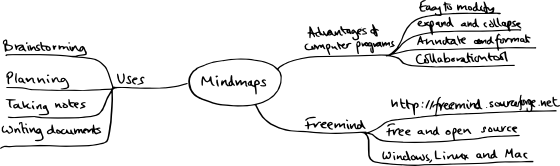
I started using mind maps when I was a student, as a way organising random snippets of facts into a half-coherent structure to make essays easier. It was a great cheat – I could write essays that seemed "well structured" and "well researched", but all I really had was random facts and a well-honed method for essay writing. For about 20 years, I used mind maps all the time, with bits of paper and notebooks stuffed full of spidery diagrams. For some reason, I stopped about three years ago. I think these newsletters are to blame – constantly writing continuous prose has forced me into more linear thinking.
A couple of weeks ago we started on a major planning exercise at Metrici. There were loads of different things we need to cover: commercial, marketing, technical, personal. We had lots and lots of ideas we wanted to sort through. Perfect mind map material.
But we had a problem. We work in different locations. We are very used to using tools such as Skype, but we needed a bit more than just talk, video and instant messaging to work together on the plan.
To cut a long story short, we decided to draw up a mind map collaboratively on a shared desktop session. I had briefly seen the program Freemind before, so I installed it to support the session.
As someone who has only done mind maps on paper before, I found Freemind very easy to use. One of the things that is particularly important for mind mapping is to be able to get your ideas down quickly and without fuss. Freemind has intuitive mouse and keyboard commands to maintain the mind map. It was a really useful tool for our planning session.
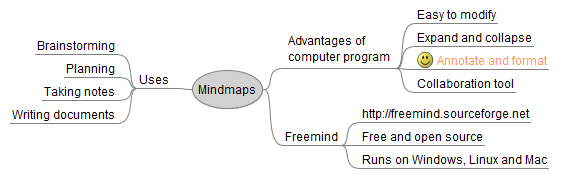
Creating a mind map on a computer has advantages over paper. You can alter the layout, edit the writing, collapse and expand the branches. Freemind lets you format and annotate the mind map, though personally I avoid too much formatting and annotation because it distracts me from the overall structure and ideas. Although Freemind does not have any built-in collaboration features, using it on a shared desktop was perfect for a remote brainstorming session.
I was hugely impressed by Freemind. It is really easy to use, and has enough to tempt me away from using paper. It is available for free download, and can run on Windows, Mac or Linux, or any other platform that can run Java. There are many other mind map programs, but it is certainly worth taking a look at Freemind.
© Copyright 2010 Minimal IT Ltd. See the Minimal IT website for the original newsletter and copyright information.
Just in case you are not familiar with them, mind maps are an easy way of getting your thoughts down on paper.
In a mind map, you start with a central thought, and then add to it with ever more specific thoughts radiating from the centre. It lets you record lots of ideas quickly, and visualise the relationships between them.
Mind map on paper
I started using mind maps when I was a student, as a way organising random snippets of facts into a half-coherent structure to make essays easier. It was a great cheat – I could write essays that seemed "well structured" and "well researched", but all I really had was random facts and a well-honed method for essay writing. For about 20 years, I used mind maps all the time, with bits of paper and notebooks stuffed full of spidery diagrams. For some reason, I stopped about three years ago. I think these newsletters are to blame – constantly writing continuous prose has forced me into more linear thinking.
A couple of weeks ago we started on a major planning exercise at Metrici. There were loads of different things we need to cover: commercial, marketing, technical, personal. We had lots and lots of ideas we wanted to sort through. Perfect mind map material.
But we had a problem. We work in different locations. We are very used to using tools such as Skype, but we needed a bit more than just talk, video and instant messaging to work together on the plan.
To cut a long story short, we decided to draw up a mind map collaboratively on a shared desktop session. I had briefly seen the program Freemind before, so I installed it to support the session.
As someone who has only done mind maps on paper before, I found Freemind very easy to use. One of the things that is particularly important for mind mapping is to be able to get your ideas down quickly and without fuss. Freemind has intuitive mouse and keyboard commands to maintain the mind map. It was a really useful tool for our planning session.
Mind map from Freemind
Creating a mind map on a computer has advantages over paper. You can alter the layout, edit the writing, collapse and expand the branches. Freemind lets you format and annotate the mind map, though personally I avoid too much formatting and annotation because it distracts me from the overall structure and ideas. Although Freemind does not have any built-in collaboration features, using it on a shared desktop was perfect for a remote brainstorming session.
I was hugely impressed by Freemind. It is really easy to use, and has enough to tempt me away from using paper. It is available for free download, and can run on Windows, Mac or Linux, or any other platform that can run Java. There are many other mind map programs, but it is certainly worth taking a look at Freemind.
© Copyright 2010 Minimal IT Ltd. See the Minimal IT website for the original newsletter and copyright information.
Tuesday, 9 March 2010
Five years on: Minimal IT
A clearer view of IT will help the IT management challenges ahead.
In these newsletters, we have explored three themes.
Theme one is that computers are very simple. They only do three things: store, calculate and communicate information. This is a useful way of cutting through the fog and separating what the IT is doing from all the other business activities and changes that surround the IT.
Theme two, based on the first theme, is the idea of reducing IT demand. A lot of IT activity is far removed from the storage, calculation and communication of valuable information, and with a bit of clear thinking could be removed without reducing value.
Theme three is that we need to use simple management measurements to get to grips with complex management issues. This idea is the basis of our SQM method. SQM provides a way to tackle the mess of legacy IT and complex transformations, and gives management an alternative to paying more and more just to keep where they are.
One of the major challenges currently faced by IT organisations is to take advantage of low-cost options, such as virtualization, Linux and Software-as-a-Service (SaaS), without abandoning traditional corporate IT qualities such as security and integration. How do the themes from these newsletters help IT organisations meet these challenges?
I think they help in two main ways.
The first theme, which reduces IT to its bare minimum, helps understand how IT can be moved to simpler, cheaper, more commoditised solutions. It helps us to see that IT is a relatively simple business automation tool. Now that technology has matured, IT need not be a huge corporate endeavour. We need to "let go" of a lot of what we hold dear in IT, particularly the IT organisation's control of all IT spend. A simplified view of IT makes this more understandable and maybe more palatable. The IT organisation's role moves from the provider (which is the easy bit) to the adviser (which is always hard and always requires insider knowledge).
However, we all know it is not as easy as that. We need to renovate or replace existing IT to work in this new world. We need to extend good IT qualities, such as security and integration, into a broader mix of solutions.
This is where SQM is really valuable. It gives you a simple but insightful way to understand what is going on, see how well you are meeting your objectives, and pinpoint what you need to do to improve. For example, it could show you whether SaaS solutions meet your IT security objectives, whether your outsourcer is managing the quality of your application code effectively, or show progress on your strategy for moving from proprietary Unix to commodity Linux. It can show all these at the same time, and help balance the competing priorities between them.
IT is broad subject, and these Minimal IT musings only cover a small part. But five years on, the themes we have been exploring are still relevant to the challenges that we face. What will the next five years bring?
© Copyright 2010 Minimal IT Ltd. See the Minimal IT website for the original newsletter and copyright information.
In these newsletters, we have explored three themes.
Theme one is that computers are very simple. They only do three things: store, calculate and communicate information. This is a useful way of cutting through the fog and separating what the IT is doing from all the other business activities and changes that surround the IT.
Theme two, based on the first theme, is the idea of reducing IT demand. A lot of IT activity is far removed from the storage, calculation and communication of valuable information, and with a bit of clear thinking could be removed without reducing value.
Theme three is that we need to use simple management measurements to get to grips with complex management issues. This idea is the basis of our SQM method. SQM provides a way to tackle the mess of legacy IT and complex transformations, and gives management an alternative to paying more and more just to keep where they are.
One of the major challenges currently faced by IT organisations is to take advantage of low-cost options, such as virtualization, Linux and Software-as-a-Service (SaaS), without abandoning traditional corporate IT qualities such as security and integration. How do the themes from these newsletters help IT organisations meet these challenges?
I think they help in two main ways.
The first theme, which reduces IT to its bare minimum, helps understand how IT can be moved to simpler, cheaper, more commoditised solutions. It helps us to see that IT is a relatively simple business automation tool. Now that technology has matured, IT need not be a huge corporate endeavour. We need to "let go" of a lot of what we hold dear in IT, particularly the IT organisation's control of all IT spend. A simplified view of IT makes this more understandable and maybe more palatable. The IT organisation's role moves from the provider (which is the easy bit) to the adviser (which is always hard and always requires insider knowledge).
However, we all know it is not as easy as that. We need to renovate or replace existing IT to work in this new world. We need to extend good IT qualities, such as security and integration, into a broader mix of solutions.
This is where SQM is really valuable. It gives you a simple but insightful way to understand what is going on, see how well you are meeting your objectives, and pinpoint what you need to do to improve. For example, it could show you whether SaaS solutions meet your IT security objectives, whether your outsourcer is managing the quality of your application code effectively, or show progress on your strategy for moving from proprietary Unix to commodity Linux. It can show all these at the same time, and help balance the competing priorities between them.
IT is broad subject, and these Minimal IT musings only cover a small part. But five years on, the themes we have been exploring are still relevant to the challenges that we face. What will the next five years bring?
© Copyright 2010 Minimal IT Ltd. See the Minimal IT website for the original newsletter and copyright information.
Tuesday, 2 March 2010
Five years on: The IT Industry
Corporate IT will be challenged to adopt lower-cost approaches such as virtualization, Linux and Software-as-a-Service, but need to retain traditional corporate IT values such as security and integration.
It is five years since I started writing these newsletters. It is interesting to look back and see what has changed, and where things might be going.
From a technology point of view, a number of areas have matured.
Linux has grown more mainstream. The leading distributions are now stable and mature and a real alternative to Microsoft and other proprietary operating systems, especially on servers. Other open source products, such as the OpenOffice.org suite, are now mature and stable.
Server virtualization has grown mainstream. It is now a common choice for production servers, and a very useful capability for system development and test.
Software-as-a-Service (SaaS) has been growing significantly. It was a novelty five years ago, but is now a serious offer.
Lastly, the whole area of individual connectivity has grown. Individuals now have broadband, mobile internet, Voice over IP, and simple video conferencing. People really can work anywhere now.
Taken together, these changes have a big impact. Not long ago, businesses' IT and location were a major investment, and a barrier to entry for competitors. IT is growing cheaper, and you can now provide the IT for an organisation without major capital expenditure. Where it fits the business models, IT allows organisations to operate without the expense of fixed premises. Small companies can compete much more readily with large companies. We are only just beginning to see the impact of these changes.
IT management has also matured, particularly IT services management and services outsourcing. However, some problems stubbornly remain.
There are still big problems in IT project management. My personal view is that most IT projects are overambitious and unrealistic, and that our project management approach is too concerned with managing the truth and too adversarial. I might be naive or idealistic, but I think we have to improve.
There is also a big problem with the ongoing manageability of IT, and its longevity, particularly the structure and viability of applications. Some organisations are shifting the responsibility onto outsourcers, but the problems still remain.
These changes and problems will pose challenges for corporate IT over the next few years. There will be a competitive pressure to adopt, or justify not adopting, new lower-cost approaches, whether they be Linux, virtualisation, outsourcing or SaaS. This gives us two further challenges.
The first challenge is adopt these in a way that does not undo all the things that are good about corporate IT, such as IT security and systems integration.
The second challenge is to sort out our portfolios of IT systems so that they can be renovated, or integrated with or replaced by newer systems. This is not primarily a technical problem, and is more to do the structure and manageability of the existing IT.
In these newsletters, I have explored alternative "minimal" approaches. Next week I will outline how I think these approaches can help meet these challenges.
© Copyright 2010 Minimal IT Ltd. See the Minimal IT website for the original newsletter and copyright information.
It is five years since I started writing these newsletters. It is interesting to look back and see what has changed, and where things might be going.
From a technology point of view, a number of areas have matured.
Linux has grown more mainstream. The leading distributions are now stable and mature and a real alternative to Microsoft and other proprietary operating systems, especially on servers. Other open source products, such as the OpenOffice.org suite, are now mature and stable.
Server virtualization has grown mainstream. It is now a common choice for production servers, and a very useful capability for system development and test.
Software-as-a-Service (SaaS) has been growing significantly. It was a novelty five years ago, but is now a serious offer.
Lastly, the whole area of individual connectivity has grown. Individuals now have broadband, mobile internet, Voice over IP, and simple video conferencing. People really can work anywhere now.
Taken together, these changes have a big impact. Not long ago, businesses' IT and location were a major investment, and a barrier to entry for competitors. IT is growing cheaper, and you can now provide the IT for an organisation without major capital expenditure. Where it fits the business models, IT allows organisations to operate without the expense of fixed premises. Small companies can compete much more readily with large companies. We are only just beginning to see the impact of these changes.
IT management has also matured, particularly IT services management and services outsourcing. However, some problems stubbornly remain.
There are still big problems in IT project management. My personal view is that most IT projects are overambitious and unrealistic, and that our project management approach is too concerned with managing the truth and too adversarial. I might be naive or idealistic, but I think we have to improve.
There is also a big problem with the ongoing manageability of IT, and its longevity, particularly the structure and viability of applications. Some organisations are shifting the responsibility onto outsourcers, but the problems still remain.
These changes and problems will pose challenges for corporate IT over the next few years. There will be a competitive pressure to adopt, or justify not adopting, new lower-cost approaches, whether they be Linux, virtualisation, outsourcing or SaaS. This gives us two further challenges.
The first challenge is adopt these in a way that does not undo all the things that are good about corporate IT, such as IT security and systems integration.
The second challenge is to sort out our portfolios of IT systems so that they can be renovated, or integrated with or replaced by newer systems. This is not primarily a technical problem, and is more to do the structure and manageability of the existing IT.
In these newsletters, I have explored alternative "minimal" approaches. Next week I will outline how I think these approaches can help meet these challenges.
© Copyright 2010 Minimal IT Ltd. See the Minimal IT website for the original newsletter and copyright information.
Subscribe to:
Posts (Atom)