Tuesday, 21 December 2010

Quite ambiguous

Picking the right words for IT is very hard.

One of the satisfying things about writing this newsletter is that it is read by people all over the world. Although I am British, I can communicate with people in the US, in India, in other English-speaking parts of the world, and, because English is the closest thing we have to a global language, in many other countries too.

However, I use the term "communicate" very loosely. I am very aware that use of language varies wildly across the world.

Although I am sure I fail a lot of the time, I do try to remember this when I write. As an example, I am careful not to use the work "quite". "Quite" is very commonly used in British English, but it is an awkward little word because it can mean "totally" or "very", or it can mean or "moderately" or "only slightly". In British spoken English we distinguish by the amount of stress we put on the word, so "quite warm" can mean "hot" or "between cool and warm" depending on how you say it.

From what I understand, "quite" nearly always means "very" in other countries, especially in the US. One example, possibly fictitious, is the British job applicant to a US-based company who was told that they were "quite pleased" with his interview. In the UK this would be a polite refusal; in the US it means they really liked him.

IT is a global profession, with the same solutions and ideas being applied across the world. We therefore need to be very careful with the words we use. Added to that, IT is a young profession, and we have not yet settled on the right words to use in different situations.

This can cause misunderstanding even within a single organisation. Within my own company we have argued whether we should present our approach as "lightweight". What we are trying to get across is that our methods for improving IT are easy and cheap. But it could just as well be interpreted that our methods are not powerful and are not professional.

We have a similar problem when we try to explain that we can support assessments and analysis in many different subject areas. I have tried using the word "generic", meaning that they are not specific to one subject area but can be applied to many. However, "generic" could just as easily mean that our solutions are not from a known brand and are inferior quality.

It takes time to find the right words. We have learnt to use "general-purpose" rather than "generic". Other people use the term "lite" rather than "lightweight", though I cannot bring myself to use such a horribly misspelled word.

In IT we have all the terminology problems of a technical subject, amplified by the global nature of the profession, and made harder by its newness. There are huge opportunities for misunderstanding. We have to work hard at finding the right words, and need to value clarity much more than elegance in how we communicate.

© Copyright 2010 Minimal IT Ltd. See the Minimal IT website for the original newsletter and copyright information.
Tuesday, 14 December 2010

Postmodern IT

A postmodern interpretation can help us understand many problems in IT.

Postmodernism is a difficult, ill-defined and contentious subject. A lot of what is written about postmodernism relates to the arts, and is largely incomprehensible to anyone from a scientific or technical background.

It is therefore with some trepidation that I attempt to relate postmodernism to IT.

As the name suggests, postmodernism is what comes after modernism. Modernism can be characterised as an attempt to interpret the world as rational and to use that understanding of the world as the basis for improvement. Postmodernism is a step on from modernism that asserts that the world is not as rational as we imagine it to be, and that out interpretation of the world, and our understanding of what improvement looks like, is largely a product of our own minds and the meanings that we attach to things. This has a huge relevance to IT.

IT has historically been technically demanding. It has attracted people who have a strong drive to structure and consistency. We think of IT as a systematic, rational, technical activity.

This perception of IT is carried into our working methods and how we apply IT to business problems. We use structured methods, and intricate architectures. We approach project management in a detailed and structured way. We have formal methods to capture, structure and follow-through on requirements. The IT profession is a reflection of our systematic and rational world view.

Yet we do acknowledge shortcomings with our approach. We often have problems engaging with our business colleagues. We often ignore the more human aspects of IT, like usability. There is a gulf between the formal management structures that IT implements and the more instinctive and fluid approaches used elsewhere.

A postmodern interpretation helps understand this. Our systematic and rational approach to IT is a reflection of who we are, much more than a fundamental reflection of how IT must be. Difficulties with business engagement reflect differences of world view that stem from the types of people that are attracted to IT. Recognising this can give us new ways to engage.

Postmodernism also applies to technical products. The modernist IT mindset is that technology should improve. Every product should incorporate all the capabilities of what has been before, plus new innovations. Sometimes products break this rule, and very successfully. Recently I came across Q10, which is a plain text writer's editor. It has none of the sophistication of modern word processors. It takes the entire screen up thus removing the advantages of a windowed environment. By doing this it creates a fantastically uncluttered writing tool. I see it as postmodern because instead of trying to compete for technological advance, it has accepted that the value of a tool is subjective to its users, and focussed solely on just one group of users.

My attempt to apply postmodernism to IT may come across as contradictory, confusing and generally annoying, which seems to be common with postmodernism. However, as as body of thought it can help us understand the tendency to overemphasise structure, rationality and technological advancement, and to look more carefully at how we can apply IT more successfully to the different types of opportunities that exist.

© Copyright 2010 Minimal IT Ltd. See the Minimal IT website for the original newsletter and copyright information.

Tuesday, 7 December 2010

ConTEXT

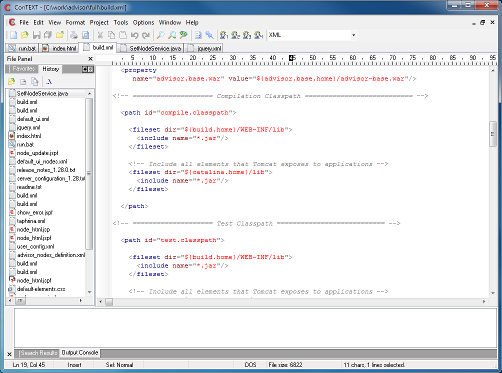
ConTEXT is a simple, powerful, open source text editor for Windows.

Screen shot of ConTEXT editor

ConTEXT is designed to make it easy to edit source code of various forms, such as program code, HTML or configuration files. Its main features are:

  • You can edit multiple files in multiple tabs.
  • It automatically maintains a manageable list of recently opened files, allowing you to jump in and out of a set of related files with ease. You can set bookmarks in files, to easily find your way around them.
  • It has features to help editing code, such as automatic indent, block indent and comment/uncomment.
  • It supports different editing options, such as what characters to use at the end of a line, or whether to use tabs or spaces for indents.
  • It has tools for common editing tasks, such as a compare tool and sort, which means you do not have to leave the tool to perform these.
  • It has configurable syntax highlighters, which give you many more visual clues to the code you are editing. Highlighters for many different types of code can be downloaded for free.

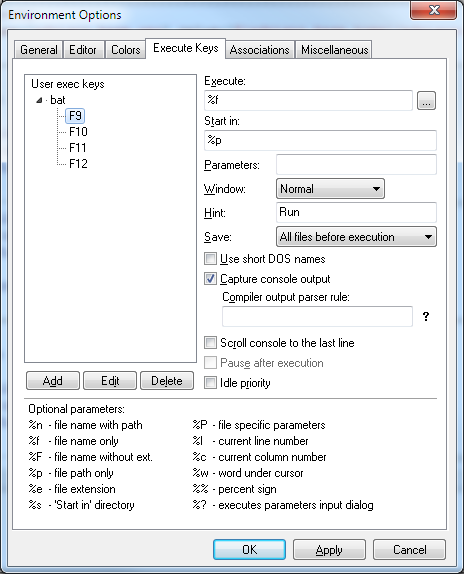
One of the most useful features of ConTEXT are the execute keys and user commands. These allow external programs to be executed when you press a key or one of the buttons on the toolbar.

Screen shot of ConTEXT options showing how to set up execute keys to run a batch file.

I use this with simple batch files to run all my compilations and test directly from ConTEXT.

What I really like about ConTEXT is that it is very simple indeed. If you have ever used any Windows program before, you will be able to use ConTEXT straight away. It has all the features you really need to edit code, but it is not bloated with a whole load of unnecessary stuff. It is a small, well-behaved executable with no particular setup requirements.

There are, of course, much more advanced integrated development environments (IDEs), which offer many more features, in addition to editing and basic tools. Many people find IDEs really useful. Personally, I have never found IDEs easy to work with รข€“ they are too hard to set up, there is too much to learn, and they hide what is really going on. ConTEXT does everything that I need, and for the past five years I have used it for the vast majority of my development work. But even if you do use an IDE, ConTEXT provides a very good secondary tool for occasional tasks that your IDE can not support so simply.

Choice of editor bring out strong feelings amongst programmers, and we can be fiercely loyal to the tools we use. If you are happy with the editors you use, then I am not trying to convert you to ConTEXT. However, if you have any involvement in software development of any kind, and you do not have a good general-purpose editor, then you really should get to know ConTEXT.

© Copyright 2010 Minimal IT Ltd. See the Minimal IT website for the original newsletter and copyright information.