Tuesday, 12 August 2014

Representing table structures in memory

The design challenges Metrici has faced with summary data are common to lots of systems, and the solution we have adopted could be used elsewhere.

Metrici holds data across multiple nodes and members, each of which is physically implemented as a separate row in the database. This is very versatile but can be slow to gather, process and display large volumes of data. This problem is not unique to Metrici - many systems need to manipulate data in summary form, rather than record-at-a-time.

We have tried lots of different approaches. We had one approach for displaying tables of data, one for holding evaluation scores from assessments, another for holding reporting data, one for creating charts, one for importing data, another for exporting data, and so on. We used both XML and JavaScript objects. Although each approach was a reasonable response to different aspects of design, the overall result was a muddle.

To overcome this, we standardised on a single way of representing summary data, and rebuilt components around this. Although not optimised for any single purpose, the ability to reuse the same components across the system has made everything much simpler.

The basic idea of the standard is to use JavaScript Object Notation (JSON) to represent summary data as tables. The structure of each table is very simple:
  • Each table is an object.
  • Each table has an array of column objects called "columns".
  • Each column has name, reference and type properties.
  • Each table has an array of row objects called "rows".
  • Each row object contains a set of fields.
  • The names of the fields match the references of the columns.
  • The values of the fields match the data types in the corresponding column.
  • Each table can have an options object to control processing.
The full standard is documented in the Metrici table structure documentation. As a simple example, the table:

NameSpecies
FidoDog
TiddlesCat
JawsGoldfish

Can be represented using the structure:

{
    "columns": [
        {
            "reference": "name"
            "name": "Name",
            "type": "text"
        },
        {
            "reference": "species",
            "name": "Species",
            "type": "text"
        }
    ],
    "rows": [
        {
            "name": "Fido",
            "species": "Dog"
        },
        {
            "name": "Tiddles",
            "species": "Cat"
        },
        {
            "name": "Jaws",
            "species": "Goldfish"
        }
    ]
}

The same structure is used throughout Metrici for different purposes. It is used to efficiently extract data from the triple store, including incrementally recalculating only those parts of a table that have changed. It is used for set-based operations such as filtering and data aggregation. It is used to display data as HTML tables, blocks of content, or lists. It is used to pass data to charting routines. It is used as an in-memory structure, but it is also written to and read from node members to persist tables in the database. It is particularly effective with Metrici's derivation processing, efficiently providing summarised data that is automatically kept up to date. It is very fast indeed.

The standard we have adopted for representing tables in memory has proved really useful in many different scenarios, and I would recommend it to anyone facing similar design problems. Over the next few weeks I will show in more detail how it is used in different parts of Metrici.

© Copyright 2014 Minimal IT Ltd. See the Minimal IT website for the original newsletter and copyright information.


Tuesday, 22 July 2014

Metadata redefinition 2: how?

Metadata redefinition is the basis for Metrici's versatility, productivity and simplicity. How does it work?

Metadata is data about data. Within Metrici, everything is a node, and the data and behaviour of a node is fully described in its node type and member types. Node types and member types are therefore the metadata within Metrici.

But it doesn't stop there. Node types and member types are themselves nodes. They are defined using other node types, which we call node type types and member type types, which are also nodes. You can think of node type types and member type types as the tools that you use within Metrici. Metadata redefinition involves creating node type types and member type types, or new tools, to make the development of solutions as simple as possible.

This approach streamlines simple requirements and makes it easier to build complicated solutions.

As an example of streamlining the simple, creating questions for questionnaires is simplified by using the Question member type type rather than the standard member type type. It uses more familiar terms like "text", "number" and "repeat", rather than "value", "scale" and "cardinality", and makes it easy to pick different formats without having to know about display properties.

To give a more complicated example, file handling member type types create components to manage the upload and display of images.

Sample Metrici Gallery

You can use the file handling member type types to create gallery components

Internally, these are complicated: you need to control where images are stored, you may need to downsize images and generate previews, and you may need to link the images to other nodes. The member type types encapsulate the processing and present it in more familiar terms. And because it is all just data, it is easy to use these tools to create the specific file handling components that your solution needs.

A handful of techniques are used to define and redefine metadata in Metrici. Derivation converts tool parameters into the underlying standard metadata or API calls. Member type types can use templates to specify prototypes that acts as a basis for member types. Extension scripts create additional content within the user interface.

What metadata redefinition delivers may seem similar to the features of other platforms, but there are two key differences that make it more versatile and simpler:
  • Metadata redefinition allows new tools to be created within the platform itself. The Metrici libraries provide a large number of types and tools that meet the needs of most solutions, but if your solution could benefit from a new sort of tool, you can extend the standard set of tools to provide the ideal environment for creating your solution.

  • Everything is data based. Small amounts of scripting are used to control processing, but these scripts are just part of the data, and types and tools can be used just as data without further programming.
What I really like about metadata redefinition is that it removes constraint. Metrici has a very versatile data model, but if we used any other approach, the versatility of the data would be compromised. As it is, we are only scratching the surface of what it can do.

© Copyright 2014 Minimal IT Ltd. See the Minimal IT website for the original newsletter and copyright information.
Tuesday, 15 July 2014

Metadata redefinition 1: what and why?

Metadata redefinition is the most powerful feature of Metrici. But what is it, and why is it useful?

Like a lot of systems, Metrici uses metadata, or "data about data". Metrici's use of metadata is very extensive. Entire solutions are developed simply by defining them in data, which means that you can create new solutions very quickly. But what really sets Metrici apart is that the metadata is itself defined by other metadata, and so the way of defining metadata can itself be redefined to exactly match the needs of the solution.

This may sound like gobbledegook, so let's explore it from a number of angles.

Whatever type of solution you are building, you need to work with appropriate paradigms and tools. If you are building a content management solution, you need to work with pages, images, taxonomies and content workflows. If you are building an assessment solution, you need to work with questions, questionnaires, assignments, responses and reports. By changing how you define solutions, Metrici lets you develop any solution using the most appropriate paradigms and tools. Metrici isn't a "one size fits all" approach, it supports multiple specialised approaches for different types of solution. It even lets you merge paradigms to create solutions that would be near impossible using traditional methods.

Another way of thinking about Metrici is as an evolution of how we build computer solutions.

A traditional computer solution has fixed functionality. To meet more requirements, more functionality is added, but this leads to bloat because most users only require a small proportion of the functionality. Even a bloated system does not meet all requirements, so solutions add user-definable data and functions and possibly an API. But these are still constrained within the original design of the solution, and require considerable skill to integrate. However you approach it, traditional computer solutions have constraints and tend to bloat, and you can only get out of this with complex programming effort.

Metrici solutions are not constrained. Because solutions are defined in metadata, and the metadata fits the concepts and requirements of the solution, it's much easier to extend the solution to meet additional requirements and to exclude functionality you don't need. Solutions developed in Metrici can achieve a high fit to requirements, without bloat, and without resorting to complex programming effort.

Metrici is similar to component or object-based development. It allows you to create encapsulated components that can be combined to build solutions. But Metrici has advantages over traditional component-based development. It supports many paradigms, and the solution does not have to be written in an object-oriented way or conform to a pre-defined object model. Because it is metadata-driven, you can create reusable components without complex programming. Because all components are just nodes, components from different sources can be combined seamlessly. And because the data and metadata are all maintained within the same tool, you do not need a separate set of tools and skills to achieve the benefits of component-based design.

The ability to define solutions in data, and redefine how those definitions are created and maintained, is the basis of Metrici's versatility, productivity and simplicity. Next week I will go through an example of how to do this.

© Copyright 2014 Minimal IT Ltd. See the Minimal IT website for the original newsletter and copyright information.
Tuesday, 8 July 2014

Display properties

Display properties control how data is presented and how the user interacts with it.

Last week we covered how to use Metrici to create and maintain any data structure. Although versatile, the structures we created were unrefined and difficult to use. We can fix this by setting display properties.

There are lots of different display properties, controlling different aspects of the display. Most properties apply to member types, but there are node type properties too.

For member types with values, there are properties to specify whether values are single line, plain text, or text with HTML markup. You can set CSS classes which switch on an editor for text, or a date picker for dates.

Interlinked nodes are used for many purposes in Metrici, and so there are lots of properties to control link targets. By setting a list of possible targets on the member type, you can present targets as a drop-down list, radio buttons or check boxes. You can switch on mobile-friendly large buttons. You can change what caption is shown when no target is selected. You can control whether descriptions are shown next to targets, and whether hyperlinks are shown.

Layout properties modify ordering. You can modify the order in which the value, scale and target are presented, and what they are called. You can sort members, and you can sort targets in a target list.

You can control whether a member type is shown in browse mode, in edit mode, or when there is no data. You can add sequence numbers, for example to number questions on a questionnaire, or switch off headings.

You can set additional text to be shown in edit mode, before the input fields, before the value, scale and target, and at the end. This is useful for giving instructions or asking questions.

You can use properties to add CSS classes to member types, and there are properties to add style statements to further control appearance.

On node types, you can control which buttons to show, for example whether to show the Apply button, and what to call the Save button.

Look in the Metrici Development Guide for a full list of display properties.

To try properties out, have a play with the types you created last week. You will see that the node types and member types have a Display Properties tab, where you can select properties from a drop-down list and enter values. You can get an idea of what's possible by using a node type that we use to test different member type options. In a suitable package, create a new node using type metrici.library.MemberTypeGallery.MemberTypeGalleryType. See how the different member types appear and behave as you edit them.

Adding display properties to member types and node types makes them easier to use, but it adds to the complexity of setting them up. I find it hard to remember what all the display properties do, and I have to constantly remind myself by looking at the documentation.

We can make things much simpler by using the most powerful feature of Metrici, metadata redefinition, which I will cover next week.

© Copyright 2014 Minimal IT Ltd. See the Minimal IT website for the original newsletter and copyright information.
Wednesday, 2 July 2014

Node types and member types

Metrici node types and member types allow you to define any data structure.

In last week's newsletter we covered how Metrici stores member data. This week is a practical session on how to configure Metrici to do this.

You can follow the examples yourself. If you have an account, sign in. If you haven't got an account, sign up for free. Or, if you prefer, watch the video.

Step 1 - Create a package

Packages provide a place to hold nodes.

From your home page, click on the New button, and then select Package on the New menu. Call the new package Types Example. Click on Save, then click on Types Example to open the package.

Step 2 - Create a node type

Node types define the data that nodes hold by listing member types that the node should use.

Inside Types Example, click on New, and select Type.

Call your type Example Type. We can use built-in member types to start with. In the Member Type List, enter system.NODE_NAME in the Member Type column, and click on Apply. This will open up a new row. Enter system.NODE_DESCRIPTION, apply, and then system.NODE_LIST. Save to return to the package.

Step 3 - Use your node type

You can use the node type you have just created to create your own nodes. Copy the web address of the node type, and then navigate back to the Types Example package. Click on New, and paste the address of your type into the box at the bottom of the New dialog.

This will create a new node based on your node type.

Give your new node a name and a description. In the node list, link to other nodes by entering their references (like system.NODE_NAME) or pasting in their page addresses (like https://www.metrici.com/system/NODE_DESCRIPTION). Use Sequence to reorder the list. Save your node when you are finished.

Step 4 - Create your own member types

Go back to the Types Example package, and use New to create a new Member Type.

Call the member type Full Member Type. On the Basic tab, set Use Value and Use Scale to True. Click on the Target tab and set Use Target and Allow Other Targets to True. Click on Save.

Go back to your type, and click on Edit at the top of the page. Add your new member type to the member type list (it should be in the drop-down list) and Save. Find the node you created in Step 3 and edit it. You should have a new member type that lets you enter values, scales and targets.

Now create a member type called Text Member Type that has Use Value set to True and a Maximum Cardinality of 1, and add it to your type. It just produces a text box.

You can repeat this as much as you need, creating new member types with different storage models and adding them to node types. By using targets to link between nodes you can create any data structure.

But there is a problem. Although it is very flexible, the nodes you create can be ugly and difficult to use. Next week we will cover display properties which let you control the appearance and behaviour of your types and member types.

© Copyright 2014 Minimal IT Ltd. See the Minimal IT website for the original newsletter and copyright information.
Tuesday, 24 June 2014

Member storage model

Metrici has a versatile storage model based more on pragmatism and experience than on data theory.

In How Metrici is structured we covered the internal structure of Metrici. Over the next few weeks we are going to look at this in more detail and cover how to define new types of data.

To recap, in Metrici:
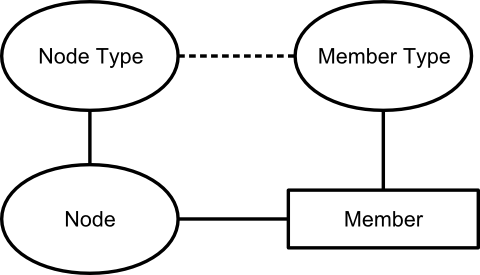
  • Everything is a node.
  • Nodes' data is stored in members.
  • Each node is defined by another node, its node type.
  • Each member is defined by a node, the member type.
  • Node types list the member types that should be used for a node.
Node, Member, Node Type and Member Type

This week we are going to look at the storage of data in members.

Each member can hold three pieces of data:
  • A piece of text, known as the "value".
  • A number, known as the "scale".
  • A link to a node, known as the "target".
Members with the same member type can repeat. The member type defines a minimum and maximum cardinality (number of repeats), though in 99.9% of cases we either set a maximum cardinality of 1 (no repeat) or unlimited. Members are inherently ordered.

You can therefore think of the members with the same member type as a table:
Value Scale Target
Member 1 value Member 1 scale Member 1 target
Member 2 value Member 2 scale Member 2 target
... etc ... etc ... etc
By varying which of the value, scale and target are used, and whether the members repeat, this structure can be used to hold pretty much any data. Here are some examples:

My name:
Value
Andrew

The country I live in:
Target
United Kingdom

The cost and currency of the printer I just bought:
ScaleTarget
162.00GBP

Latest results from the lottery:
Scale
5
15
25
38
49

Prioritised emergency call-out list:
Target
Superman
Ironman
Spiderman
Mario
Mr Bean

Grades and scores for assessing swimming pool water quality:
Scale Target
0 Brown and smelly
25 Green and cloudy
60 Mostly clear, some debris
100 Clear and sparkling

Notice how "things" like country, currency, superhero and water quality are all implemented as links to other nodes, not as names or references as they might be in a conventional database.

There is no theoretical basis for this storage model. We came up with the model by analysing the data structures within version 1 of Metrici (when it was just an assessment tool), and trying to come up with a model that would fit all of our data needs as efficiently as possible. Our subsequent experience has shown that this is a very versatile way of storing data, and copes easily with 99% of data requirements. It works well for structured data in databases and for less structured web content. It achieves some of the "attribute on link" capabilities of, for example, the associative model of data, without a significant increase in complexity. In comparison to a conventional triple store, it removes the need for a lot of link nodes that just exist to define the relationship between other nodes. It maps easily onto a conventional database.

Armed with this knowledge of the member storage model, next week we will cover how to define member types and node types to store any type of data.

© Copyright 2014 Minimal IT Ltd. See the Minimal IT website for the original newsletter and copyright information.
Tuesday, 10 June 2014

Metrici derivation

Metrici's data derivation makes it easy to build complicated processing and increases performance by orders of magnitude.

We have covered Metrici concepts, web pages, and building websites using the Metrici MiniSite app. Now its time for something more technical.

Within Metrici, the term "derivation" is used to mean the automatic recalculation of data. It is a fundamental concept used by all Metrici components and solutions.

When we were designing Metrici, we knew that a triple store would be very versatile. But we knew that versatility would come at a cost. A triple store can involve a large number of data accesses and be horribly slow.

To overcome this problem, we came up with a simple solution: have two triple stores.

The first store contains the data originally entered by the user. The second store, the derived data, contains the original data plus calculated data, and is used for read operations. In our final design, we merged these two stores into one store, called "node members", with a flag on each member to indicate whether it is original or derived.

Calculating derived data is simple. The starting point is to copy all the original data for a node to the derived data. After this, other processes perform additional calculations.

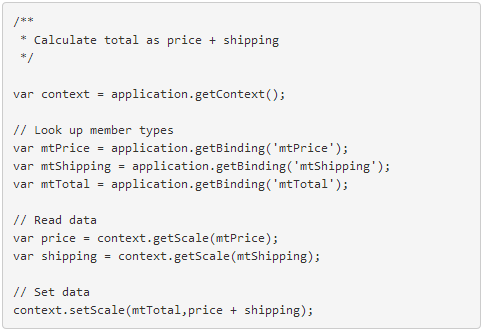
The calculations are defined on the node type's member types (see How Metrici is structured), and are written in JavaScript that runs on the server (see Metrici scripting). The simple example below shows the calculation of one number based on the value of two others. If you want a complicated example, see how quick links are resolved in the page type.

Example of Metrici derivation script

Timing of derivation is important. Nodes are marked as out of date whenever they are changed. When a node is subsequently accessed, derivation is performed if it is out of date. This means that update processing is fast (there is no need to recalculate data between updates), and repeated read processing is fast (calculated data is stored between reads).

Derivation may access linked nodes. Before a node is derived, all out-of-date nodes to which it links are derived. Conversely, when a node is changed, not only is it set out of date, but all nodes which link to it are also set out of date. By managing these dependencies, Metrici always returns a completely up-to-date view of data.

Metrici contains further optimisations. There is a process that performs derivation in the background so that data can be recalculated in advance of being needed. There are settings to control which nodes are set out of date when a node changes, and whether nodes can be accessed in their out-of-date or "stale" state.

Inheritance is a special case of derivation. Inheritance copies members from another node as part of the derivation process. When applied to node types, this provides something similar to class-based inheritance in object-oriented system. It can also be applied in a less structured way. For example, you could use it to the styles across all the pages in a website.

Derivation in Metrici is very powerful and efficient. It allows complicated processing, such as calculating and formatting a report, to be broken down to a series of steps which are automatically rerun when data changes. It allows Metrici to exploit the versatility of triple stores without a performance penalty.

© Copyright 2014 Minimal IT Ltd. See the Minimal IT website for the original newsletter and copyright information.
Tuesday, 3 June 2014

Metrici MiniSite

Metrici MiniSite makes it easy to create websites in Metrici and gives you complete control over who can update and read them.

Over the past couple of newsletters we have covered how to build a simple website in Metrici, including setting up permissions to share your stuff with a defined group of colleagues or publish it more widely.

Metrici MiniSite is an application written in Metrici that makes it easier to create websites.

You can use Metrici MiniSite for free. Sign in or register at www.metrici.com. Then, from the Metrici Store, select Metrici MiniSite.

After you have installed MiniSite, you will be taken to the main page for your site. This is just a normal page, like we covered in Building websites in Metrici. (We have made a couple of improvement since then, to make it easier to create pages, and to include content from other pages.)

Installing MiniSite also creates a Settings area, which you can see when you click on Home. Inside this area is a settings area for each MiniSite you create, and inside that are two important components, the site manager and the permission manager, as well as a link to the MiniSite reference guide.

The site manager gives you a view of your entire site, with sorting and filtering to help you find particular pages. It lets you create, amend and delete pages, and upload images and other files. It also lets you mark which pages you want to make public.

As the name suggests, the permission manager manages permissions on your site. It works by scanning through your site and setting permissions based on rules and roles. The rules are driven by tags which are attached to pages and, in this case, indicate whether to make the page public. (Tags are used widely in Metrici for a variety of purposes.)

For MiniSite, we have configured the permission manager to support four roles. There are roles to administer, update and read all of the pages on the site. There is also a public role to read pages that you have marked as public. You can reconfigure the permission manager to support other rules and roles if you need.

We are not trying to pretend that Metrici MiniSite is a serious competitor to WordPress, Dreamweaver, GoDaddy, 1and1, and the like. But it does meet a need for quick and simple websites with good security and which can be extended to include any content or functionality. You are welcome to use it for free. (See Metrici pricing for details.)

MiniSite and all its components are built in Metrici itself. We have not used any extra software or needed any special permissions to build MiniSite. You can extend MiniSite as you need. You could develop an alternative website creation and management tool, and make it available for others to use. Like everything else in Metrici, it is all just an arrangement of interlinked nodes. Starting next newsletter, we will take a look in a bit more detail at how we build applications like this in Metrici.

© Copyright 2014 Minimal IT Ltd. See the Minimal IT website for the original newsletter and copyright information.
Tuesday, 20 May 2014

Sharing your stuff

On the web, it's very easy to share stuff. What's harder is to keep your stuff private, and to only share it with the people you want.

We've taken this to heart at Metrici and built in strong controls on who can access what. The controls are based on a simple principle: everything you create is private until you say otherwise. For example, if you create a website in Metrici, nobody other that you can see the pages until you grant them access.

For a quick overview, look at content sharing in Metrici.

If you want to share your stuff, you need to think about users, permissions and user groups.

Users

When you create an account, a main account user is created. You can create additional users, with their own user ids and passwords, and grant them access to your nodes.

To create additional users, click on the More menu at the top of the page and select the Admin link. This will take you to an admin page, which has sections "About me", "Account administration" and "Systems administration". (Do try out the cool change theme option.)

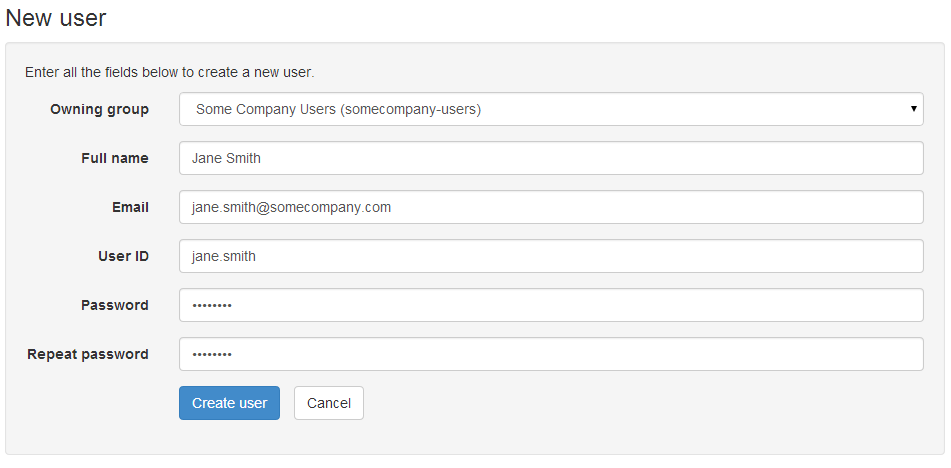
To create a new user, click on the Users icon and then the New user button. Leave the owning group to default, and fill in the details. Make a note of the password. Metrici stores passwords using strong, one-way encryption, so you can't retrieve a password after it has been set. (This also means there's no way that passwords can be "hacked" from Metrici.)

Creating a new user

When you click on Create user, you'll be taken back to the user details page. This has all the options you need to manage the user. You can get back to the details page for a user using the Search option on the Users page.

Permissions

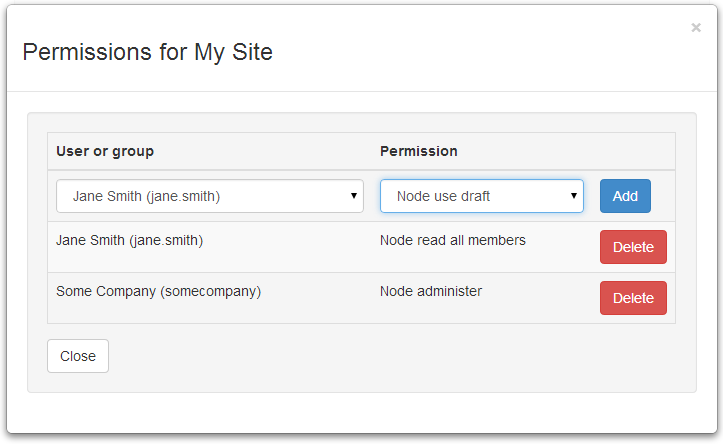
When you have set up your new user, click on Home and navigate back to the node you want to give the user access to. Click on the More menu, and then Manage permissions. This lets you add permissions for individual users.

Adding permissions

Metrici supports many different types of permission. You can read about all of them in the Permissions section of the Metrici development guide. To give someone read access to a node, you need to grant them:
  • Node read all members which means they can read all the data about the node.
  • Node use draft which means they can use the node in its draft state (this is to do with version control, which we will cover in a later newsletter).
You can use package-level permissions to set permissions across all the nodes in a package. These are like the node-level permissions, but start with "Package". So you can grant Package read all members and Package use draft to let someone read all the pages within a package. Package permissions only set permissions on the nodes directly contained by the package; you will need to grant node-level permissions if you want other people to read the package itself, and further package-level permissions for sub packages.

The principle of everything being private applies to people as well as data. You can't grant access to simply anyone, you can only grant access to people that you are authorised to grant access to.

There's a good reason for this restriction. Most of the time you don't want to make things public. You want to limit access to a group of people or, at most, all the people in your organisation. Within Metrici, you are only authorised to grant access to people in the same account. You can't be tricked into granting other people access; fundamentally the information stays in the organisation.

User groups

To make permissions easier to manage, you can group users into user groups, and then grant permissions to the user groups.

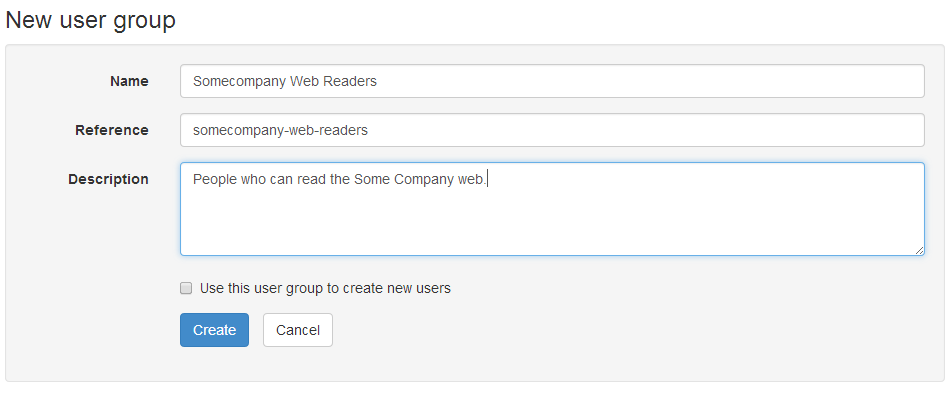
To create a user group, go to the Admin page and then User groups, and click on New user group. Give the new user group a reference and name, and optionally a description.

Creating a new user group

The Use this user group to create new users option lets you create a different sort of user group that you can put new users into, known as an owning user group. This is used when you need different categories of users that you want to keep separate from others. Leave this box blank for now.

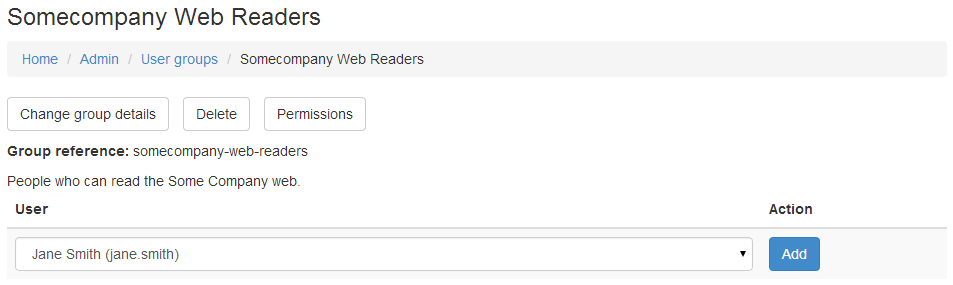
Once you have created the user group, you can select users to add to the group. You can return to the user group details page later to add and remove users, to change the group details, or delete the group.

Adding people to a user group

You can use your new group on the permissions page to grant access to all the people in the group. As you add and remove people from the group, their permissions will change.

Sharing with everyone

When you account is created, an account user group is created, called "accountname Users". Granting permission to this group means that everyone in your account gets access. Also, everyone in the account user group is authorised to grant to everyone else in the account user group, which is what allows people in the same account to grant to each other.

Granting permissions to the special user Anonymous lets anyone read the nodes, even people from other accounts or when nobody is signed in. You need to use Anonymous access with care, but it does have additional safeguards. The most significant of these is that you can only grant read access to Anonymous. If you grant a higher privilege, such as update or administer, then other people will only get read access.

We have covered setting up web pages and permissions by hand. Next newsletter I will introduce the MiniSite app which sets up a site and associated permissions for you, including a Permission Manager component which lets you define permission rules and roles across a package structure, and then attach users and groups to the roles.

© Copyright 2014 Minimal IT Ltd. See the Minimal IT website for the original newsletter and copyright information.
Tuesday, 13 May 2014

Building websites in Metrici

You can build sophisticated websites in Metrici, but you also build simple websites very quickly and easily.

If you are anything like me, you are probably a bit suspicious of claims that you can build websites in Metrici.

Surely the world doesn't need yet another website building tool? Why use Metrici when there are so many other products?

Well, Metrici is not trying to compete with WordPress, Dreamweaver, GoDaddy, 1and1, and the like. You could build and publish large, beautiful websites in Metrici, but most organisations have skills and investment in other tools which would be hard to change.

Metrici is trying to address different requirements. We're trying to meet the needs for websites when any or all of the following apply:
  • Simple, cheap and very quick.
  • Easy to update, either by you or by others.
  • Secure, limiting access to just your colleagues, or a mixture of public and private content.
  • Combine web content with structured data from databases or other applications.
  • Uncertain requirements, so you need something flexible that you can enhance later, or even take your content out of if you need to.
Over the next couple of newsletter I will cover how Metrici supports websites. I will cover how to build a website from first principles. I will also introduce our MiniSite app, which lets you create and publish a website in just a few minutes.

To start with, I want to cover how Metrici supports web pages. Within Metrici, any node can be shown as a web page, but the page node type is designed to make it easy to create and modify web content.

Pages use a WYSIWYG editor, just like a word processor. There are all the formatting options you would expect, and an option to edit the underlying HTML if you need.

Pages support "quick links". Quick links are like the links in Wiki software, using names or references in double square brackets. So if you want to link to the "Refreshments Rota" page, you just type [[Refreshments Rota]], and the quick links feature will create a link. See page type for documentation.

Pages can have attachments. Attachments are files of any type that you can reference for download from the page using the quick links feature. You can show attached pictures by prefixing the name with "img". For example [[img:Jerry Green]] will show the picture of Jerry Green.

Click on the More menu at the top of each page for options to create, modify, copy, move and delete pages.

And that's all there is to it. I could go on about advanced features, but that would be missing the point. The real advantage of Metrici is that you can start creating web pages and linking them together in just a few minutes, and grow from there. To see for yourself, follow our getting started guides to create a free account and a simple web page.

Having shown how easy it is to create the content of the website, next week I will cover permissions and how to share your content with your colleagues, friends, or the world.

© Copyright 2014 Minimal IT Ltd. See the Minimal IT website for the original newsletter and copyright information.
Tuesday, 6 May 2014

Packages

Nodes, members, node types and member types make Metrici very versatile and let it hold any data. Metrici also has a hierarchical structure to make it even more flexible.

Nodes are arranged in a hierarchy similar to the hierarchy of directories and files on your PC. Nodes are arranged in packages in the same way that files are arranged in directories. Nodes have dot-delimited references in the same way that files have slash-delimited file names.

Packages are themselves just nodes. Most packages act like directories and list the nodes within them. However, unlike a file system where directories are different from regular files, packages can be any sort of node, and any node can act as a package.

Packages allow nodes to be grouped meaningfully. It allows data for different purposes to be put in different places, much like you would arrange directories and files on a PC.

Packages make it easy to separate data according to ownership and permissions. All the nodes in your account are in the same high-level package. Within an account, you can use packages to grant different people different access to different groups of nodes.

Using a hierarchical reference helps avoid name clashes, the "dll hell" that used to be so much of a problem on PCs. For example, you might have a node type for contact, as we did in the example web app. But because it has a full reference (such as somecompany.ContactsApp.Contact), there's no danger that you will pick up another contact node type by mistake.

By changing the dots in the reference to slashes, every node can be accessed at a unique web address. For example, the node with reference metrici.documentation.GettingStarted is available at web address http://www.metrici.com/metrici/documentation/GettingStarted. Metrici is a not a "web enabled" solution, it is fundamentally designed to be delivered on the web.

As well as imposing order on the data, using packages lets Metrici act as a table-based database, as in the first web app example. But unlike a relational database which holds everybody's data in one big table, packages allow you to split data down by ownership if that is what you need.

Splitting data into packages make processing simpler. It reduces the number triple store links that must be set up by hand, though links can be set up automatically using indexes where required. It provides a basis for processing groups of related nodes, such as reporting, export and import.

The hierarchical structure of Metrici is more than just a way of giving nodes unique references. It allows Metrici to extend the versatile triple store to deliver structures that act in much the same way as database tables and as file systems, and, as we covered last week, the structure of nodes and members is equivalent to an object-oriented system. Metrici does not map nodes to objects, tables and web pages; the fundamental design of Metrici means that nodes can be structured and accessed in any of these ways. This allows Metrici solutions to combine a variety of data storage and structuring paradigms – object, triple store, data table and file – rather than being constrained to choose one or another, while maintaining a simple, consistent structure throughout.

© Copyright 2014 Minimal IT Ltd. See the Minimal IT website for the original newsletter and copyright information.
Tuesday, 29 April 2014

How Metrici is structured

Everything in Metrici is built on a simple, self-defining structure.

Last week I showed how to create a simple web app in Metrici. If you haven't already, do have a look at the your first web app video. This week I will cover how Metrici is structured. You might like to check out the short video on the node store which supports this newsletter.

Node, Member, Node Type and Member Type

Metrici is structured around a small number of concepts:
  • Nodes
  • Members
  • Node types
  • Member types
Nodes are the basic unit of data within Metrici. They are equivalent to objects in an object-oriented system. Everything is represented as nodes: data such as people and places, web pages, images, and so on.
Information about the node is held in members. Each piece of information is held as a separate member. For example, the "London" node could have one member to indicate that its name is "London" and another member to indicate that its population is 13,000,000.

Members are the triples that we covered a couple of weeks ago. Each member identifies its owning node (subject), what type of member it is (predicate), and its content (object). The content can be any combination of text, number or a link to another node. Members of the same type can repeat to create lists.

Different nodes have different members. Each node links to a node type which lists the types of members that the node can use. The node type for "London" might be "Place", with allows "Name" and "Population" members.

Each member type defines which of text, number and link are allowed, and whether members repeat. For example, the "Name" member type uses just text and does not repeat; "Population" uses just a number.
Node types and member types are themselves nodes. The list of member types that node type allows is held a list of members which link to member types. A member type has members which indicate which of the text, number and link are allowed, and whether the members can repeat.

Because they are just nodes, node types and member types have types themselves. There are type types that define types, and member type types that define member types.

This same structure is used for all data within Metrici. There are additional members on node types and member types to control how data is displayed, and members that hold scripts to perform calculations and to provide additional formatting. But all of this is held in same structure.

You can examine the structure of nodes from within Metrici. If you haven't already done so, register at www.metrici.com. When you are signed in, use the More link at the top of any page to pull down a menu panel. This has a link to the node's node type. Click on this to see the definition of the node type. The node type will list the member types. Click on these to see the definition of the member types. If you keep going, you'll find that all links eventually end at the same Type node, which defines itself and forms the basis of everything in Metrici.

© Copyright 2014 Minimal IT Ltd. See the Minimal IT website for the original newsletter and copyright information.
Tuesday, 15 April 2014

Your first web app

With a unified approach, creating a web app is as easy as creating a web page.

This week I want to cover how to create a simple web app with Metrici. Although its an overworked example, I am going to create a contacts database app.

This is a hands-on guide. If you haven't already registered, look at the getting started instructions to register and create a simple web page.

Follow the steps below to create the contacts app. If you want to see a demo first, look at the Your first web app video.

1. Somewhere for the app

Sign in and click on Home to go to your home page. Use the New button, and select Package.
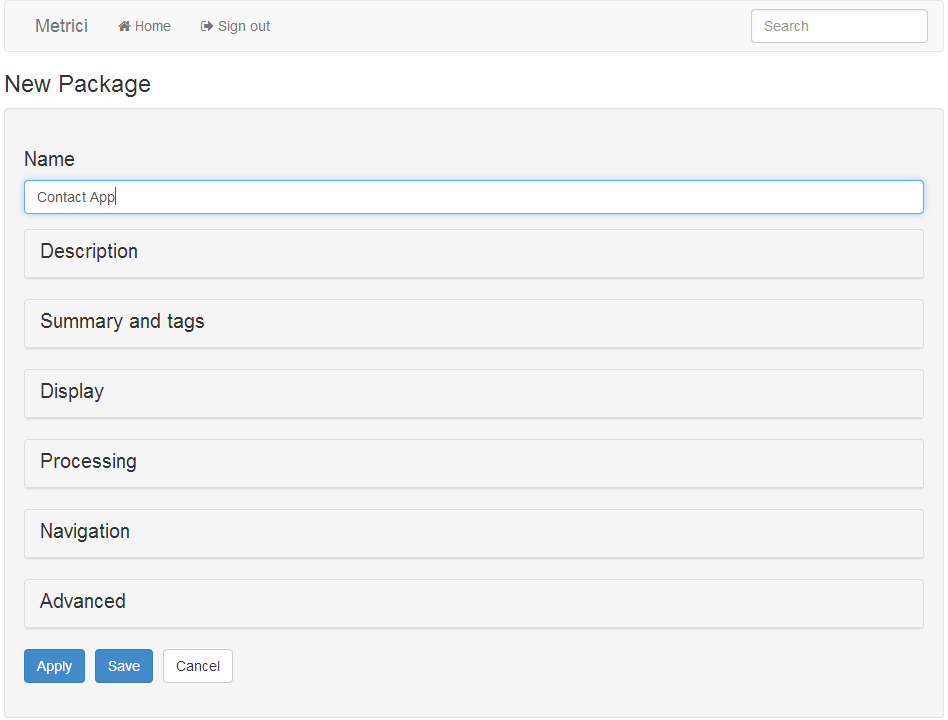
Selecting a new package in Metrici
Creating a new package in Metrici
Call your new package Contact App and click on Save at the bottom of the page.
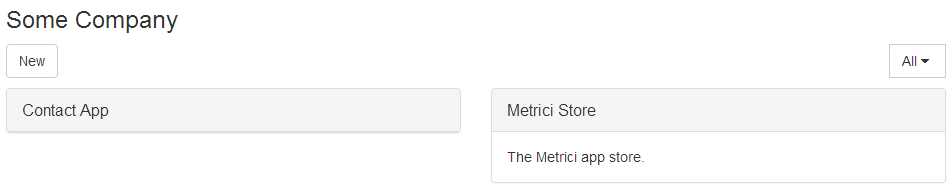
Metrici home page with a new package
When you are back at the home page, click on the Contact App box to take you to the Contacts application area.

2. Data types

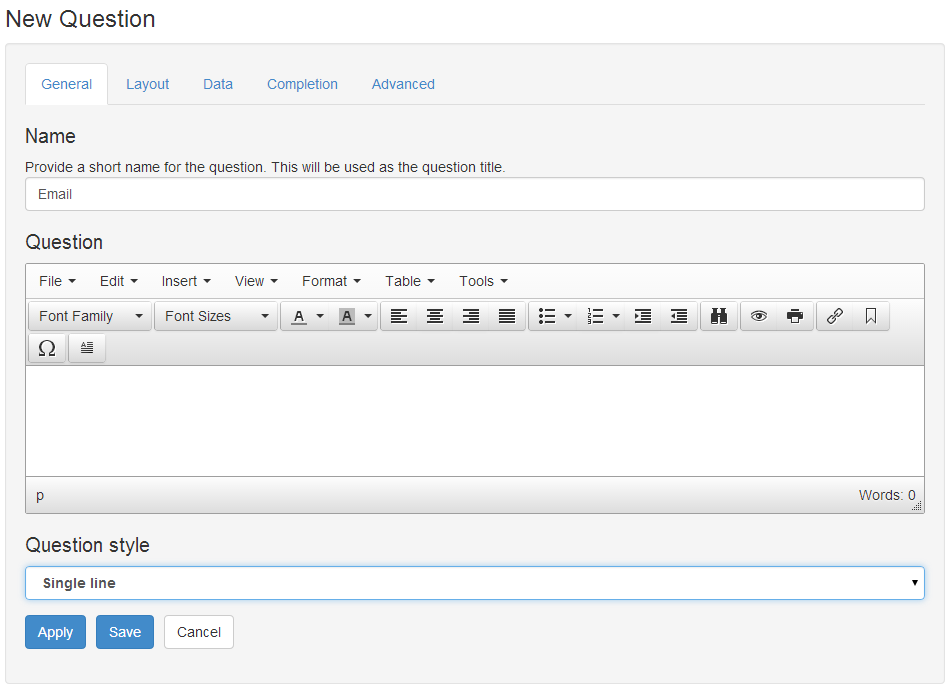
When you are inside the Contact App, click on New, and this time select Question. In the Name field, enter Email, and in the Question style drop-down, select Single line. Click on Save to save the question.
Creating a new question in Metrici
Create another one just the same, this time called Phone.

3. Node type

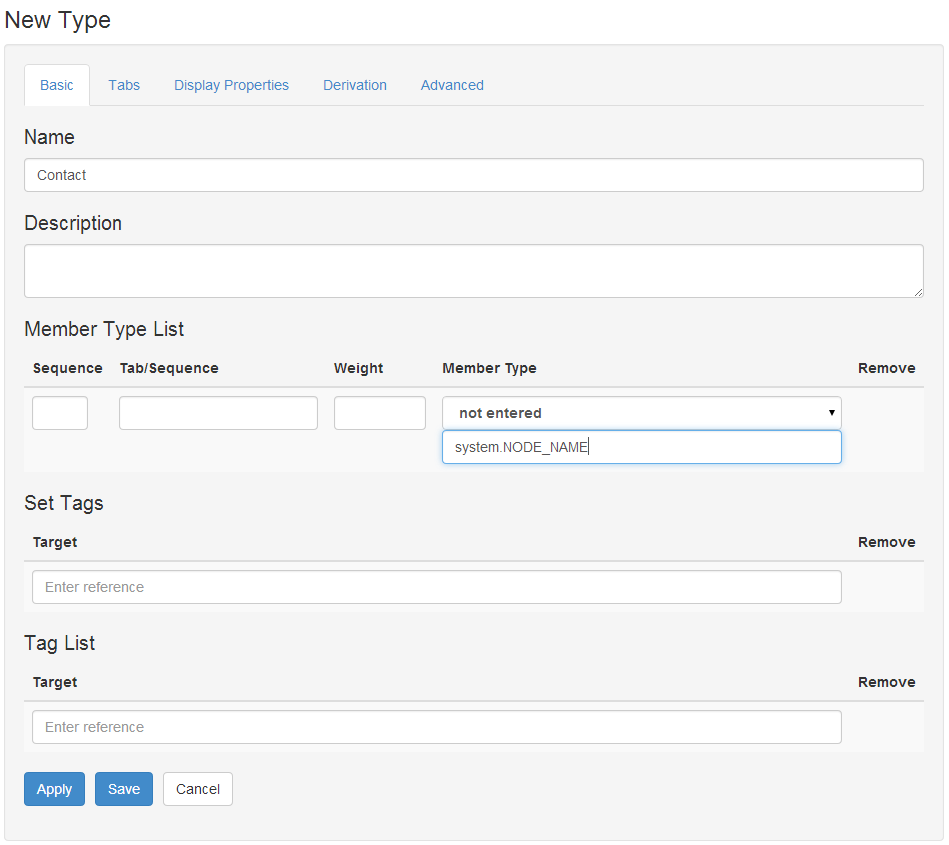
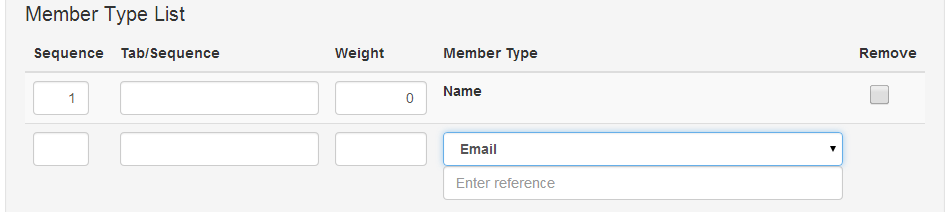
From inside Contact App, click on New, and this time select Type. Give it a name of Contact, and in the Member Type List, type in system.NODE_NAME as a Member Type.
Creating a new node type in Metrici
Click on Apply at the bottom of the page. This will open up another space in the Member Type List. This time select Email from the drop-down list under Member Type, and click on Apply again.
Adding a further member type to a node type in Metrici
Finally, select Phone from the drop-down list, and click on Save.

4. Somewhere for the data

Click on Home to go back to your home page. Create a new package, just like in step 1, but this time call it My Contacts.

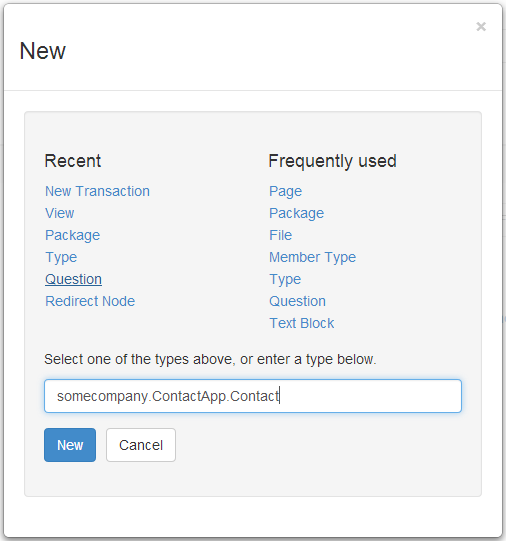
Click on My Contacts to go into the My Contacts area. Click on New, and in the box at the bottom, enter youraccount.ContactApp.Contact, where youraccount is your account reference/user identifier, and click on New.
Selecting a node type by reference in Metrici
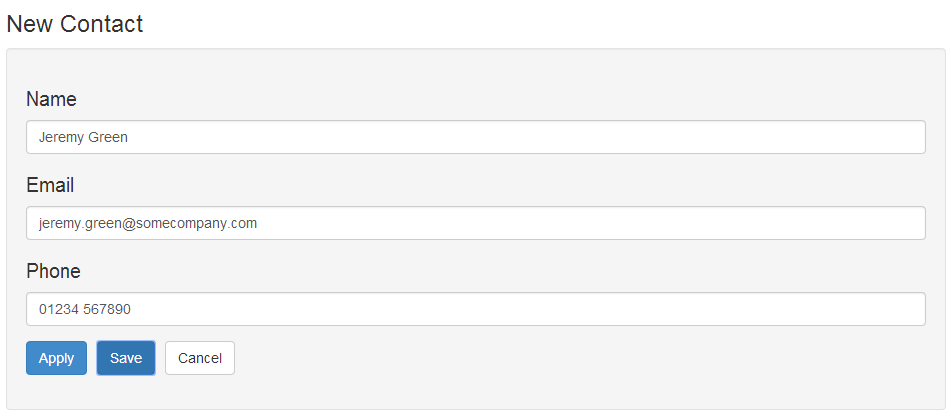
Fill in details, and click on Save.
Creating a new contact in Metrici
When you click on Save, your new contact will be shown.
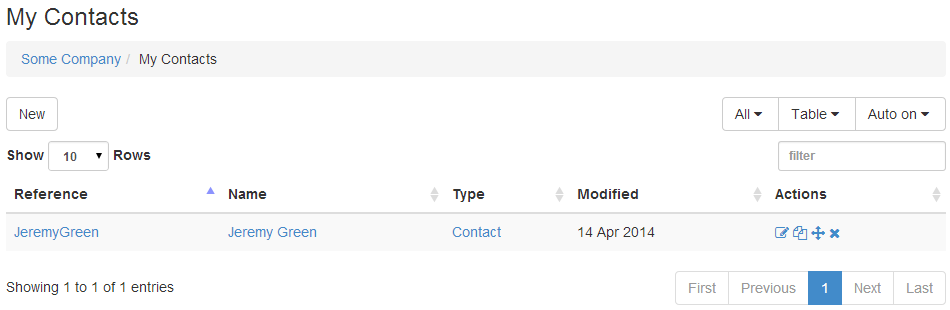
Metrici default table view showing a new contact

5. Define view

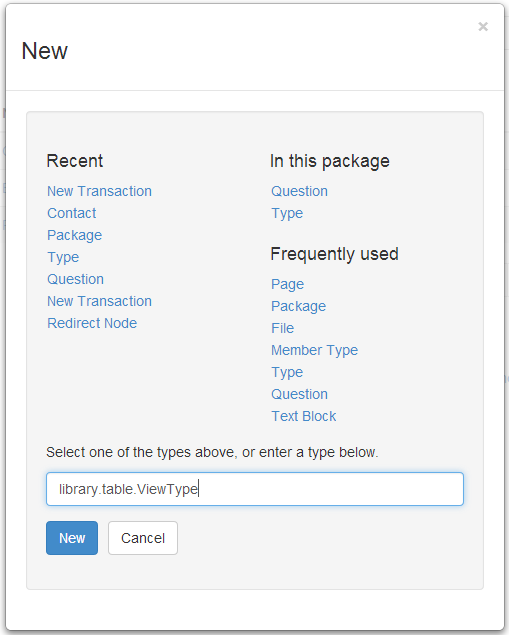
It would be nice if the table showed all the contact details. Click on Home and then Contact App. Use the New button and enter library.table.ViewType in the box at the bottom, and click on New.
Selecting the View node type by reference in Metrici
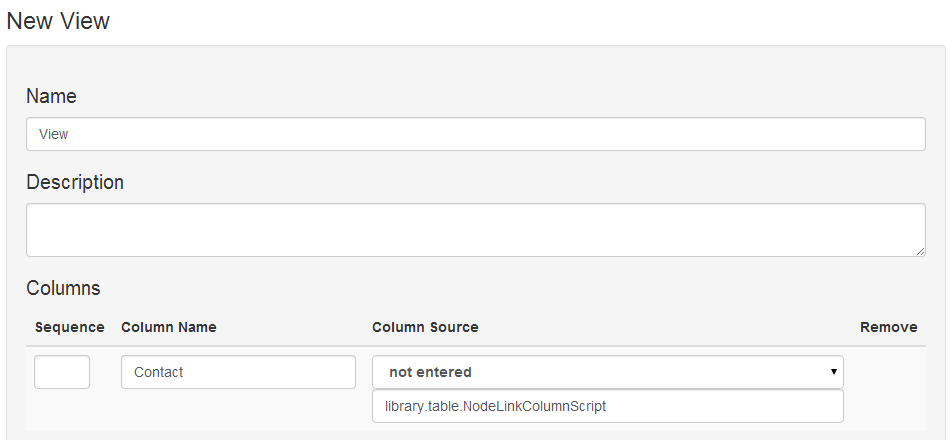
In the Name field, enter View. In the Columns section, enter a Column Name of Contact and in the Column Source enter library.table.NodeLinkColumnScript.
Adding the Node Link Column Script to a view to provide a link called Contacts to the nodes in the table
Click on Apply to show a new column. On the new column, leave Column Name blank and select Email in the drop down list. Click on Apply again and select Phone. Then click on Save.

6. Use view

Click on the Home button to go back to the home page, and then click on the My Contacts link to go to your contacts data area.

Click on Edit at the top of the page, and then click on the Display section. In the View Selection, enter youraccount.ContactApp.View under View family or view.

Setting the view to use on a Metrici package
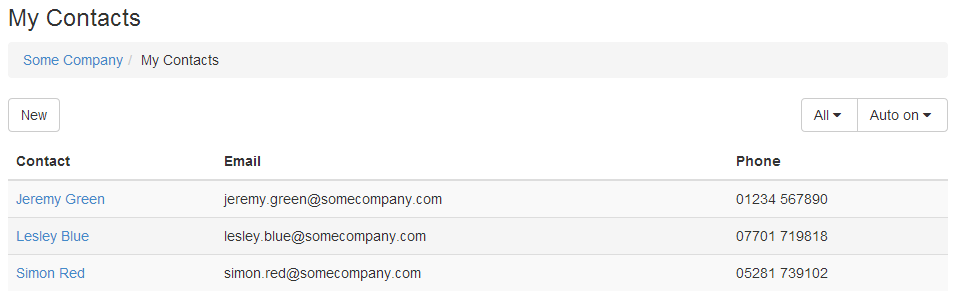
Click on Save, and you should now see a table of your contacts. Now when you use the New button, you will see Contact listed under In this package. You can add more contacts.

Table of contacts with a custom view
In just a few minutes, you have built a web app in Metrici. In a few more minutes you could share your contacts database with your colleagues, or package your app for others to use.

This is a very simple app. Applications can have any data types and any structures, not just one simple table. You can add more features, styling and processing rules. You can use high-level building blocks, not just packages, questions, types and views, to create more advanced apps.

Next week I will explain a how Metrici is structured and how the pieces you've used fit together.

© Copyright 2014 Minimal IT Ltd. See the Minimal IT website for the original newsletter and copyright information.
Tuesday, 8 April 2014

What cats can do

The idea of a unified approach is not marketing fluff, but reflects underlying IT architecture.

Why is a finance system a finance system? Why is a web content management system (CMS) a CMS? And why is a cat?

The simple answer is that the finance system is what it is because it was designed that way, and the same applies to the CMS. They are intended for different jobs and are programmed differently.

Although that's true, let's put the question another way. Why can't a finance system manage web content, and why can't a CMS manage money? And what has that got to do with cats?

You can't reprogram a finance system to be a CMS, or vice versa. The underlying data structures are different. A finance system is built on ledgers and transactions, and can not hold web content. A CMS is built on web content, templates and structures, and can not hold ledgers. The data structures of a system constrain what that system is capable of doing.

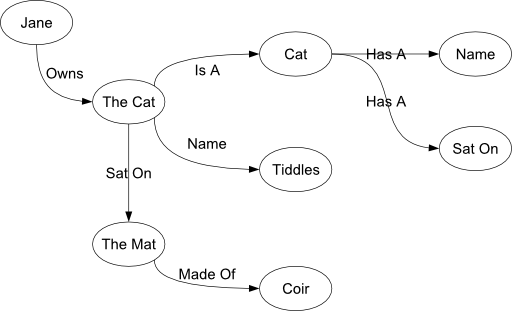
A truly versatile "do anything" system needs to be based on data structures that do not have constraints. There is a well-known approach to this: triple stores. A triple store breaks data down into triples: a subject, a predicate and an object. For example, "the cat sat on the mat" is a triple, in which "the cat" is the subject, "sat on" is the predicate, and "the mat" is the object.

Triple stores can be represented graphically, where the subjects and objects are represented by blobs called nodes, and the predicates by lines.

Triple store definition of Jane's cat tiddles sat on the coir mat

Jane's cat Tiddles sat on the coir mat

The beauty of triple stores is that you can use them to represent any structure: tables, lists, hierarchies, ledgers, web content, cats, and so on.

Triple stores are a well-established technology. But having a versatile data structure is only part of the story. To make Metrici truly versatile, we needed three more ingredients.

The first ingredient is to optimise the triple store. In particular, Metrici automatically calculates and stores derived views of data to improve performance dramatically.

The second ingredient is to describe the triple store in itself. We don't just capture that the cat sat on the mat, we describe what cats can do (sit on things), what properties mats have, and so on. This imposes structure on the triple store and stops it getting chaotic.

The last ingredient is a general-purpose engine that uses the description of the store to view and maintain the store online. This engine provides the basic capability for any solution. And because the store is described in itself, the same engine can be used to develop solutions.

This approach gives us a system which can hold data for any purpose, which can be structured in any way, which can be viewed and maintained online, and which can be created and maintained in itself. This provides the fundamental unification which makes Metrici a much simpler, yet much more powerful environment.

Next week I will cover how to write your own web application in Metrici in less then ten minutes. In the meantime, check out the one minute summary of Metrici's approach to data management.

© Copyright 2014 Minimal IT Ltd. See the Minimal IT website for the original newsletter and copyright information.
Tuesday, 1 April 2014

Reunification


For such a young subject, IT is disproportionately haunted by its history.

The first stored program computers came out in the late 1940s. They were very primitive by modern standards but they had one important characteristic that has been lost from later computers. Although the inputs, outputs and programs that they ran were near-unintelligible machine code, they were all in the same unintelligible machine code. They were saved to paper tape in the same way; they shared the same tools and skills.

Since those early days, computers have grown hugely more capable. But as each new capability has come along, from symbolic assemblers onwards, IT has grown more fragmented. In the effort to make things more efficient and easier to use we have divided IT into more and more parts.

In a modern IT architecture, you're likely to have a database management system, file servers, web servers, a content management system, application execution environments, browser-based scripts, and so on. And each has its own concepts and representations: SQL for the database, HTML, CSS and JavaScript for the web pages, and core code written in one or many high-level languages.

Each part has a different set of concepts, a different set of tools, and a different skill set. And as well as mastering separate data, web and programming constructs, you need to integrate them into a meaningful system.

When looked at individually, each new component looks like a good idea, but we have ended up with a much more complicated environment. We are haunted by the legacy of progress, and have not gone back to consider if it can be simplified. I am not suggesting we should go back to machine code and paper tape, but we should use our ingenuity to reduce the number of concepts, technologies and representations. Computers are simply machines that automate the storage, movement and transformation of information; it should not be so hard.

Unification has been one of the driving forces of the Metrici platform. Within Metrici there is no distinction between data, application, content or anything much else. It is all just information to be stored, moved or transformed.

To see what I mean, set up a simple web page in Metrici. Look at getting started for instructions, but in summary:

  • Register at www.metrici.com.
  • When your account has been created, use the New button to create a new Page.
  • Give your page a name and some content, and click Save.
  • Click on the page title to view your page.

    What have you just done? Obviously you have created some web content – a web page with its own address. But the text you entered is stored in a database. And the actions you have used – New, Save, etc – are the actions of an application.

    Within Metrici, everything is the same. The code that creates your account, the record of your account, your account home page, the New dialog, the web page you create, are all represented in the same way and are all used in the same way. It is not an integrated environment that combines multiple tools, it is a fundamentally unified environment, making it hugely simpler.

    Next week I will describe the concepts behind Metrici's unified approach.

    © Copyright 2014 Minimal IT Ltd. See the Minimal IT website for the original newsletter and copyright information.
    Tuesday, 25 March 2014

    I'm not a salesman

    It is difficult to get out of your comfort zone and do something different.

    I've been working on the Metrici platform for many years, and it is finally ready. It works well, and it is fantastically effective. I need to get more people using it.

    The problem is, I'm not a salesman. I'm just a guy who fiddles with computers for a living. I don't know how to sell it, but more importantly, selling it scares me.

    There is a big temptation to keep tinkering with the product, and keep making it better. That keeps me in my comfort zone, and puts off the day when I have to show it to other people. But I know I shouldn't wait any longer. It's already good enough. In fact, it's much better than good enough, it's fantastic.

    We do already sell Metrici through partners. Our biggest success so far has been the itSMF Monitor product, an online tool for IT service management self-assessment and benchmarking. It is really good to see our technology being used so enthusiastically.

    It is great to have success, but to make sense of all the hard work we've put in, we need to get a lot more people using it. We have to move it from a powerful niche product to a mass-market product.

    So, what is Metrici?

    Metrici is a software-as-a-service platform for creating and delivering software-as-a-service solutions. You can use it to deliver a simple website, or a complex enterprise application, or anything in between. Its defining characteristic is that it represents all data, content and applications in the same way, and that rather than using lots of different tools (database, content management, application development, web design), you can do all of these in the same way in a single tool. Its unique selling points are:
    • It is very versatile - you can use it for any mix of data, content and application.
    • It copes well with complex, uncertain or changing requirements.
    • It is very fast to develop and deploy, ten times faster than conventional methods.
    It has an impressive list of features:
    • 100% web-based, no software to install.
    • Fully self-service, you provision and install it yourself.
    • Mobile-friendly.
    • Fully re-stylable and re-brandable for resale.
    • Version management.
    • Product packaging, publication and subscription.
    • Expert system.
    • Email integration.
    • Extensive libraries of built-in components.
    • Comprehensively secure.
    • Comprehensive permission model.
    • Comprehensive user management.
    • Extensive API.
    • Self-documenting.
    • Fully extensible.
    • Data import/export.
    • Extensive inheritance model for easy customisation.
    • Web services for integrating with other applications.
    • Full set of web application components - forms, tables, upload/download, graphing, dashboards.
    • Background calculation and caching for high performance.
    It really is a "do anything" tool, and it could revolutionise how we deliver many IT solutions. But I'm not a salesman, and I don't expect you to believe me. All I can do is show you what it is and how to use it. So, I'm going to start a step-by-step, week-by-week guide to the Metrici platform. Rather than me telling you how good it is, I will show you how to use it and let you decide.

    © Copyright 2014 Minimal IT Ltd. See the Minimal IT website for the original newsletter and copyright information.