Tuesday, 29 April 2014

How Metrici is structured

Everything in Metrici is built on a simple, self-defining structure.

Last week I showed how to create a simple web app in Metrici. If you haven't already, do have a look at the your first web app video. This week I will cover how Metrici is structured. You might like to check out the short video on the node store which supports this newsletter.
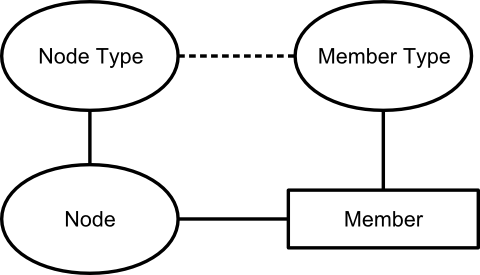
Node, Member, Node Type and Member Type

Metrici is structured around a small number of concepts:
  • Nodes
  • Members
  • Node types
  • Member types
Nodes are the basic unit of data within Metrici. They are equivalent to objects in an object-oriented system. Everything is represented as nodes: data such as people and places, web pages, images, and so on.
Information about the node is held in members. Each piece of information is held as a separate member. For example, the "London" node could have one member to indicate that its name is "London" and another member to indicate that its population is 13,000,000.

Members are the triples that we covered a couple of weeks ago. Each member identifies its owning node (subject), what type of member it is (predicate), and its content (object). The content can be any combination of text, number or a link to another node. Members of the same type can repeat to create lists.

Different nodes have different members. Each node links to a node type which lists the types of members that the node can use. The node type for "London" might be "Place", with allows "Name" and "Population" members.

Each member type defines which of text, number and link are allowed, and whether members repeat. For example, the "Name" member type uses just text and does not repeat; "Population" uses just a number.
Node types and member types are themselves nodes. The list of member types that node type allows is held a list of members which link to member types. A member type has members which indicate which of the text, number and link are allowed, and whether the members can repeat.

Because they are just nodes, node types and member types have types themselves. There are type types that define types, and member type types that define member types.

This same structure is used for all data within Metrici. There are additional members on node types and member types to control how data is displayed, and members that hold scripts to perform calculations and to provide additional formatting. But all of this is held in same structure.

You can examine the structure of nodes from within Metrici. If you haven't already done so, register at www.metrici.com. When you are signed in, use the More link at the top of any page to pull down a menu panel. This has a link to the node's node type. Click on this to see the definition of the node type. The node type will list the member types. Click on these to see the definition of the member types. If you keep going, you'll find that all links eventually end at the same Type node, which defines itself and forms the basis of everything in Metrici.

© Copyright 2014 Minimal IT Ltd. See the Minimal IT website for the original newsletter and copyright information.

Tuesday, 15 April 2014

Your first web app

With a unified approach, creating a web app is as easy as creating a web page.

This week I want to cover how to create a simple web app with Metrici. Although its an overworked example, I am going to create a contacts database app.

This is a hands-on guide. If you haven't already registered, look at the getting started instructions to register and create a simple web page.

Follow the steps below to create the contacts app. If you want to see a demo first, look at the Your first web app video.

1. Somewhere for the app

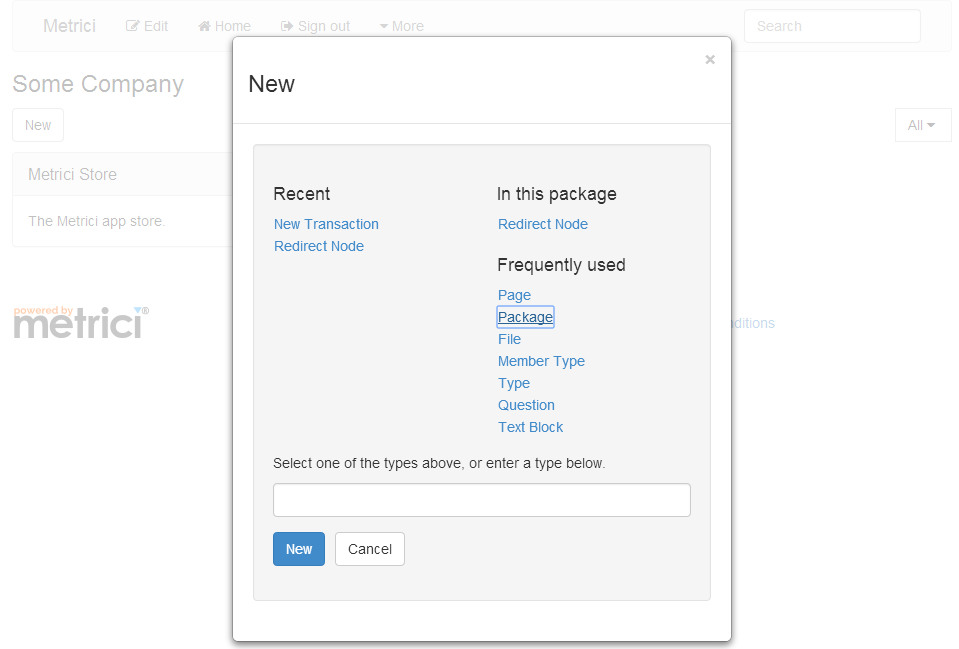
Sign in and click on Home to go to your home page. Use the New button, and select Package.
Selecting a new package in Metrici
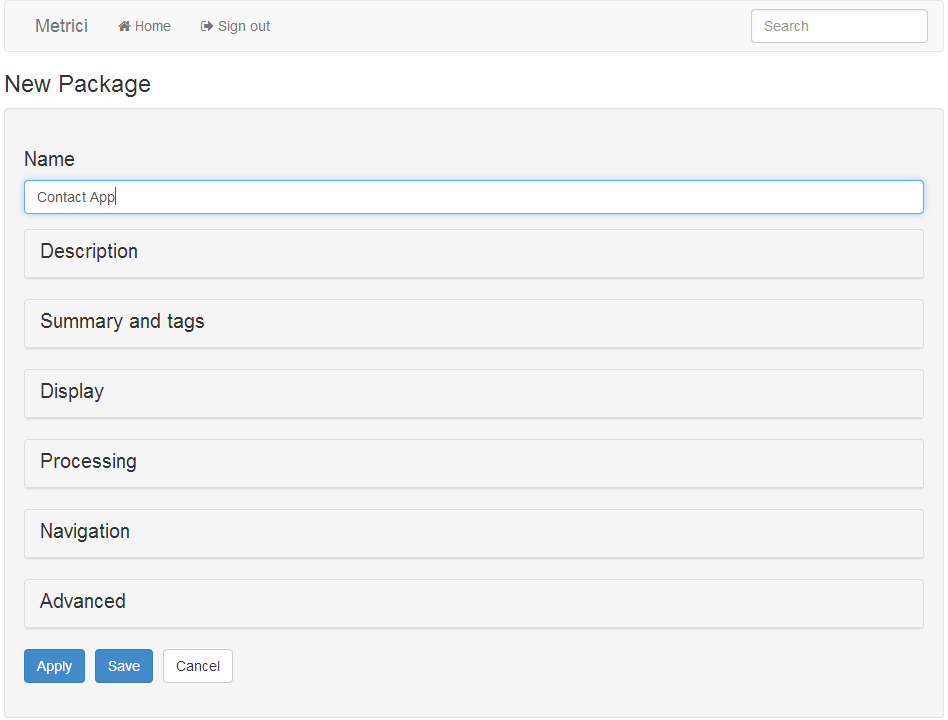
Creating a new package in Metrici
Call your new package Contact App and click on Save at the bottom of the page.
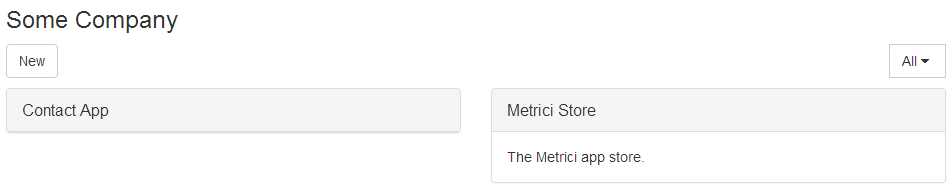
Metrici home page with a new package
When you are back at the home page, click on the Contact App box to take you to the Contacts application area.

2. Data types

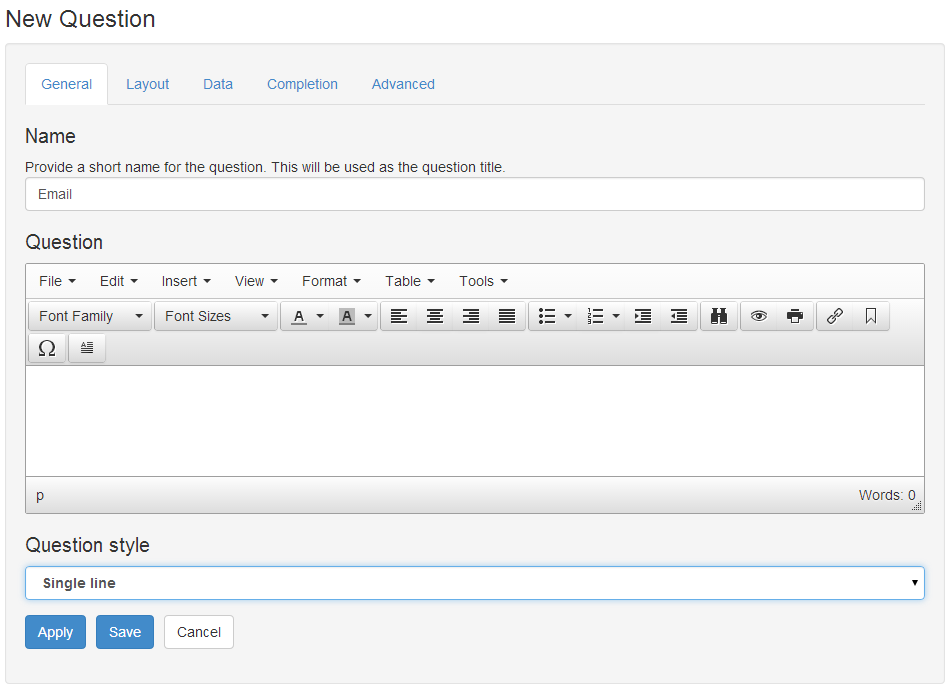
When you are inside the Contact App, click on New, and this time select Question. In the Name field, enter Email, and in the Question style drop-down, select Single line. Click on Save to save the question.
Creating a new question in Metrici
Create another one just the same, this time called Phone.

3. Node type

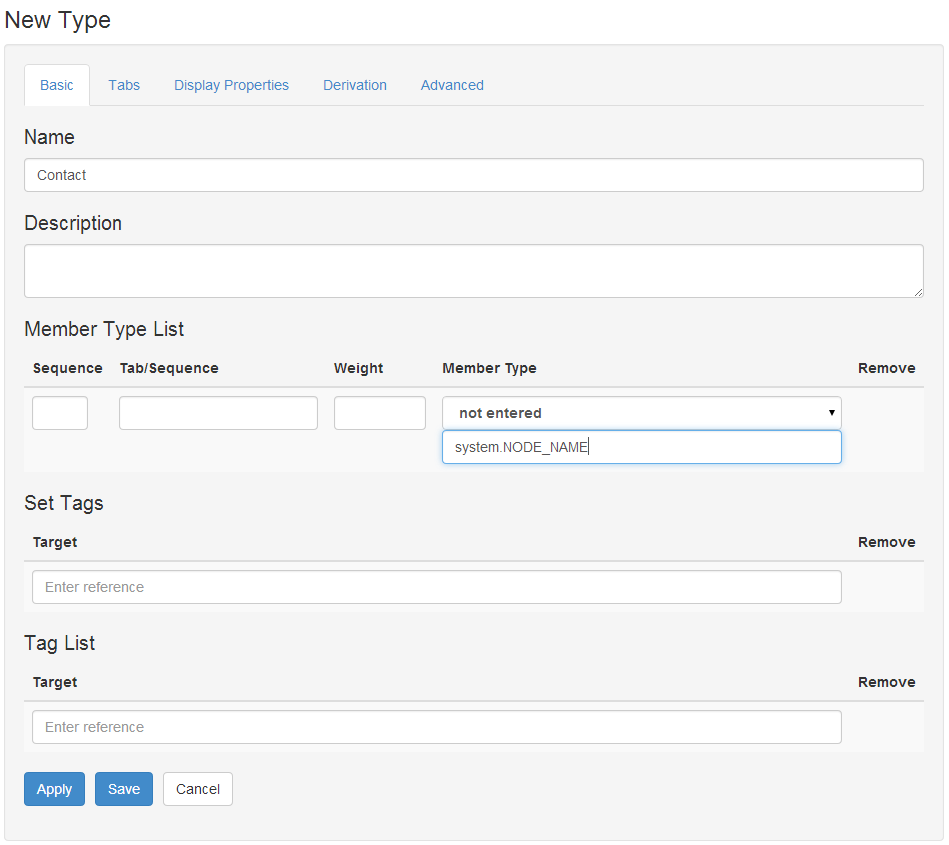
From inside Contact App, click on New, and this time select Type. Give it a name of Contact, and in the Member Type List, type in system.NODE_NAME as a Member Type.
Creating a new node type in Metrici
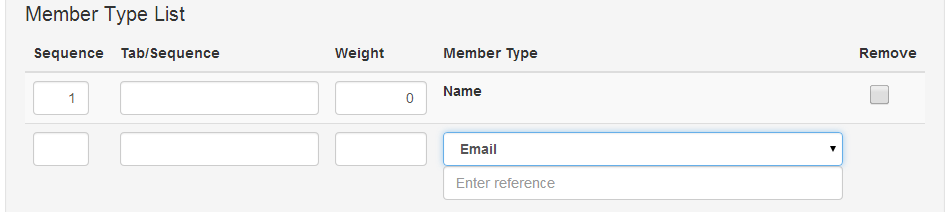
Click on Apply at the bottom of the page. This will open up another space in the Member Type List. This time select Email from the drop-down list under Member Type, and click on Apply again.
Adding a further member type to a node type in Metrici
Finally, select Phone from the drop-down list, and click on Save.

4. Somewhere for the data

Click on Home to go back to your home page. Create a new package, just like in step 1, but this time call it My Contacts.

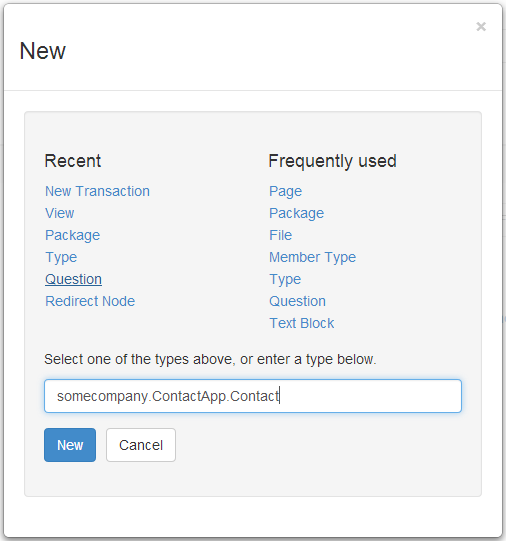
Click on My Contacts to go into the My Contacts area. Click on New, and in the box at the bottom, enter youraccount.ContactApp.Contact, where youraccount is your account reference/user identifier, and click on New.
Selecting a node type by reference in Metrici
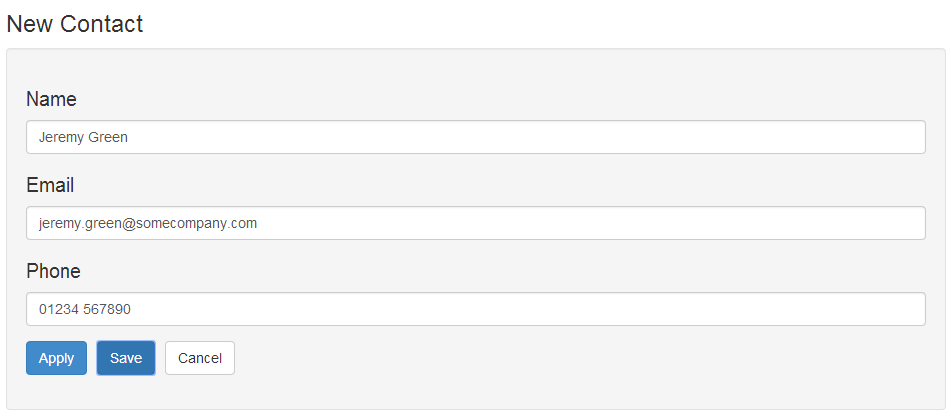
Fill in details, and click on Save.
Creating a new contact in Metrici
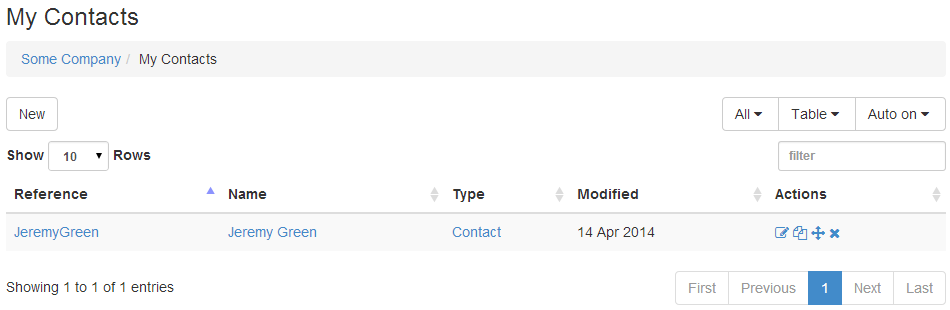
When you click on Save, your new contact will be shown.
Metrici default table view showing a new contact

5. Define view

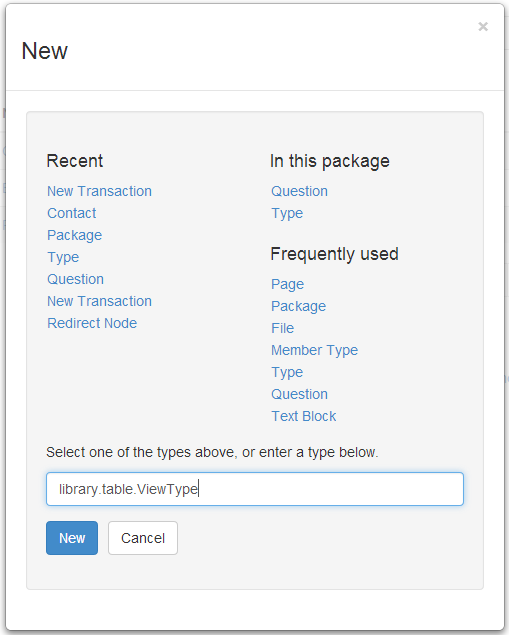
It would be nice if the table showed all the contact details. Click on Home and then Contact App. Use the New button and enter library.table.ViewType in the box at the bottom, and click on New.
Selecting the View node type by reference in Metrici
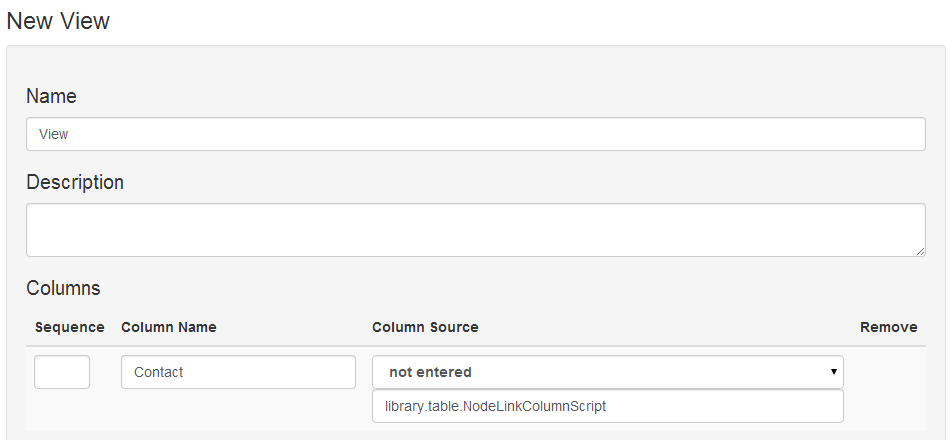
In the Name field, enter View. In the Columns section, enter a Column Name of Contact and in the Column Source enter library.table.NodeLinkColumnScript.
Adding the Node Link Column Script to a view to provide a link called Contacts to the nodes in the table
Click on Apply to show a new column. On the new column, leave Column Name blank and select Email in the drop down list. Click on Apply again and select Phone. Then click on Save.

6. Use view

Click on the Home button to go back to the home page, and then click on the My Contacts link to go to your contacts data area.

Click on Edit at the top of the page, and then click on the Display section. In the View Selection, enter youraccount.ContactApp.View under View family or view.

Setting the view to use on a Metrici package
Click on Save, and you should now see a table of your contacts. Now when you use the New button, you will see Contact listed under In this package. You can add more contacts.

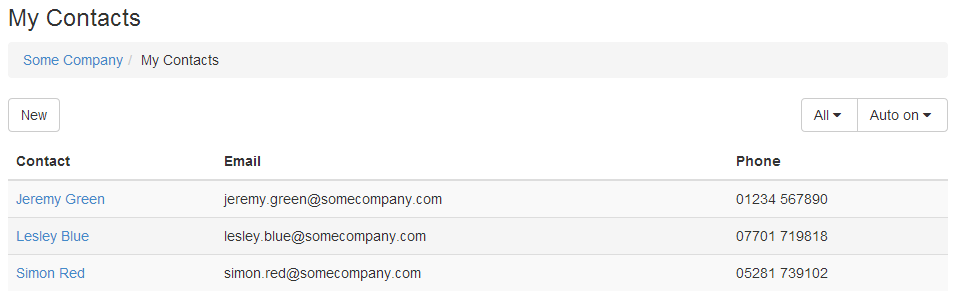
Table of contacts with a custom view
In just a few minutes, you have built a web app in Metrici. In a few more minutes you could share your contacts database with your colleagues, or package your app for others to use.

This is a very simple app. Applications can have any data types and any structures, not just one simple table. You can add more features, styling and processing rules. You can use high-level building blocks, not just packages, questions, types and views, to create more advanced apps.

Next week I will explain a how Metrici is structured and how the pieces you've used fit together.

© Copyright 2014 Minimal IT Ltd. See the Minimal IT website for the original newsletter and copyright information.
Tuesday, 8 April 2014

What cats can do

The idea of a unified approach is not marketing fluff, but reflects underlying IT architecture.

Why is a finance system a finance system? Why is a web content management system (CMS) a CMS? And why is a cat?

The simple answer is that the finance system is what it is because it was designed that way, and the same applies to the CMS. They are intended for different jobs and are programmed differently.

Although that's true, let's put the question another way. Why can't a finance system manage web content, and why can't a CMS manage money? And what has that got to do with cats?

You can't reprogram a finance system to be a CMS, or vice versa. The underlying data structures are different. A finance system is built on ledgers and transactions, and can not hold web content. A CMS is built on web content, templates and structures, and can not hold ledgers. The data structures of a system constrain what that system is capable of doing.

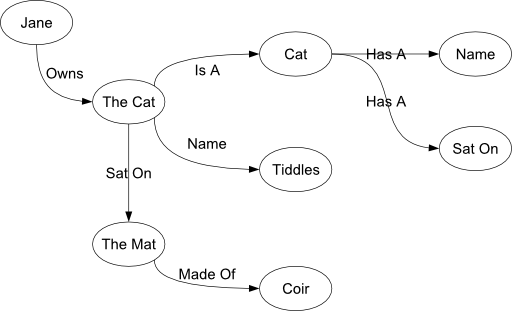
A truly versatile "do anything" system needs to be based on data structures that do not have constraints. There is a well-known approach to this: triple stores. A triple store breaks data down into triples: a subject, a predicate and an object. For example, "the cat sat on the mat" is a triple, in which "the cat" is the subject, "sat on" is the predicate, and "the mat" is the object.

Triple stores can be represented graphically, where the subjects and objects are represented by blobs called nodes, and the predicates by lines.

Triple store definition of Jane's cat tiddles sat on the coir mat

Jane's cat Tiddles sat on the coir mat

The beauty of triple stores is that you can use them to represent any structure: tables, lists, hierarchies, ledgers, web content, cats, and so on.

Triple stores are a well-established technology. But having a versatile data structure is only part of the story. To make Metrici truly versatile, we needed three more ingredients.

The first ingredient is to optimise the triple store. In particular, Metrici automatically calculates and stores derived views of data to improve performance dramatically.

The second ingredient is to describe the triple store in itself. We don't just capture that the cat sat on the mat, we describe what cats can do (sit on things), what properties mats have, and so on. This imposes structure on the triple store and stops it getting chaotic.

The last ingredient is a general-purpose engine that uses the description of the store to view and maintain the store online. This engine provides the basic capability for any solution. And because the store is described in itself, the same engine can be used to develop solutions.

This approach gives us a system which can hold data for any purpose, which can be structured in any way, which can be viewed and maintained online, and which can be created and maintained in itself. This provides the fundamental unification which makes Metrici a much simpler, yet much more powerful environment.

Next week I will cover how to write your own web application in Metrici in less then ten minutes. In the meantime, check out the one minute summary of Metrici's approach to data management.

© Copyright 2014 Minimal IT Ltd. See the Minimal IT website for the original newsletter and copyright information.
Tuesday, 1 April 2014

Reunification


For such a young subject, IT is disproportionately haunted by its history.

The first stored program computers came out in the late 1940s. They were very primitive by modern standards but they had one important characteristic that has been lost from later computers. Although the inputs, outputs and programs that they ran were near-unintelligible machine code, they were all in the same unintelligible machine code. They were saved to paper tape in the same way; they shared the same tools and skills.

Since those early days, computers have grown hugely more capable. But as each new capability has come along, from symbolic assemblers onwards, IT has grown more fragmented. In the effort to make things more efficient and easier to use we have divided IT into more and more parts.

In a modern IT architecture, you're likely to have a database management system, file servers, web servers, a content management system, application execution environments, browser-based scripts, and so on. And each has its own concepts and representations: SQL for the database, HTML, CSS and JavaScript for the web pages, and core code written in one or many high-level languages.

Each part has a different set of concepts, a different set of tools, and a different skill set. And as well as mastering separate data, web and programming constructs, you need to integrate them into a meaningful system.

When looked at individually, each new component looks like a good idea, but we have ended up with a much more complicated environment. We are haunted by the legacy of progress, and have not gone back to consider if it can be simplified. I am not suggesting we should go back to machine code and paper tape, but we should use our ingenuity to reduce the number of concepts, technologies and representations. Computers are simply machines that automate the storage, movement and transformation of information; it should not be so hard.

Unification has been one of the driving forces of the Metrici platform. Within Metrici there is no distinction between data, application, content or anything much else. It is all just information to be stored, moved or transformed.

To see what I mean, set up a simple web page in Metrici. Look at getting started for instructions, but in summary:

  • Register at www.metrici.com.
  • When your account has been created, use the New button to create a new Page.
  • Give your page a name and some content, and click Save.
  • Click on the page title to view your page.

    What have you just done? Obviously you have created some web content – a web page with its own address. But the text you entered is stored in a database. And the actions you have used – New, Save, etc – are the actions of an application.

    Within Metrici, everything is the same. The code that creates your account, the record of your account, your account home page, the New dialog, the web page you create, are all represented in the same way and are all used in the same way. It is not an integrated environment that combines multiple tools, it is a fundamentally unified environment, making it hugely simpler.

    Next week I will describe the concepts behind Metrici's unified approach.

    © Copyright 2014 Minimal IT Ltd. See the Minimal IT website for the original newsletter and copyright information.