Tuesday, 20 May 2014

Sharing your stuff

On the web, it's very easy to share stuff. What's harder is to keep your stuff private, and to only share it with the people you want.

We've taken this to heart at Metrici and built in strong controls on who can access what. The controls are based on a simple principle: everything you create is private until you say otherwise. For example, if you create a website in Metrici, nobody other that you can see the pages until you grant them access.

For a quick overview, look at content sharing in Metrici.

If you want to share your stuff, you need to think about users, permissions and user groups.

Users

When you create an account, a main account user is created. You can create additional users, with their own user ids and passwords, and grant them access to your nodes.

To create additional users, click on the More menu at the top of the page and select the Admin link. This will take you to an admin page, which has sections "About me", "Account administration" and "Systems administration". (Do try out the cool change theme option.)

To create a new user, click on the Users icon and then the New user button. Leave the owning group to default, and fill in the details. Make a note of the password. Metrici stores passwords using strong, one-way encryption, so you can't retrieve a password after it has been set. (This also means there's no way that passwords can be "hacked" from Metrici.)
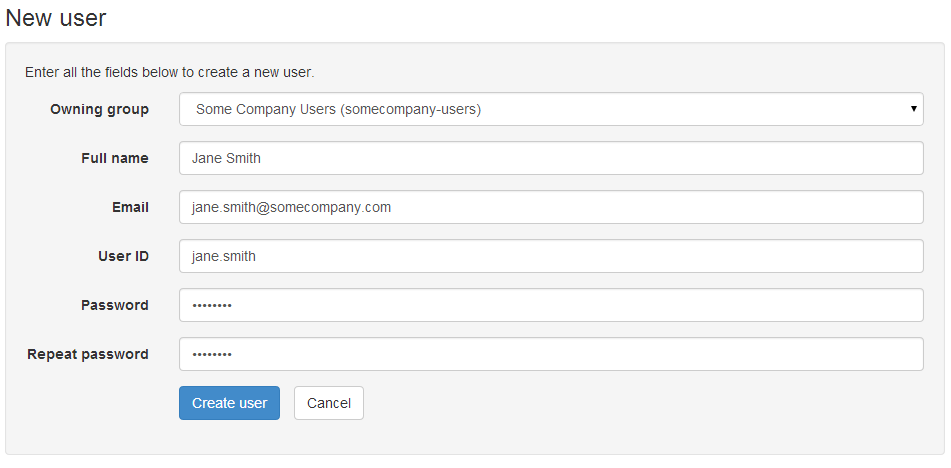
Creating a new user

When you click on Create user, you'll be taken back to the user details page. This has all the options you need to manage the user. You can get back to the details page for a user using the Search option on the Users page.

Permissions

When you have set up your new user, click on Home and navigate back to the node you want to give the user access to. Click on the More menu, and then Manage permissions. This lets you add permissions for individual users.
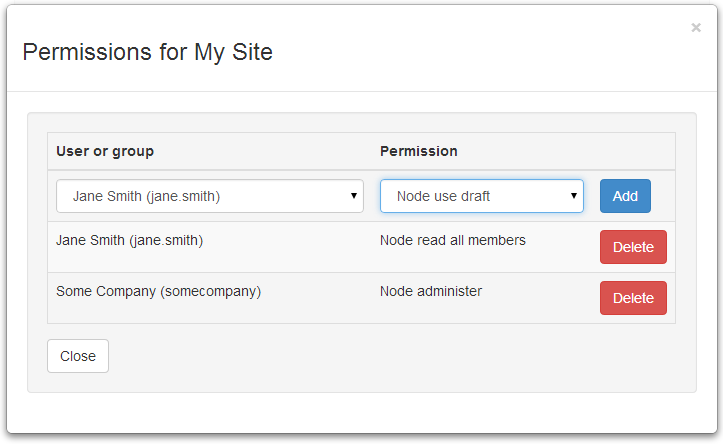
Adding permissions

Metrici supports many different types of permission. You can read about all of them in the Permissions section of the Metrici development guide. To give someone read access to a node, you need to grant them:
  • Node read all members which means they can read all the data about the node.
  • Node use draft which means they can use the node in its draft state (this is to do with version control, which we will cover in a later newsletter).
You can use package-level permissions to set permissions across all the nodes in a package. These are like the node-level permissions, but start with "Package". So you can grant Package read all members and Package use draft to let someone read all the pages within a package. Package permissions only set permissions on the nodes directly contained by the package; you will need to grant node-level permissions if you want other people to read the package itself, and further package-level permissions for sub packages.

The principle of everything being private applies to people as well as data. You can't grant access to simply anyone, you can only grant access to people that you are authorised to grant access to.

There's a good reason for this restriction. Most of the time you don't want to make things public. You want to limit access to a group of people or, at most, all the people in your organisation. Within Metrici, you are only authorised to grant access to people in the same account. You can't be tricked into granting other people access; fundamentally the information stays in the organisation.

User groups

To make permissions easier to manage, you can group users into user groups, and then grant permissions to the user groups.

To create a user group, go to the Admin page and then User groups, and click on New user group. Give the new user group a reference and name, and optionally a description.
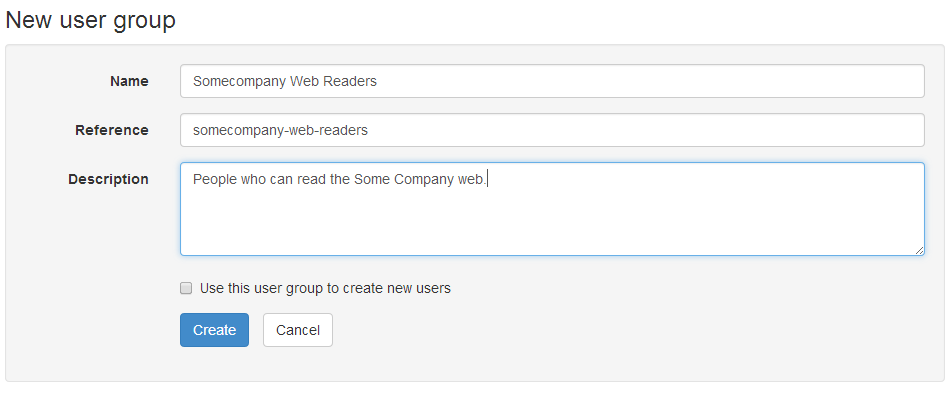
Creating a new user group

The Use this user group to create new users option lets you create a different sort of user group that you can put new users into, known as an owning user group. This is used when you need different categories of users that you want to keep separate from others. Leave this box blank for now.

Once you have created the user group, you can select users to add to the group. You can return to the user group details page later to add and remove users, to change the group details, or delete the group.
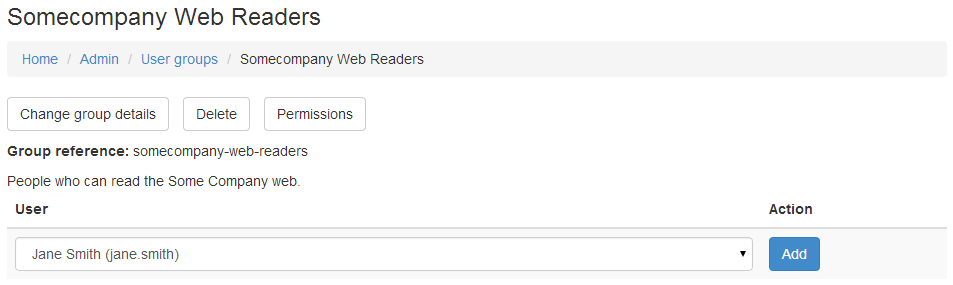
Adding people to a user group

You can use your new group on the permissions page to grant access to all the people in the group. As you add and remove people from the group, their permissions will change.

Sharing with everyone

When you account is created, an account user group is created, called "accountname Users". Granting permission to this group means that everyone in your account gets access. Also, everyone in the account user group is authorised to grant to everyone else in the account user group, which is what allows people in the same account to grant to each other.

Granting permissions to the special user Anonymous lets anyone read the nodes, even people from other accounts or when nobody is signed in. You need to use Anonymous access with care, but it does have additional safeguards. The most significant of these is that you can only grant read access to Anonymous. If you grant a higher privilege, such as update or administer, then other people will only get read access.

We have covered setting up web pages and permissions by hand. Next newsletter I will introduce the MiniSite app which sets up a site and associated permissions for you, including a Permission Manager component which lets you define permission rules and roles across a package structure, and then attach users and groups to the roles.

© Copyright 2014 Minimal IT Ltd. See the Minimal IT website for the original newsletter and copyright information.

Tuesday, 13 May 2014

Building websites in Metrici

You can build sophisticated websites in Metrici, but you also build simple websites very quickly and easily.

If you are anything like me, you are probably a bit suspicious of claims that you can build websites in Metrici.

Surely the world doesn't need yet another website building tool? Why use Metrici when there are so many other products?

Well, Metrici is not trying to compete with WordPress, Dreamweaver, GoDaddy, 1and1, and the like. You could build and publish large, beautiful websites in Metrici, but most organisations have skills and investment in other tools which would be hard to change.

Metrici is trying to address different requirements. We're trying to meet the needs for websites when any or all of the following apply:
  • Simple, cheap and very quick.
  • Easy to update, either by you or by others.
  • Secure, limiting access to just your colleagues, or a mixture of public and private content.
  • Combine web content with structured data from databases or other applications.
  • Uncertain requirements, so you need something flexible that you can enhance later, or even take your content out of if you need to.
Over the next couple of newsletter I will cover how Metrici supports websites. I will cover how to build a website from first principles. I will also introduce our MiniSite app, which lets you create and publish a website in just a few minutes.

To start with, I want to cover how Metrici supports web pages. Within Metrici, any node can be shown as a web page, but the page node type is designed to make it easy to create and modify web content.

Pages use a WYSIWYG editor, just like a word processor. There are all the formatting options you would expect, and an option to edit the underlying HTML if you need.

Pages support "quick links". Quick links are like the links in Wiki software, using names or references in double square brackets. So if you want to link to the "Refreshments Rota" page, you just type [[Refreshments Rota]], and the quick links feature will create a link. See page type for documentation.

Pages can have attachments. Attachments are files of any type that you can reference for download from the page using the quick links feature. You can show attached pictures by prefixing the name with "img". For example [[img:Jerry Green]] will show the picture of Jerry Green.

Click on the More menu at the top of each page for options to create, modify, copy, move and delete pages.

And that's all there is to it. I could go on about advanced features, but that would be missing the point. The real advantage of Metrici is that you can start creating web pages and linking them together in just a few minutes, and grow from there. To see for yourself, follow our getting started guides to create a free account and a simple web page.

Having shown how easy it is to create the content of the website, next week I will cover permissions and how to share your content with your colleagues, friends, or the world.

© Copyright 2014 Minimal IT Ltd. See the Minimal IT website for the original newsletter and copyright information.

Tuesday, 6 May 2014

Packages

Nodes, members, node types and member types make Metrici very versatile and let it hold any data. Metrici also has a hierarchical structure to make it even more flexible.

Nodes are arranged in a hierarchy similar to the hierarchy of directories and files on your PC. Nodes are arranged in packages in the same way that files are arranged in directories. Nodes have dot-delimited references in the same way that files have slash-delimited file names.

Packages are themselves just nodes. Most packages act like directories and list the nodes within them. However, unlike a file system where directories are different from regular files, packages can be any sort of node, and any node can act as a package.

Packages allow nodes to be grouped meaningfully. It allows data for different purposes to be put in different places, much like you would arrange directories and files on a PC.

Packages make it easy to separate data according to ownership and permissions. All the nodes in your account are in the same high-level package. Within an account, you can use packages to grant different people different access to different groups of nodes.

Using a hierarchical reference helps avoid name clashes, the "dll hell" that used to be so much of a problem on PCs. For example, you might have a node type for contact, as we did in the example web app. But because it has a full reference (such as somecompany.ContactsApp.Contact), there's no danger that you will pick up another contact node type by mistake.

By changing the dots in the reference to slashes, every node can be accessed at a unique web address. For example, the node with reference metrici.documentation.GettingStarted is available at web address http://www.metrici.com/metrici/documentation/GettingStarted. Metrici is a not a "web enabled" solution, it is fundamentally designed to be delivered on the web.

As well as imposing order on the data, using packages lets Metrici act as a table-based database, as in the first web app example. But unlike a relational database which holds everybody's data in one big table, packages allow you to split data down by ownership if that is what you need.

Splitting data into packages make processing simpler. It reduces the number triple store links that must be set up by hand, though links can be set up automatically using indexes where required. It provides a basis for processing groups of related nodes, such as reporting, export and import.

The hierarchical structure of Metrici is more than just a way of giving nodes unique references. It allows Metrici to extend the versatile triple store to deliver structures that act in much the same way as database tables and as file systems, and, as we covered last week, the structure of nodes and members is equivalent to an object-oriented system. Metrici does not map nodes to objects, tables and web pages; the fundamental design of Metrici means that nodes can be structured and accessed in any of these ways. This allows Metrici solutions to combine a variety of data storage and structuring paradigms – object, triple store, data table and file – rather than being constrained to choose one or another, while maintaining a simple, consistent structure throughout.

© Copyright 2014 Minimal IT Ltd. See the Minimal IT website for the original newsletter and copyright information.