Tuesday, 24 June 2014

Member storage model

Metrici has a versatile storage model based more on pragmatism and experience than on data theory.

In How Metrici is structured we covered the internal structure of Metrici. Over the next few weeks we are going to look at this in more detail and cover how to define new types of data.

To recap, in Metrici:
  • Everything is a node.
  • Nodes' data is stored in members.
  • Each node is defined by another node, its node type.
  • Each member is defined by a node, the member type.
  • Node types list the member types that should be used for a node.
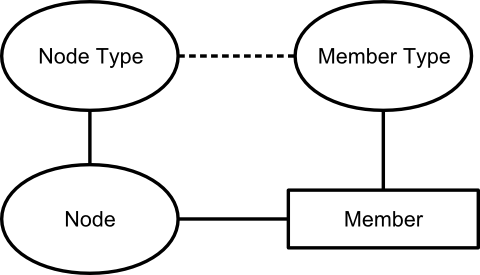
Node, Member, Node Type and Member Type

This week we are going to look at the storage of data in members.

Each member can hold three pieces of data:
  • A piece of text, known as the "value".
  • A number, known as the "scale".
  • A link to a node, known as the "target".
Members with the same member type can repeat. The member type defines a minimum and maximum cardinality (number of repeats), though in 99.9% of cases we either set a maximum cardinality of 1 (no repeat) or unlimited. Members are inherently ordered.

You can therefore think of the members with the same member type as a table:
Value Scale Target
Member 1 value Member 1 scale Member 1 target
Member 2 value Member 2 scale Member 2 target
... etc ... etc ... etc
By varying which of the value, scale and target are used, and whether the members repeat, this structure can be used to hold pretty much any data. Here are some examples:

My name:
Value
Andrew

The country I live in:
Target
United Kingdom

The cost and currency of the printer I just bought:
ScaleTarget
162.00GBP

Latest results from the lottery:
Scale
5
15
25
38
49

Prioritised emergency call-out list:
Target
Superman
Ironman
Spiderman
Mario
Mr Bean

Grades and scores for assessing swimming pool water quality:
Scale Target
0 Brown and smelly
25 Green and cloudy
60 Mostly clear, some debris
100 Clear and sparkling

Notice how "things" like country, currency, superhero and water quality are all implemented as links to other nodes, not as names or references as they might be in a conventional database.

There is no theoretical basis for this storage model. We came up with the model by analysing the data structures within version 1 of Metrici (when it was just an assessment tool), and trying to come up with a model that would fit all of our data needs as efficiently as possible. Our subsequent experience has shown that this is a very versatile way of storing data, and copes easily with 99% of data requirements. It works well for structured data in databases and for less structured web content. It achieves some of the "attribute on link" capabilities of, for example, the associative model of data, without a significant increase in complexity. In comparison to a conventional triple store, it removes the need for a lot of link nodes that just exist to define the relationship between other nodes. It maps easily onto a conventional database.

Armed with this knowledge of the member storage model, next week we will cover how to define member types and node types to store any type of data.

© Copyright 2014 Minimal IT Ltd. See the Minimal IT website for the original newsletter and copyright information.

Tuesday, 10 June 2014

Metrici derivation

Metrici's data derivation makes it easy to build complicated processing and increases performance by orders of magnitude.

We have covered Metrici concepts, web pages, and building websites using the Metrici MiniSite app. Now its time for something more technical.

Within Metrici, the term "derivation" is used to mean the automatic recalculation of data. It is a fundamental concept used by all Metrici components and solutions.

When we were designing Metrici, we knew that a triple store would be very versatile. But we knew that versatility would come at a cost. A triple store can involve a large number of data accesses and be horribly slow.

To overcome this problem, we came up with a simple solution: have two triple stores.

The first store contains the data originally entered by the user. The second store, the derived data, contains the original data plus calculated data, and is used for read operations. In our final design, we merged these two stores into one store, called "node members", with a flag on each member to indicate whether it is original or derived.

Calculating derived data is simple. The starting point is to copy all the original data for a node to the derived data. After this, other processes perform additional calculations.

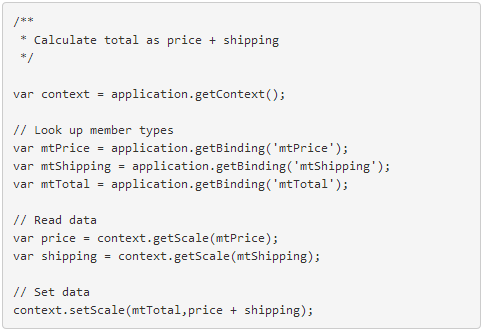
The calculations are defined on the node type's member types (see How Metrici is structured), and are written in JavaScript that runs on the server (see Metrici scripting). The simple example below shows the calculation of one number based on the value of two others. If you want a complicated example, see how quick links are resolved in the page type.

Example of Metrici derivation script

Timing of derivation is important. Nodes are marked as out of date whenever they are changed. When a node is subsequently accessed, derivation is performed if it is out of date. This means that update processing is fast (there is no need to recalculate data between updates), and repeated read processing is fast (calculated data is stored between reads).

Derivation may access linked nodes. Before a node is derived, all out-of-date nodes to which it links are derived. Conversely, when a node is changed, not only is it set out of date, but all nodes which link to it are also set out of date. By managing these dependencies, Metrici always returns a completely up-to-date view of data.

Metrici contains further optimisations. There is a process that performs derivation in the background so that data can be recalculated in advance of being needed. There are settings to control which nodes are set out of date when a node changes, and whether nodes can be accessed in their out-of-date or "stale" state.

Inheritance is a special case of derivation. Inheritance copies members from another node as part of the derivation process. When applied to node types, this provides something similar to class-based inheritance in object-oriented system. It can also be applied in a less structured way. For example, you could use it to the styles across all the pages in a website.

Derivation in Metrici is very powerful and efficient. It allows complicated processing, such as calculating and formatting a report, to be broken down to a series of steps which are automatically rerun when data changes. It allows Metrici to exploit the versatility of triple stores without a performance penalty.

© Copyright 2014 Minimal IT Ltd. See the Minimal IT website for the original newsletter and copyright information.

Tuesday, 3 June 2014

Metrici MiniSite

Metrici MiniSite makes it easy to create websites in Metrici and gives you complete control over who can update and read them.

Over the past couple of newsletters we have covered how to build a simple website in Metrici, including setting up permissions to share your stuff with a defined group of colleagues or publish it more widely.

Metrici MiniSite is an application written in Metrici that makes it easier to create websites.

You can use Metrici MiniSite for free. Sign in or register at www.metrici.com. Then, from the Metrici Store, select Metrici MiniSite.

After you have installed MiniSite, you will be taken to the main page for your site. This is just a normal page, like we covered in Building websites in Metrici. (We have made a couple of improvement since then, to make it easier to create pages, and to include content from other pages.)

Installing MiniSite also creates a Settings area, which you can see when you click on Home. Inside this area is a settings area for each MiniSite you create, and inside that are two important components, the site manager and the permission manager, as well as a link to the MiniSite reference guide.

The site manager gives you a view of your entire site, with sorting and filtering to help you find particular pages. It lets you create, amend and delete pages, and upload images and other files. It also lets you mark which pages you want to make public.

As the name suggests, the permission manager manages permissions on your site. It works by scanning through your site and setting permissions based on rules and roles. The rules are driven by tags which are attached to pages and, in this case, indicate whether to make the page public. (Tags are used widely in Metrici for a variety of purposes.)

For MiniSite, we have configured the permission manager to support four roles. There are roles to administer, update and read all of the pages on the site. There is also a public role to read pages that you have marked as public. You can reconfigure the permission manager to support other rules and roles if you need.

We are not trying to pretend that Metrici MiniSite is a serious competitor to WordPress, Dreamweaver, GoDaddy, 1and1, and the like. But it does meet a need for quick and simple websites with good security and which can be extended to include any content or functionality. You are welcome to use it for free. (See Metrici pricing for details.)

MiniSite and all its components are built in Metrici itself. We have not used any extra software or needed any special permissions to build MiniSite. You can extend MiniSite as you need. You could develop an alternative website creation and management tool, and make it available for others to use. Like everything else in Metrici, it is all just an arrangement of interlinked nodes. Starting next newsletter, we will take a look in a bit more detail at how we build applications like this in Metrici.

© Copyright 2014 Minimal IT Ltd. See the Minimal IT website for the original newsletter and copyright information.